Besides using an unconventional drivetrain (front wheel drive), I am also going to design the bike in an unconventional way. Instead of using pen, paper, and a frame jig, I am going to design the bike in 3D and then print it on my printer.
This has a couple of advantages. First, it allows anyone in the world to build the bike. (I'll post the bike plans.) Second, I'm hoping it will minimize geometry errors. For instance, when you build using a jig, it's easy to get an angle off by a degree or two, and I've found that's a great way to make the bike unridable.
If you'd like to try this yourself, the 3D program I am using is open source, named Blender. My design begins in a 2D program called Xara. I can't say enough good things about Xara; I've been using it since the 90s and I'm always surprised by how few people use it. The Linux version is open source, and the Windows version is $99 IIRC. My operating system is open source also (Ubuntu.) To turn the 3D design on the computer into something that we can ride in the real world, I am using a program called Pepakura to unfold the 3D geometry.
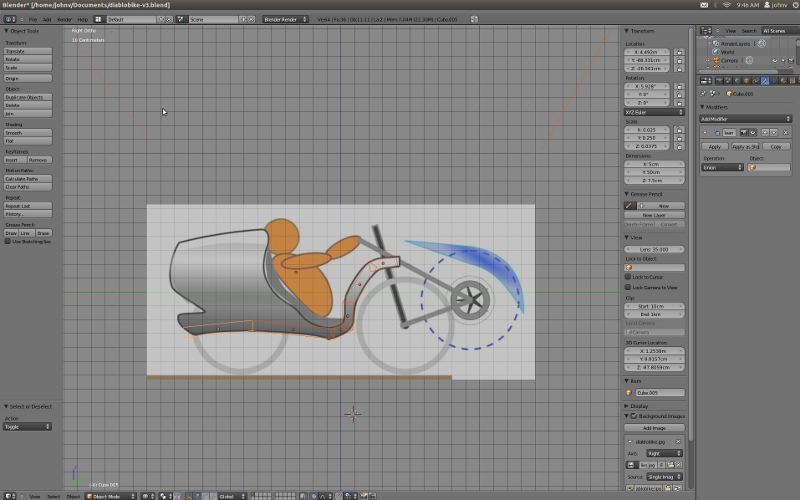
Here's a screenshot of the bike in Blender. The basic process of getting the bike into Blender goes something like this:
- The first step is finding a bike with good geometry. At first I was going to use Larry Lem's Magic Bike for my geometry, but decided to switch to the Lightning P38 for my geometry instead. The reason that I switched to the P38 is that it has a shallower seat angle, which is generally considered better for climbing, and there's lots of hills around here. So I took a picture off the internet of the P38.
- The second step is to take the picture and make it into a 2D model. To do this, I loaded the picture into Xara, then traced the bike. Be sure to set your scale right; if you do not, the bike will be too small or too big! To set my scale, I measured the wheel that will go on the bike, and then I scaled everything else accordingly.
- The third step is to take the 2D design from Xara and load it into Blender. There are a few ways to do this. The most obvious way to do it is to export the 2D model and import it into Blender, in a format like Adobe Illustrator. I did *not* do this, and instead opted to import the 2D bike from Xara as a jpg into Blender. So basically you trace the photo you get off the internet in 2D Xara, then trace the jpg from Xara in Blender. The picture above shows an example of this.
To make the 3D model into something we can ride in the real world, I am using Pepakura to flatten the 3D design.

 http://www.engadget.com/2011/11/13/v...am-films-it-t/
Kudos to Taras Lesko - his Gundam model really blew my mind. Check out his website, his videos are a real inspiration.