Calculator!
I used Mike Sherman's Gear Calculator for years, then the site went away. It's back on github, with slight format changes, and improvements -- It can do 13 sprockets now. (Rotor has 13 speed cassettes!?)
https://mike-sherman.github.io/shift/
Set the cassette sprocket sizes, then the next tab is three chainrings -- for a 1x, you can try three different choices and compare them together.
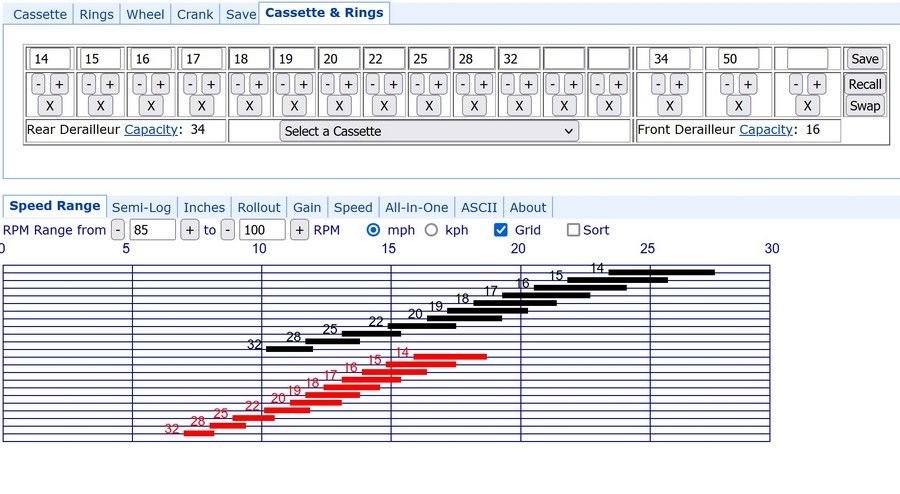
This chart shows a range of rpm for each gearing combination. For road riding, 80-100 is useful, for gravel, maybe try 60-80? For steep climbing, I look at 40-60.
The chart looks like this. Each chainring in a different color. Seeing the overlaps and the mph change for each shift is helpful.
The chart updates on the fly as you change drivetrain settings!
I picked a 11-52 12 speed, and set 3 different chainrings. All the gears can be edited too.

~~~~~~~~~~~~~~~~~~~~~~~~~~~~~~~~~
A few years ago, I was doing fast-for-me club rides, and made a cassette that had very close shifting from 18-24 mph, where I needed it. It was a 14-32, built from a 11-32 and a junior racing cassette. It worked great for those rides.
I would
spin out at 28-29 mph, but that was never a problem. I just coasted on downhills faster than that.
So, you might be fine with a top gear that's usable to 25 mph or so, and has very low climbing gears. Above that speed, spin fast, or coast.
This is it. Advantages: a straight block to 25 mph. Disadvantages: The 34 tops out around 17 mph, instead of 21 mph, so I shifted the front a lot. Di2 makes that easy. And I often shifted two or three gears in the 34 ring -- too close together!
I'm back to a 11-32 now, with easier paced groups.
Anyway, this is an example of how the gear calculator is useful.