


Garmin Live Segment - Fail Syncing
 05-28-21 | 07:42 AM
#1

Thread Starter
meh

Joined: Jul 2014
Posts: 4,742
Likes: 1,129
From: Hopkins, MN
Bikes: 23 Cutthroat, 21 CoMotion Java; 21 Bianchi Infinito; 15 Surly Pugsley; 11 Globe Daily; 09 Kona Dew Drop; 96 Mondonico
Garmin Live Segment - Fail Syncing
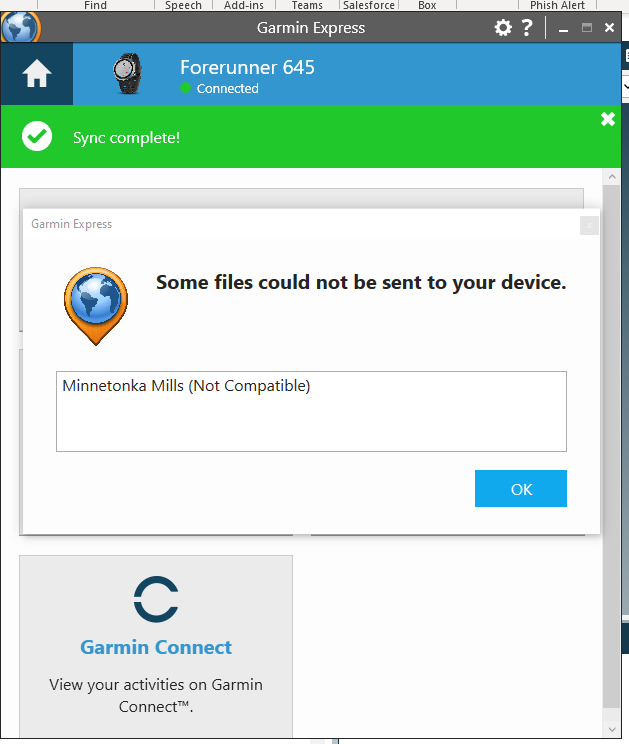
Both my Forerunner 645 and Edge 1030 fall to sync on Garmin Express. I get the following error "There was an error syncing with Garmin Connect". Both will devices show a window saying "Some files could not be sent to your device"; it's a live Strava segment that is labelled "Not Compatible". I have removed the star from this segment in Strava, but it continues to show this message. I can not find the segment in Garmin Connect or on the devices, I have no idea how to remove this not compatible segment from Garmin.
I've used Garmin long enough to see this dumb issues and simply wait for the next Garmin Express update with another load of bug fixes. But this one is not clearing up after many weeks and software updates.

I've used Garmin long enough to see this dumb issues and simply wait for the next Garmin Express update with another load of bug fixes. But this one is not clearing up after many weeks and software updates.
 05-29-21 | 09:59 AM
#2
Senior Member


Joined: Jul 2007
Posts: 8,627
Likes: 3,542
From: South shore, L.I., NY
Bikes: Trek Emonda SL7, Cannondale Topstone, Miyata City Liner, Specialized Chisel, Specialized Epic Evo
I too find Express to be flaky, seeing sync and non connection issues frequently. I really only use it to install an OS or map update and usually see all kinds of issues not connecting, etc..,, though eventually it all works. Oddly enough and with Express running in background, it works fine with my Garmin swim watch.
I do not use Express to transfer completed activities from my 1030, I let the GCM app sync and send to Connect and onward to RideWithGPS, this always works and is easier than plugging into the computer,
I do not use Express to transfer completed activities from my 1030, I let the GCM app sync and send to Connect and onward to RideWithGPS, this always works and is easier than plugging into the computer,
05-30-21 | 09:35 AM
#4

Facts just confuse people


Joined: Jul 2017
Posts: 19,384
Likes: 7,088
From: Mississippi
Bikes: Tarmac Disc Comp Di2 - 2020
What exactly are you trying to do with Garmin Express? That is for map updates and firmware updates for devices that don't have the ability to update over wifi themselves.
With my old Edge 500 I used to just manually place the route file into the /garmin/newfile folder on my device and it would import it at the next startup. For my Edge 530, on RWGPS or Garmin Connect I just click send to device... I think, I only did it once. And I think all this is handled through the Garmin Connect phone app, not the Garmin Express app.
But maybe Garmin Express does handle that too and has for a long time. I just never used it for that. I have had trouble with Garmin Express updated various older Garmin devices I have. I found that it seemed to be the wifi congestion I have in my area and my old wifi equipment with limited channels.
Using an ethernet directly connected to my computer solved those issues. I imagine the new wifi appliance I got probably will work too, but it's too easy to connect an ethernet cable since I have the house wired for ethernet.
With my old Edge 500 I used to just manually place the route file into the /garmin/newfile folder on my device and it would import it at the next startup. For my Edge 530, on RWGPS or Garmin Connect I just click send to device... I think, I only did it once. And I think all this is handled through the Garmin Connect phone app, not the Garmin Express app.
But maybe Garmin Express does handle that too and has for a long time. I just never used it for that. I have had trouble with Garmin Express updated various older Garmin devices I have. I found that it seemed to be the wifi congestion I have in my area and my old wifi equipment with limited channels.
Using an ethernet directly connected to my computer solved those issues. I imagine the new wifi appliance I got probably will work too, but it's too easy to connect an ethernet cable since I have the house wired for ethernet.
06-08-21 | 11:50 AM
#5
Thread Starter
meh
Joined: Jul 2014
Posts: 4,742
Likes: 1,129
From: Hopkins, MN
Bikes: 23 Cutthroat, 21 CoMotion Java; 21 Bianchi Infinito; 15 Surly Pugsley; 11 Globe Daily; 09 Kona Dew Drop; 96 Mondonico
What exactly are you trying to do with Garmin Express? That is for map updates and firmware updates for devices that don't have the ability to update over wifi themselves.
With my old Edge 500 I used to just manually place the route file into the /garmin/newfile folder on my device and it would import it at the next startup. For my Edge 530, on RWGPS or Garmin Connect I just click send to device... I think, I only did it once. And I think all this is handled through the Garmin Connect phone app, not the Garmin Express app.
But maybe Garmin Express does handle that too and has for a long time. I just never used it for that. I have had trouble with Garmin Express updated various older Garmin devices I have. I found that it seemed to be the wifi congestion I have in my area and my old wifi equipment with limited channels.
Using an ethernet directly connected to my computer solved those issues. I imagine the new wifi appliance I got probably will work too, but it's too easy to connect an ethernet cable since I have the house wired for ethernet.
With my old Edge 500 I used to just manually place the route file into the /garmin/newfile folder on my device and it would import it at the next startup. For my Edge 530, on RWGPS or Garmin Connect I just click send to device... I think, I only did it once. And I think all this is handled through the Garmin Connect phone app, not the Garmin Express app.
But maybe Garmin Express does handle that too and has for a long time. I just never used it for that. I have had trouble with Garmin Express updated various older Garmin devices I have. I found that it seemed to be the wifi congestion I have in my area and my old wifi equipment with limited channels.
Using an ethernet directly connected to my computer solved those issues. I imagine the new wifi appliance I got probably will work too, but it's too easy to connect an ethernet cable since I have the house wired for ethernet.
06-08-21 | 11:50 AM
#6
Thread Starter
meh
Joined: Jul 2014
Posts: 4,742
Likes: 1,129
From: Hopkins, MN
Bikes: 23 Cutthroat, 21 CoMotion Java; 21 Bianchi Infinito; 15 Surly Pugsley; 11 Globe Daily; 09 Kona Dew Drop; 96 Mondonico
06-08-21 | 12:43 PM
#7
Facts just confuse people
Joined: Jul 2017
Posts: 19,384
Likes: 7,088
From: Mississippi
Bikes: Tarmac Disc Comp Di2 - 2020
Well if you set up your Edge 1030 to connect to your wifi then by default it should be updating itself, firmware, maps, ride data and stuff through the wifi already. My Edge 530 does. Also it can do this through the bluetooth connection via the phone app... or at least some of that stuff can be done through the phone app.
I haven't needed Garmin Express to do anything with my Edge 530. Nor does my son use Garmin Express for his Edge 1030. If you ever turned off or answered 'no' to a question concerning wifi during the initial setup wizard with your 1030, then maybe your disabled that on your Edge. I don't have a Forerunner, so you'll have to wing it on that. Is it wifi enabled too, then likely it can do anything the Edge can through wifi.
Garmin Express has been buggy for me at various times. Connections to the Garmin servers especially were an issue a while back. Once due to a time zone being wrong in the OS setup for my computer and other times for who knows? I tried again later and it worked.
If you are still having the issue. Call Garmin Support. It's free just to talk to them. They'll help you even if the device is out of warranty.
I haven't needed Garmin Express to do anything with my Edge 530. Nor does my son use Garmin Express for his Edge 1030. If you ever turned off or answered 'no' to a question concerning wifi during the initial setup wizard with your 1030, then maybe your disabled that on your Edge. I don't have a Forerunner, so you'll have to wing it on that. Is it wifi enabled too, then likely it can do anything the Edge can through wifi.
Garmin Express has been buggy for me at various times. Connections to the Garmin servers especially were an issue a while back. Once due to a time zone being wrong in the OS setup for my computer and other times for who knows? I tried again later and it worked.
If you are still having the issue. Call Garmin Support. It's free just to talk to them. They'll help you even if the device is out of warranty.
06-21-21 | 10:13 AM
#8
Thread Starter
meh
Joined: Jul 2014
Posts: 4,742
Likes: 1,129
From: Hopkins, MN
Bikes: 23 Cutthroat, 21 CoMotion Java; 21 Bianchi Infinito; 15 Surly Pugsley; 11 Globe Daily; 09 Kona Dew Drop; 96 Mondonico
Quick update: The latest Garmin update (Edge 1030 v12.00 - including heatmaps) uploaded without any effort via my Garmin Connect app on my phone. So Garmin Express is mostly useless now, I'll keep it for a couple odd Garmin devices that are not WiFi compatible.
I feel a little silly I thought I still needed a USB connection to my computer to get updates.
I feel a little silly I thought I still needed a USB connection to my computer to get updates.
