


Garmin Edge 540
 07-24-25 | 02:30 PM
#26
Senior Member

Joined: Dec 2010
Posts: 9,694
Likes: 2,617
From: northern Deep South
Bikes: Fuji Touring, Novara Randonee
That’s a bit of an exaggeration don’t you think. I have been using Garmin touch screen bycycle computers since the 800 probably over a decade ago. I have never seen these extreme situations during a rain storm much less a drop of sweat. Also, how often do you add new sensors mid ride?
I don’t add new sensors, but I do on occasion need to get into sensors to activate stuff that fails to auto connect. It’s a simple process and I can do it in the touchscreen while riding along.
As well, I use an out front mount and never get sweat on the screen and pretty much never really ride in the rain so on.y maybe once had the screen get winky from wet drops.
As well, I use an out front mount and never get sweat on the screen and pretty much never really ride in the rain so on.y maybe once had the screen get winky from wet drops.
 07-24-25 | 02:34 PM
#27
Senior Member

Joined: Jul 2007
Posts: 8,631
Likes: 3,543
From: South shore, L.I., NY
Bikes: Trek Emonda SL7, Cannondale Topstone, Miyata City Liner, Specialized Chisel, Specialized Epic Evo
I rarely need to delete and add a sensor. It's usually a case where a sensor that I always use and have connected, such as my Di2 system, doesn't show up in a timely manner. I then just go to the menu and sensors and select the Di2 and press on connect. I pretty much always then connects.
07-24-25 | 02:44 PM
#28
Senior Member
Joined: Dec 2010
Posts: 9,694
Likes: 2,617
From: northern Deep South
Bikes: Fuji Touring, Novara Randonee
I rarely need to delete and add a sensor. It's usually a case where a sensor that I always use and have connected, such as my Di2 system, doesn't show up in a timely manner. I then just go to the menu and sensors and select the Di2 and press on connect. I pretty much always then connects.
07-24-25 | 03:42 PM
#29

Facts just confuse people


Joined: Jul 2017
Posts: 19,440
Likes: 7,123
From: Mississippi
Bikes: Tarmac Disc Comp Di2 - 2020
What sensor or sensors are you having trouble with? With my Garmin Edge 530, if I start my timer before waking up my Di2, then I have to stop the timer before it will find my Di2. I don't know why, I haven't seen any other complain of that. However, I've also made it a habit to wake up the Di2 when I turn on my Garmin just before going outside with the bike.
It's rare that any other sensor gives issues pairing. But usually when they do, it's after a update. But turning the device off and on or doing a reset will have it all working correct again.
Another option might be to just start the timer when you turn on the unit. If you have auto pause enabled, then the timer won't get but a few 0.01'ths of a second on it. But since the timer is started, it shouldn't turn itself off. Be sure to wake all the sensors on the bike at the same time too.
You really should call Garmin Support and tell them that you have trouble with the sensors staying paired. They'll work with you to figure it out. Older Garmin's might need a extra step that you may not be doing correctly. Or perhaps you got a dud.
Last edited by Iride01; 07-24-25 at 03:46 PM.
 07-24-25 | 09:18 PM
#30
Senior Member
Joined: Jul 2007
Posts: 8,631
Likes: 3,543
From: South shore, L.I., NY
Bikes: Trek Emonda SL7, Cannondale Topstone, Miyata City Liner, Specialized Chisel, Specialized Epic Evo
Why don't you turn it on when you are ready to take the bike outside?
What sensor or sensors are you having trouble with? With my Garmin Edge 530, if I start my timer before waking up my Di2, then I have to stop the timer before it will find my Di2. I don't know why, I haven't seen any other complain of that. However, I've also made it a habit to wake up the Di2 when I turn on my Garmin just before going outside with the bike.
It's rare that any other sensor gives issues pairing. But usually when they do, it's after a update. But turning the device off and on or doing a reset will have it all working correct again.
Another option might be to just start the timer when you turn on the unit. If you have auto pause enabled, then the timer won't get but a few 0.01'ths of a second on it. But since the timer is started, it shouldn't turn itself off. Be sure to wake all the sensors on the bike at the same time too.
You really should call Garmin Support and tell them that you have trouble with the sensors staying paired. They'll work with you to figure it out. Older Garmin's might need a extra step that you may not be doing correctly. Or perhaps you got a dud.
What sensor or sensors are you having trouble with? With my Garmin Edge 530, if I start my timer before waking up my Di2, then I have to stop the timer before it will find my Di2. I don't know why, I haven't seen any other complain of that. However, I've also made it a habit to wake up the Di2 when I turn on my Garmin just before going outside with the bike.
It's rare that any other sensor gives issues pairing. But usually when they do, it's after a update. But turning the device off and on or doing a reset will have it all working correct again.
Another option might be to just start the timer when you turn on the unit. If you have auto pause enabled, then the timer won't get but a few 0.01'ths of a second on it. But since the timer is started, it shouldn't turn itself off. Be sure to wake all the sensors on the bike at the same time too.
You really should call Garmin Support and tell them that you have trouble with the sensors staying paired. They'll work with you to figure it out. Older Garmin's might need a extra step that you may not be doing correctly. Or perhaps you got a dud.
07-24-25 | 09:40 PM
#31
Senior Member

Joined: Sep 2015
Posts: 720
Likes: 181
From: /dev/null
Bikes: Soma Double Cross Disc (2017), Surly DT (2023)
The image below shows a custom datafield created using an app from Connect IQ store - app store for Garmin devices. Normally a climb screen has two datafields, this app turns one datafield into four smaller ones (at least on an Edge 540, may be more than four on 1040). It is configured via the smartphone Connect IQ app.
As the others say, it may be difficult to configure things using buttons without stopping during the ride, but if you know what you want it is not a problem.
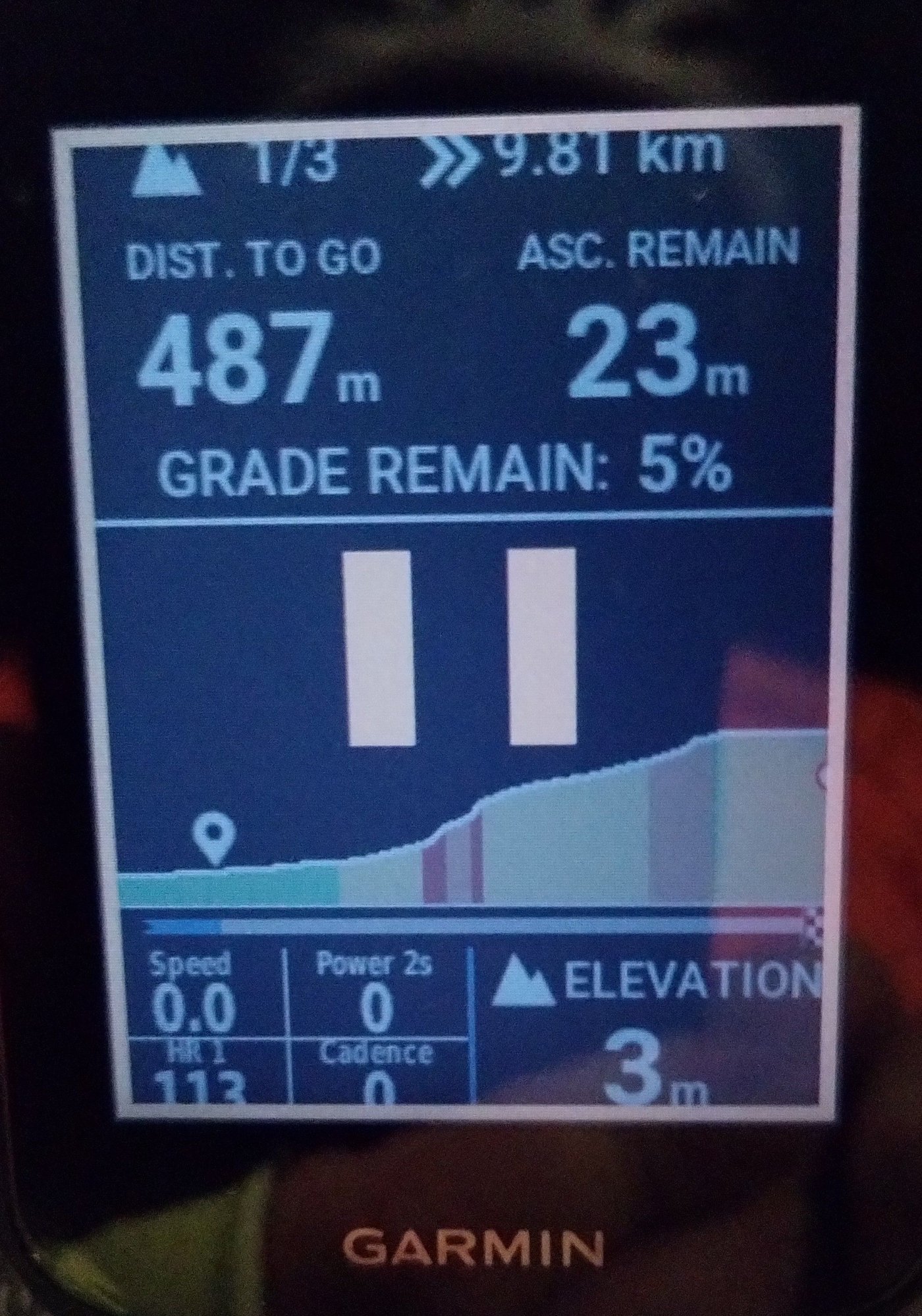
Custom datafield on the Edge 540 in the left bottom corner.
07-25-25 | 12:17 PM
#32
Senior Member
Joined: Dec 2010
Posts: 9,694
Likes: 2,617
From: northern Deep South
Bikes: Fuji Touring, Novara Randonee
Setting up and using a Garmin 5X0 series is almost a parallel to putting on old-fashioned cyclometer on a new bike. Takes a while to set it up the first time, then it's just a matter of pushing a button a couple times during a ride.
07-25-25 | 01:05 PM
#33
Facts just confuse people
Joined: Jul 2017
Posts: 19,440
Likes: 7,123
From: Mississippi
Bikes: Tarmac Disc Comp Di2 - 2020
Only if you want to use the basic things a GPS cyclometer can do. And try panning and zooming the map while riding your bike. Or checking to see how far ahead or behind your friends are if they've gone out of sight. You can do that easier with a touch screen. IMO.
07-26-25 | 08:34 AM
#34
“We don’t need no badges”
Joined: Sep 2019
Posts: 2,614
Likes: 1,634
From: SF Bay Area
Bikes: 1981 Holdsworth Special, 1993 C-dale MT3000 & 1996 F700CAD3, 2018 & 2019 Cervelo R3’s & 2022 R5, JustGo Runt, Ridley Oval, Kickr Bike 8-)
I went through the following in order.
wahoo Bolt v1
wahoo Roam v1
wahoo bolt v2
garmin 830
garmin 1050
I found the Wahoo’s easier to learn, configure and operate than Garmin.
However once mastered, the Garmin offers me functionally and data I can not get from wahoo.
Lastly, Garmin does not support the use of ERG files, so my Bolt is kept around to run my trainer 5 days a week.
But I record the Bolt controlled indoor rides with the Garmin.
TLDR:
If you are new to bike computers, the Wahoo.
If you’re experienced, you may benefit from Garmin.
Barry
wahoo Bolt v1
wahoo Roam v1
wahoo bolt v2
garmin 830
garmin 1050
I found the Wahoo’s easier to learn, configure and operate than Garmin.
However once mastered, the Garmin offers me functionally and data I can not get from wahoo.
Lastly, Garmin does not support the use of ERG files, so my Bolt is kept around to run my trainer 5 days a week.
But I record the Bolt controlled indoor rides with the Garmin.
TLDR:
If you are new to bike computers, the Wahoo.
If you’re experienced, you may benefit from Garmin.
Barry
__________________
07-26-25 | 11:56 AM
#35

Senior Member
Joined: Jul 2023
Posts: 2,059
Likes: 1,276
From: "Driftless" WI
Bikes: 1972 Motobecane Grand Record, 2023 Specialized Tarmac SL7,'26 Spesh Diverge, '22 Kona Dew+
But as you suggest, my being new to bike computers, I have to 'bootstrap' myself rather rigorously to take advantage of what it's capable of showing me.
07-27-25 | 10:55 AM
#36
Facts just confuse people
Joined: Jul 2017
Posts: 19,440
Likes: 7,123
From: Mississippi
Bikes: Tarmac Disc Comp Di2 - 2020
'S'why I jumped in, head first. Mistake? Maybe, but after a couple of Utoob's I'm gettin' further down the road.
Benefit's certainly there, the Edge 840 carries a lot around in such a smallish package, why I felt its price point justified the expenditure.
But as you suggest, my being new to bike computers, I have to 'bootstrap' myself rather rigorously to take advantage of what it's capable of showing me.
Benefit's certainly there, the Edge 840 carries a lot around in such a smallish package, why I felt its price point justified the expenditure.
But as you suggest, my being new to bike computers, I have to 'bootstrap' myself rather rigorously to take advantage of what it's capable of showing me.
People on the Garmin Forum's helped me learn about my Edge. https://forums.garmin.com/sports-fitness/cycling/
Though my years of prior use with Garmin Marine chart plotters and other devices made their menu driven interface a little more understandable to me.
07-30-25 | 06:17 PM
#37

I’ve found that the secret to connecting DI2 is to wake it up before turning on the Garmin. Bike is usually in the big ring and I hit the lever to shift up, and the DI2 just clicks, but wakes up. Then it connects right away when the Garmin turns on
07-30-25 | 07:08 PM
#38
Senior Member
Joined: Jul 2007
Posts: 8,631
Likes: 3,543
From: South shore, L.I., NY
Bikes: Trek Emonda SL7, Cannondale Topstone, Miyata City Liner, Specialized Chisel, Specialized Epic Evo
07-31-25 | 08:53 AM
#39
Facts just confuse people
Joined: Jul 2017
Posts: 19,440
Likes: 7,123
From: Mississippi
Bikes: Tarmac Disc Comp Di2 - 2020
By using them I don't put additional wear and tear on the RD or FD by having it shift when the sprockets are not turning.
The really old Di2 didn't have the hidden buttons on the top of the STI's. I'm not certain if all versions of the newer Di2 have them either.
