


BBBIKE Extract Question
 07-22-25 | 04:23 AM
#1
Thread Starter
Senior Member

Joined: Dec 2011
Posts: 2,913
Likes: 250
From: NE Ohio
Bikes: 1992 Serotta Colorado II,Co-Motion Speedster, Giant Escape Hybrid, 1977 Schwinn Super Le Tour
BBBIKE Extract Question
Not wanting to impose on a certain very helpful poster again I thought I would ask here.
I have been creating maps ,for a Garmin 800, using BBBIKE Extract. Each map has been loaded onto a separate micro SD card. Apparently, and this is because I don't know how, there is a way to have more than 1 map on a card by changing the file name. But I am not sure which file name.
Any assistance would be great!
I have been creating maps ,for a Garmin 800, using BBBIKE Extract. Each map has been loaded onto a separate micro SD card. Apparently, and this is because I don't know how, there is a way to have more than 1 map on a card by changing the file name. But I am not sure which file name.
Any assistance would be great!
 07-22-25 | 05:02 AM
#2
Senior Member


Joined: Aug 2010
Posts: 12,727
Likes: 2,105
From: Madison, WI
Bikes: 1961 Ideor, 1966 Perfekt 3 Speed AB Hub, 1994 Bridgestone MB-6, 2006 Airnimal Joey, 2009 Thorn Sherpa, 2013 Thorn Nomad MkII, 2015 VO Pass Hunter, 2017 Lynskey Backroad, 2017 Raleigh Gran Prix, 1980s Bianchi Mixte on a trainer. Others are now gone.
BBB gave you a very large file with the name gmapsupp.img which is your map. (I think I spelled it correctly, but I am not using the computer right now that I use for GPS stuff, could be wrong.) It might have given you some other tiny little files, if so those are not important to have.
The last time I got a BBB download, I changed the file name to 2025 05 Minn Wisc Ill bike.img (date and area of coverage, the word bike to differentiate it from auto or topo map). You can change it to anything that computers allow for a file name, I avoid punctuation for that reason. But I like to have the date of download, area of coverage, and type of map in my file name.
The last time I got a BBB download, I changed the file name to 2025 05 Minn Wisc Ill bike.img (date and area of coverage, the word bike to differentiate it from auto or topo map). You can change it to anything that computers allow for a file name, I avoid punctuation for that reason. But I like to have the date of download, area of coverage, and type of map in my file name.
 07-22-25 | 02:34 PM
#4
Thread Starter
Senior Member
Joined: Dec 2011
Posts: 2,913
Likes: 250
From: NE Ohio
Bikes: 1992 Serotta Colorado II,Co-Motion Speedster, Giant Escape Hybrid, 1977 Schwinn Super Le Tour
Hey Tourist! I had success! Only 1 problem I can't tell which map is which in my Downloads! No problem I will just create new ones and start from scratch now that your advice has gotten me over the hump!
07-22-25 | 04:31 PM
#5
Senior Member
Joined: Aug 2010
Posts: 12,727
Likes: 2,105
From: Madison, WI
Bikes: 1961 Ideor, 1966 Perfekt 3 Speed AB Hub, 1994 Bridgestone MB-6, 2006 Airnimal Joey, 2009 Thorn Sherpa, 2013 Thorn Nomad MkII, 2015 VO Pass Hunter, 2017 Lynskey Backroad, 2017 Raleigh Gran Prix, 1980s Bianchi Mixte on a trainer. Others are now gone.
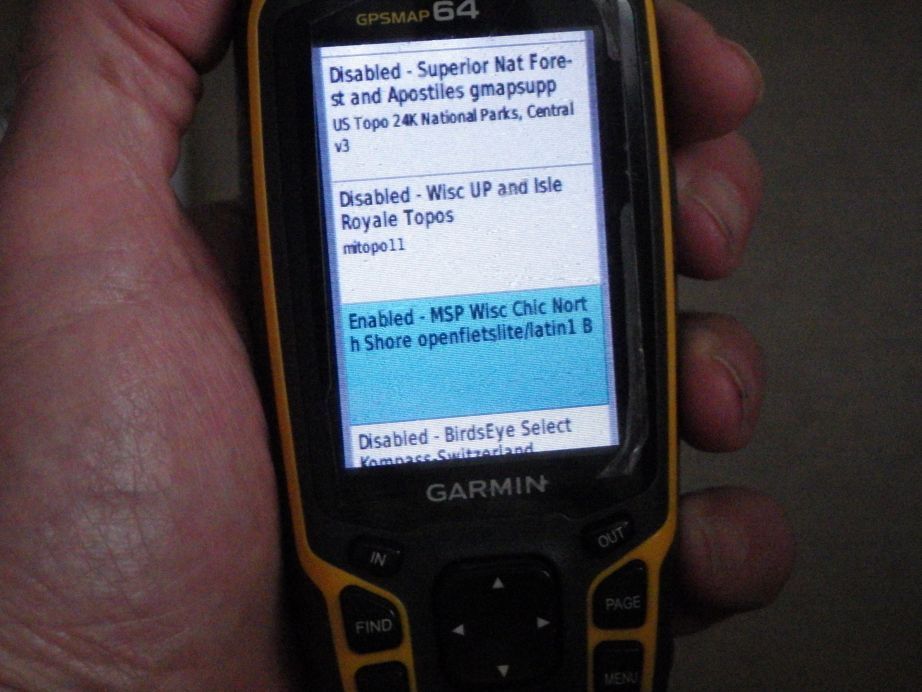
I think the one in the blue that is highlighted above was made on the BBB website.
07-28-25 | 04:17 PM
#6
Senior Member
Joined: Sep 2007
Posts: 15,253
Likes: 1,759
From: Far beyond the pale horizon.
Tourist in MSN is saying the right things.
You can freely rename the gmapupp.img file. This should be something "meaningful". (The weird gmapupp.img name is for compatibility with old devices.)
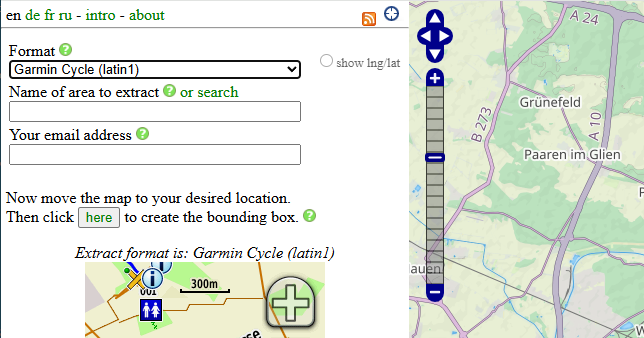
The Name of area to extract is the name that shows up in the map list.
You can freely rename the gmapupp.img file. This should be something "meaningful". (The weird gmapupp.img name is for compatibility with old devices.)
The Name of area to extract is the name that shows up in the map list.
