


Edit GPX files in Excel for import to Strava
 07-08-18 | 09:05 AM
#1

Thread Starter
Full Member

Joined: Jun 2014
Posts: 457
Likes: 91
From: Melbourne, Australia
Bikes: depends what week it is..
Edit GPX files in Excel for import to Strava
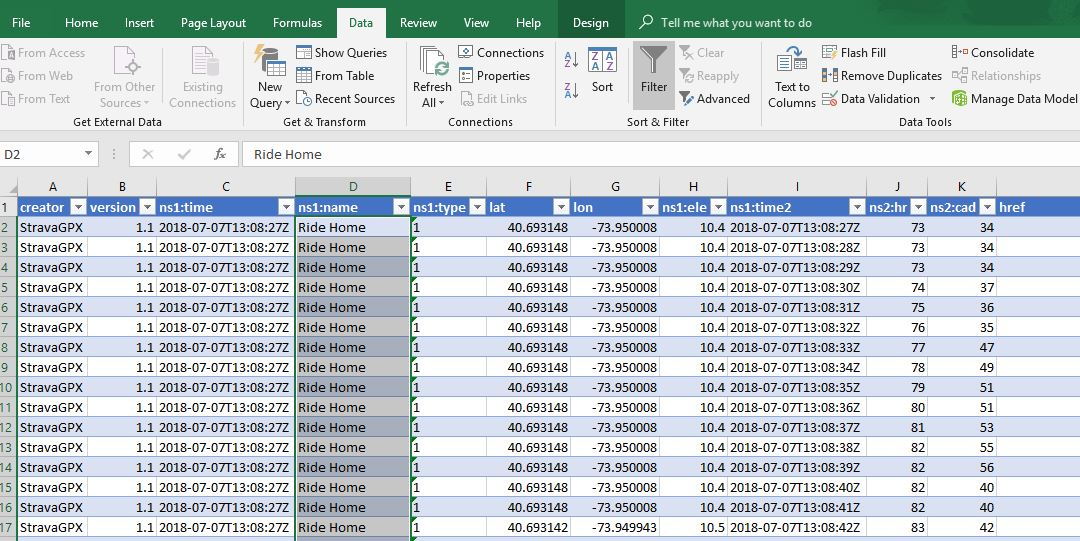
I found I can import a gpx file as an xml file into Excel (I use Excel 2016) and the data is all in neat columns - Speed, timestamp, cadence etc. So now if there is bad data I can edit it -example my HRM picks up stray data showing bpm above 230.
My question is how do I re-save the file so I can import it back to Strava as a gpx file? Excel says I can't save as a xml file. Is there some plugin I need install?
My question is how do I re-save the file so I can import it back to Strava as a gpx file? Excel says I can't save as a xml file. Is there some plugin I need install?
 07-08-18 | 03:37 PM
#2
Junior Member
Joined: Nov 2009
Posts: 13
Likes: 2
From: United Kingdom
I found I can import a gpx file as an xml file into Excel (I use Excel 2016) and the data is all in neat columns - Speed, timestamp, cadence etc. So now if there is bad data I can edit it -example my HRM picks up stray data showing bpm above 230.
My question is how do I re-save the file so I can import it back to Strava as a gpx file? Excel says I can't save as a xml file. Is there some plugin I need install?
My question is how do I re-save the file so I can import it back to Strava as a gpx file? Excel says I can't save as a xml file. Is there some plugin I need install?
07-09-18 | 07:14 PM
#3
Thread Starter
Full Member
Joined: Jun 2014
Posts: 457
Likes: 91
From: Melbourne, Australia
Bikes: depends what week it is..
Yes- I know the notepad trick. Trouble is my HRM data has a couple hundred bogus points I want to edit. In both notepad and word I cannot use find/replace probably because the data has too many symbols and Word thinks symbols have meanings in find/replace - here is a typical entry in the gpx file for HR: <gpxtpx:hr>116</gpxtpx:hr>
07-09-18 | 08:35 PM
#4

Ride On!
Joined: Apr 2016
Posts: 970
Likes: 3
Bikes: Allez DSW SL Sprint | Fuji Cross
You could find and replace in notepad++ on “hr>230” - “hr>170”. And just do that X number of times for like 230, 229, 228, etc...
This is funny because I actually do stuff like this for work. Times 80,000 (sometimes more lol) - I’d write a script to do it in most cases, but no point with such a small amount of data as you can do this pretty quickly with find and replace.
This is funny because I actually do stuff like this for work. Times 80,000 (sometimes more lol) - I’d write a script to do it in most cases, but no point with such a small amount of data as you can do this pretty quickly with find and replace.
07-09-18 | 09:11 PM
#5
Thread Starter
Full Member
Joined: Jun 2014
Posts: 457
Likes: 91
From: Melbourne, Australia
Bikes: depends what week it is..
Thanks deapee - notepad++ will do it under search>replace
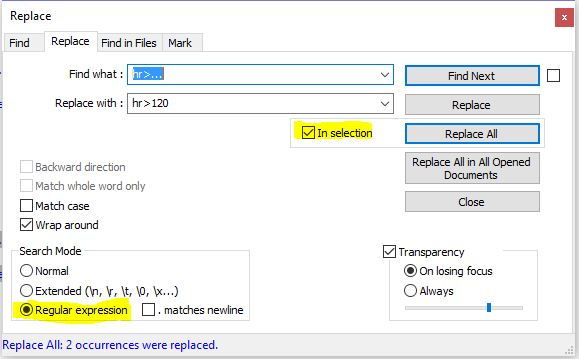
Highlight all the text which has the erroneous data. Tick "In Selection" and "regular Expression"
find: hr>… (each dot is represents a single number)
Replace with whatever figure you want (eg hr>120)
Hit "replace all" and note the number of replacements made.
Highlight all the text which has the erroneous data. Tick "In Selection" and "regular Expression"
find: hr>… (each dot is represents a single number)
Replace with whatever figure you want (eg hr>120)
Hit "replace all" and note the number of replacements made.
07-09-18 | 09:41 PM
#6

SuperGimp
Joined: Mar 2010
Posts: 13,346
Likes: 65
From: Whittier, CA
Bikes: Specialized Roubaix
there's a program out there called Free XML Editor (FoxE)... give it a whirl. I use it all the time to identify bad data in XML files (by bad, I mean non-compliant, won't display etc, not necessarily an unwanted number)
Free XML editor download
Free XML editor download
07-10-18 | 08:34 AM
#7
Member
Joined: Jun 2018
Posts: 44
Likes: 1
From: N Nevada
Bikes: '18 Giant Defy,'18 Trek FX3, Early '90s Giant Iguana
Have you tried exporting data as CSV (comma separated values)? Then rename to GPX. I have not looked in a bit but I think that's how excel saw your data. They are just pure text files.
07-10-18 | 11:10 AM
#8
Member
Joined: Jun 2018
Posts: 44
Likes: 1
From: N Nevada
Bikes: '18 Giant Defy,'18 Trek FX3, Early '90s Giant Iguana
Well, I guess it is in a kind of .xml. I use GPX track editor to clean up and divide tracks. Never tried changing data but you can delete sections and export selections. I normally use it for rock hounding trips and offroading.
Wife was after me before to "get going if you are going for a ride before it gets any hotter". Did 12 miles.
Wife was after me before to "get going if you are going for a ride before it gets any hotter". Did 12 miles.

Thread
Thread Starter
Forum
Replies
Last Post
cmark84
Electronics, Lighting, & Gadgets
0
04-19-14 09:57 AM
