


Strava "Segment" Question...
 01-04-19 | 01:00 AM
#1
Thread Starter
Senior Member
Joined: Jun 2012
Posts: 118
Likes: 15
From: St. Petersburg, FL
Bikes: 2007 Quiring Ti + 2014 Focus Izalco + 2009 Dynamic Synergy + 80's Bottecchia w/105 Crank Set + 2010 Jamis Commuter-4 + 1999 GT Slipstream Hybrid
Strava "Segment" Question...
Hi All!
I've been using Strava for a couple of months now and my daily rides are usually on a popular, local trail. I have no idea why Strava occasionally decides to switch from aview of my "total distance" and "average speed" (which I'm interested in) to a mapped "Segment" which I never created nor have any interest in. My question: How can I delete "segments" from my Strava app?
I've been using Strava for a couple of months now and my daily rides are usually on a popular, local trail. I have no idea why Strava occasionally decides to switch from aview of my "total distance" and "average speed" (which I'm interested in) to a mapped "Segment" which I never created nor have any interest in. My question: How can I delete "segments" from my Strava app?
 01-04-19 | 01:09 AM
#2

Me duelen las nalgas

Joined: Aug 2015
Posts: 13,519
Likes: 2,832
From: Texas
Bikes: Centurion Ironman, Trek 5900, Univega Via Carisma, Globe Carmel
Those are existing segments created by other cyclists. As we approach and exit segments Strava highlights them for folks who want to try for a personal best effort.
It's one of the cores of Strava. I'm not sure there's a way to disable that. I kinda wish people would disable it for group rides, which turn into free for all sprints that scatter the entire group.
If it bothers you, try another app like Wahoo Fitness, which is free, low resource and more reliable than Strava for recording rides. Then upload the data to Strava. That's what I usually do. Not because the segment notifications bother me, but because Wahoo Fitness is more reliable, less drain on the battery, and interfaces nicely with Strava afterward.
It's one of the cores of Strava. I'm not sure there's a way to disable that. I kinda wish people would disable it for group rides, which turn into free for all sprints that scatter the entire group.
If it bothers you, try another app like Wahoo Fitness, which is free, low resource and more reliable than Strava for recording rides. Then upload the data to Strava. That's what I usually do. Not because the segment notifications bother me, but because Wahoo Fitness is more reliable, less drain on the battery, and interfaces nicely with Strava afterward.
01-04-19 | 06:41 AM
#3
Senior Member
Joined: Sep 2014
Posts: 86
Likes: 10
From: Wisconsin
Bikes: 2007 Trek 820, 2014 Fuji Gran Fondo 2.1
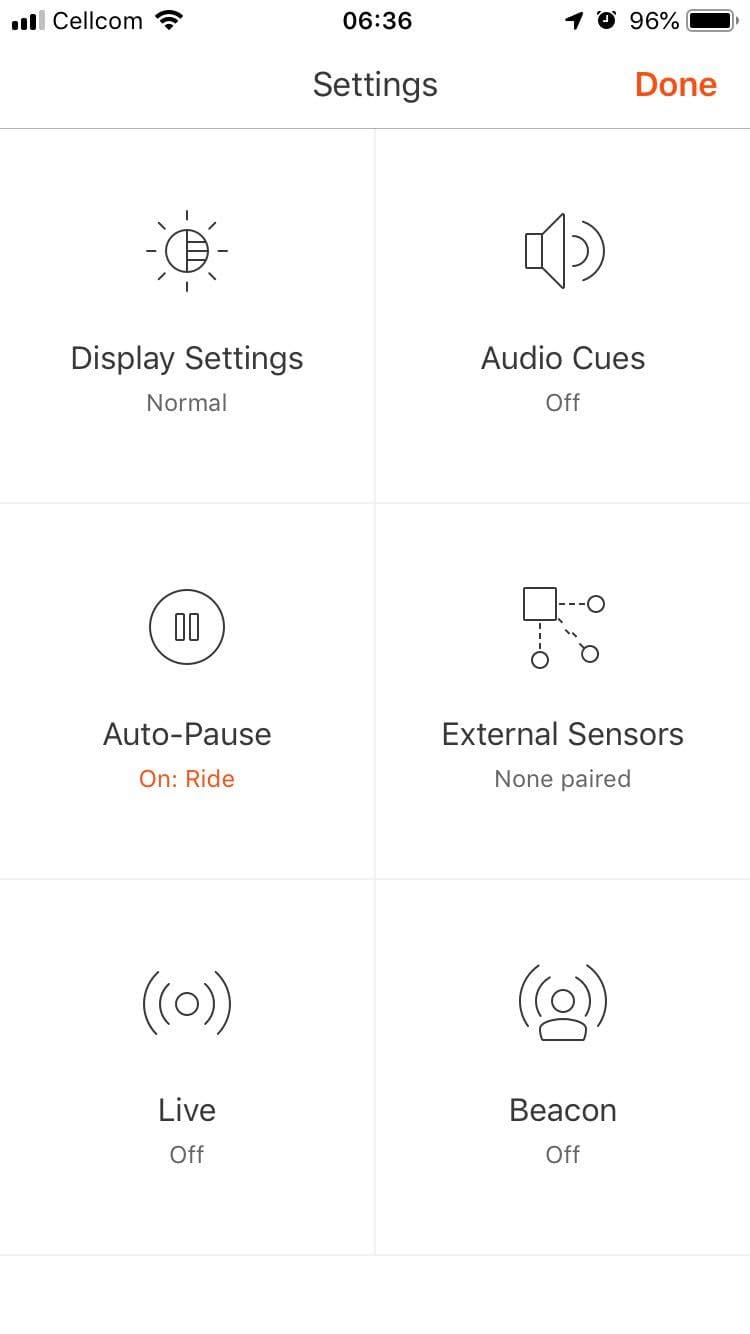
You’re wanting to turn off what strava calls live segments. Open the starva app and push the record button like you’re going to start a ride. Upper left corner should say settings, push on that to open the settings menu then find where it says live segments and push on that to open the menu to tune it on/off. Screen shot of the settings app attched, notice the live segment square down in the bottom right of the picutre, that’s what you’re looking for.
Last edited by silverado8405; 01-04-19 at 06:46 AM. Reason: picture upload
 01-04-19 | 03:23 PM
#5
Senior Member

Joined: Nov 2015
Posts: 4,444
Likes: 1,429
From: Music City, USA
Bikes: bikes
Live segments are awesome! Looking down and seeing you've already put 10 seconds into someone a quarter- mile in is fantastic.
Of course, going flat out and seeing you're 10 seconds behind after a quarter mile has the opposite effect, but at least you've got a heads up that today may not be your day...
Of course, going flat out and seeing you're 10 seconds behind after a quarter mile has the opposite effect, but at least you've got a heads up that today may not be your day...
01-07-19 | 01:38 PM
#6

Senior Member

Joined: Oct 2005
Posts: 1,885
Likes: 843
From: Santa Barbara Calif.
I answered what I thought was an important call when riding, and discovered this feature by accident. My phone stays rear jersey pocket, so of course I am oblivious to whatever Strava is doing.
Anyway, I am going to find a bar mount today and run some segments and have some fun with this feature.
Anyway, I am going to find a bar mount today and run some segments and have some fun with this feature.
01-07-19 | 02:22 PM
#7
Thread Starter
Senior Member
Joined: Jun 2012
Posts: 118
Likes: 15
From: St. Petersburg, FL
Bikes: 2007 Quiring Ti + 2014 Focus Izalco + 2009 Dynamic Synergy + 80's Bottecchia w/105 Crank Set + 2010 Jamis Commuter-4 + 1999 GT Slipstream Hybrid
You’re wanting to turn off what strava calls live segments. Open the starva app and push the record button like you’re going to start a ride. Upper left corner should say settings, push on that to open the settings menu then find where it says live segments and push on that to open the menu to tune it on/off. Screen shot of the settings app attched, notice the live segment square down in the bottom right of the picutre, that’s what you’re looking for.
01-07-19 | 09:52 PM
#8
Thread Starter
Senior Member
Joined: Jun 2012
Posts: 118
Likes: 15
From: St. Petersburg, FL
Bikes: 2007 Quiring Ti + 2014 Focus Izalco + 2009 Dynamic Synergy + 80's Bottecchia w/105 Crank Set + 2010 Jamis Commuter-4 + 1999 GT Slipstream Hybrid
I have a cell phone holder on my handlebar and do, indeed, view Strava as I ride. It shows me total distance and average speed. Next to it, my Sigma computer gives me current speed and cadence. I use the information to improve my performance.
01-26-19 | 12:33 AM
#9
Thread Starter
Senior Member
Joined: Jun 2012
Posts: 118
Likes: 15
From: St. Petersburg, FL
Bikes: 2007 Quiring Ti + 2014 Focus Izalco + 2009 Dynamic Synergy + 80's Bottecchia w/105 Crank Set + 2010 Jamis Commuter-4 + 1999 GT Slipstream Hybrid
Strava decided to go from Average Speed to actual speed. How do I get it to show Average Speed again?
I sent a request for information to Strava. There response was they hoped someone would get back to me!
I sent a request for information to Strava. There response was they hoped someone would get back to me!

