Originally Posted by
pdedes
try ridewithgps.com
You can drag to select just a section of the elevation chart to expand it and see the grades in more detail.
For instance, this
Blue Ridge Parkway ride.
Also, on the Metrics tab at the right side, there's a graph of minutes spent on each mph speed. (I was recording during stops and moving around during the lunch break, so there's a lot of 0 to 2 mph minutes)
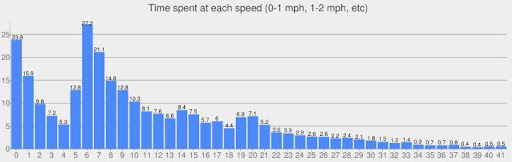
and the corresponding average elevation at each speed. (The 7% grades got averaged over a few different mph speeds)
