


Google MyTracks and elevation plot
 11-22-10 | 12:33 PM
#1

Thread Starter
Beer >> Sanity
Joined: Oct 2010
Posts: 3,449
Likes: 0
From: Colorado
Bikes: 2014 Evo DA2, 2010 Caad9-4, 2011 Synapse-4, 2013 CaadX-disc
Google MyTracks and elevation plot
Has anyone used Google MyTracks and found a way to download the elevation plot to a computer or as an image? It's hard to get a sense of the data on a small screen and no way to share it either. I know how to get route data downloaded or uploaded to Google Maps, and I've searched but can't figure out how to get the plot - maybe not possible. Thanks.
 11-22-10 | 02:31 PM
#2

Senior Member
Joined: Jul 2006
Posts: 762
Likes: 0
Bikes: Kestrel RT900SL, 1975 Viner, Specialized StumpJumper
Do you mean the elevation profile? I've used it a couple times as well as some other GPS type programs for my Android device and it seems that I was able to do what your asking. Second thought I may have transfered the file (gpx?) to my PC then uploaded it to garmin connect and Sport Tracks. I will mess with it in a minute and figure out how I did it.
11-22-10 | 03:24 PM
#3
Thread Starter
Beer >> Sanity
Joined: Oct 2010
Posts: 3,449
Likes: 0
From: Colorado
Bikes: 2014 Evo DA2, 2010 Caad9-4, 2011 Synapse-4, 2013 CaadX-disc
Yeah, I guess that's the right word for it. But it does look like a graph. I did download a kml file and imported it to Google Earth, but I don't see a way to get a profile or graph of the elevation gain and loss. The roads I was on supposedly have 10-12 grades, but MyTracks doesn't break it down. I was thinking with the graph I could figure it out better. Plus it's cool to look at.
I'll try the garmin connect thing too.
Thanks for the help.
I'll try the garmin connect thing too.
Thanks for the help.
11-22-10 | 08:17 PM
#4
Thread Starter
Beer >> Sanity
Joined: Oct 2010
Posts: 3,449
Likes: 0
From: Colorado
Bikes: 2014 Evo DA2, 2010 Caad9-4, 2011 Synapse-4, 2013 CaadX-disc
Well, can't upload to garmin since the data was not on a garmin - at least I don't see a way. However, I was able to export a gpx file and import that to garmin base camp on my computer and see an elevation plot there as well. From there I can print to a file and make a jpg of it. Not entirely seamless but works okay.
The base camp profile says the elevation gain was over 1400 feet but MyTracks said only 1100. Same data, but analyses by different software. Wonder which is right.

The base camp profile says the elevation gain was over 1400 feet but MyTracks said only 1100. Same data, but analyses by different software. Wonder which is right.
11-22-10 | 09:24 PM
#5

ka maté ka maté ka ora
Joined: Oct 2008
Posts: 4,423
Likes: 4
From: wessex
Bikes: breezer venturi - red novo bosberg - red, pedal force cg1 - red, neuvation f-100 - da, devinci phantom - xt, miele piste - miche/campy, bianchi reparto corse sbx, concorde squadra tsx - da, miele team issue sl - ultegra
try ridewithgps.com
11-23-10 | 05:33 PM
#7


You can drag to select just a section of the elevation chart to expand it and see the grades in more detail.
For instance, this Blue Ridge Parkway ride.
Also, on the Metrics tab at the right side, there's a graph of minutes spent on each mph speed. (I was recording during stops and moving around during the lunch break, so there's a lot of 0 to 2 mph minutes)
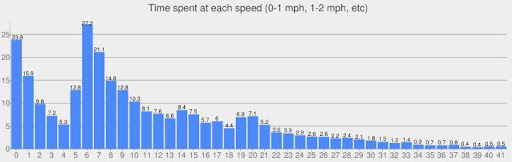
and the corresponding average elevation at each speed. (The 7% grades got averaged over a few different mph speeds)

For instance, this Blue Ridge Parkway ride.
Also, on the Metrics tab at the right side, there's a graph of minutes spent on each mph speed. (I was recording during stops and moving around during the lunch break, so there's a lot of 0 to 2 mph minutes)
and the corresponding average elevation at each speed. (The 7% grades got averaged over a few different mph speeds)
11-23-10 | 05:52 PM
#9

Should Be More Popular


Joined: Dec 2007
Posts: 46,194
Likes: 11,755
From: Malvern, PA (20 miles West of Philly)
Bikes: 1986 Alpine (steel road bike), 2009 Ti Habenero, 2013 Specialized Roubaix
 11-23-10 | 07:05 PM
#11
Senior Member
Joined: Jul 2006
Posts: 762
Likes: 0
Bikes: Kestrel RT900SL, 1975 Viner, Specialized StumpJumper
I used MyTracks on todays ride and here is how I do it.
Since I use both Sport tracks and Garmin connect once the GPX file is imported onto my PC I then Import it into SportTracks then I export it out of SportTracks and then upload it to Garmin Connect. Where I can view it as if the GPX file came from my Edge 305.
For some reason Garmin Connect will not accept it unless I export them out of Sporttracks first then upload it.
You may want to check out SportTracks, it's a free download, updated regularly and works great and has a lot of features.
***Edit: Just checked out ridewithgps.com and it seems awesome too.
Since I use both Sport tracks and Garmin connect once the GPX file is imported onto my PC I then Import it into SportTracks then I export it out of SportTracks and then upload it to Garmin Connect. Where I can view it as if the GPX file came from my Edge 305.
For some reason Garmin Connect will not accept it unless I export them out of Sporttracks first then upload it.
You may want to check out SportTracks, it's a free download, updated regularly and works great and has a lot of features.
***Edit: Just checked out ridewithgps.com and it seems awesome too.
Last edited by c_bake; 11-23-10 at 07:22 PM.
11-23-10 | 09:47 PM
#12
Thread Starter
Beer >> Sanity
Joined: Oct 2010
Posts: 3,449
Likes: 0
From: Colorado
Bikes: 2014 Evo DA2, 2010 Caad9-4, 2011 Synapse-4, 2013 CaadX-disc
EDIT: tried sporttracks but it's a windows only product and I've purged MS from my life (different post, different forum
 ). Anyway, I can export from Garmin Base Camp and then upload to Garmin Connect. Still a lot of importing/exporting. Might just stick with ridewithgps.com, but I now have a few options. Thanks for the feedback.
Last edited by bikerjp; 11-23-10 at 10:48 PM.

Thread
Thread Starter
Forum
Replies
Last Post
macbride
Electronics, Lighting, & Gadgets
5
08-21-15 05:26 AM
yescolleen
Electronics, Lighting, & Gadgets
1
01-03-12 02:56 AM
oliviercaire
Electronics, Lighting, & Gadgets
3
08-28-11 06:09 AM
