


Are you using a phone App?


 06-14-18 | 03:07 PM
#27

Senior Member

Joined: Nov 2017
Posts: 2,095
Likes: 810
From: Seattle
Bikes: Specialized Roubaix, Obed Boundary, Canyon Inflite AL SLX, Ibis Ripley AF, Priority Continuum Onyx, Santana Vision, Kent Dual-Drive Tandem
I used the free Wahoo Fitness App until I recently got a Garmin Edge 520. The app was fine, much better than Strava at showing information and also not using as much battery, but the old phone I was using just didn't have enough battery life for the longer rides I plan to do this summer. I like that the Edge is a lot smaller and weatherproof, as my handlebar was too crowded with a ginormous waterproof phone mount in between light, action cam, and tail light remote.
06-14-18 | 05:11 PM
#28

Me duelen las nalgas

Joined: Aug 2015
Posts: 13,519
Likes: 2,832
From: Texas
Bikes: Centurion Ironman, Trek 5900, Univega Via Carisma, Globe Carmel
Cyclemeter for iPhone was very good, lots of user configurable settings including voice prompts. Almost too many options and some aren't clear at first. But the overall layout is much better than IpBike, which offers comparable user configurable options.
Be sure to transfer and back up your data separately from Cyclemeter. If you don't renew the subscription you'll lose access to your own data recorded by Cyclemeter. I uploaded most activities recorded with Cyclemeter to Strava.
After a year I decided I wasn't getting enough use from Cyclemeter since I don't use fitness monitors, so I didn't renew and now just use Strava. If I decided to add heart rate and other monitors I'll consider renewing Cyclemeter.
Wahoo Fitness for iPhone is a very good freebie. Clear display, simple interface, not a battery hog. Lots of activity presets with easy to understand options to configure for your preferences. It records full data, but displays only a tiny fraction. To see more data, upload to Strava. Don't bother with the Android version until they fix the lack of an auto-pause/resume feature.
I keep trying other apps suggested by other cyclists, but so far I haven't found any I like better than Strava (Android and iPhone versions) and Wahoo Fitness (iPhone only).
If I wanted to record routes as well for future navigation I'd reconsider Ride With GPS and Map My Ride. Those are popular with local clubs for scheduled group rides. Guests can download the data and be ready to tag along and regroup if they fall off the back on fast group rides. Excellent for previewing routes before joining a group for a long ride on unfamiliar turf.
Be sure to transfer and back up your data separately from Cyclemeter. If you don't renew the subscription you'll lose access to your own data recorded by Cyclemeter. I uploaded most activities recorded with Cyclemeter to Strava.
After a year I decided I wasn't getting enough use from Cyclemeter since I don't use fitness monitors, so I didn't renew and now just use Strava. If I decided to add heart rate and other monitors I'll consider renewing Cyclemeter.
Wahoo Fitness for iPhone is a very good freebie. Clear display, simple interface, not a battery hog. Lots of activity presets with easy to understand options to configure for your preferences. It records full data, but displays only a tiny fraction. To see more data, upload to Strava. Don't bother with the Android version until they fix the lack of an auto-pause/resume feature.
I keep trying other apps suggested by other cyclists, but so far I haven't found any I like better than Strava (Android and iPhone versions) and Wahoo Fitness (iPhone only).
If I wanted to record routes as well for future navigation I'd reconsider Ride With GPS and Map My Ride. Those are popular with local clubs for scheduled group rides. Guests can download the data and be ready to tag along and regroup if they fall off the back on fast group rides. Excellent for previewing routes before joining a group for a long ride on unfamiliar turf.
06-14-18 | 05:18 PM
#29
Me duelen las nalgas
Joined: Aug 2015
Posts: 13,519
Likes: 2,832
From: Texas
Bikes: Centurion Ironman, Trek 5900, Univega Via Carisma, Globe Carmel
Regarding real-time display, no phone app based on GPS data can offer true real-time speed, etc. There's always lag, ranging from small to significant. Some are worse than others. Some days are worse than others when GPS sync errors occur -- usually a problem with the phone itself, or atmospheric/terrain conditions.
The best (or least laggy) GPS phone app I've tried for near-real-time speed is Speedometer for iPhone by by David Garner. Minimalist, clear, easy to see even in daylight and very battery-frugal. It doesn't record data for uploading to Strava -- the one thing that would make it the perfect minimalist app, for folks who don't need to record heart rate, power, etc. But it's a good substitute for a proper bike computer.
But any sub-$50 wired or wireless computer would be better for real-time speed.
The best (or least laggy) GPS phone app I've tried for near-real-time speed is Speedometer for iPhone by by David Garner. Minimalist, clear, easy to see even in daylight and very battery-frugal. It doesn't record data for uploading to Strava -- the one thing that would make it the perfect minimalist app, for folks who don't need to record heart rate, power, etc. But it's a good substitute for a proper bike computer.
But any sub-$50 wired or wireless computer would be better for real-time speed.
06-14-18 | 06:19 PM
#30
Senior Member
Joined: Nov 2017
Posts: 2,095
Likes: 810
From: Seattle
Bikes: Specialized Roubaix, Obed Boundary, Canyon Inflite AL SLX, Ibis Ripley AF, Priority Continuum Onyx, Santana Vision, Kent Dual-Drive Tandem
The Wahoo Fitness app for Android has had autopause/resume for a couple months now.
06-14-18 | 07:54 PM
#31
Senior Member
Joined: Apr 2017
Posts: 1,272
Likes: 11
From: Ottawa,ON,Canada
Bikes: Schwinn Miranda 1990, Giant TCX 2 2012
Try Meerun for Android or iPhone. It's free and has no monthly or yearly fee (pro version only gives a few extra like auto pause). The activities are stored locally or if you create an account on their server, they're uploaded there and still no fee. Not just for cycling but a slew of other activities. Lots of stats and the display is fully configurable. Also has voice announcements for distance, time, speed, heart rate and lots of other stuff. Voice is very human like, not robotized. I've been using it for about two years and have over 1200 activities stored locally. If you sync with their server, if you switch device, the activities will automatically redownload to your new device.
This is what an activity looks like from the web
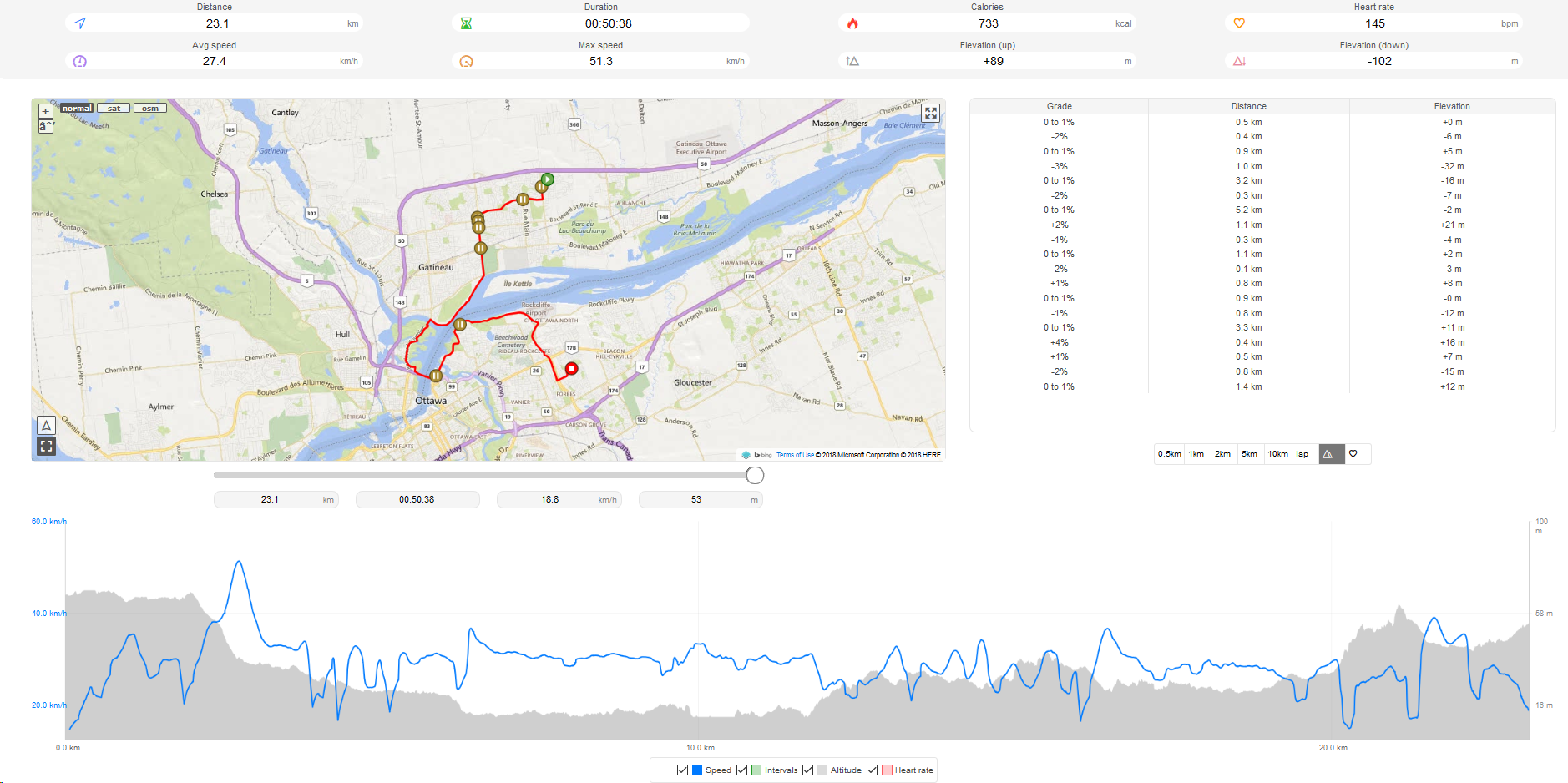
This is what an activity looks like from the web
06-15-18 | 12:42 PM
#32

Senior Member

Joined: Jun 2011
Posts: 5,585
Likes: 122
From: Tampa, Florida
Bikes: 2017 Colnago C-RS, 2012 Colnago Ace, 2010 Giant Cypress hybrid
Cyclemeter for iPhone was very good, lots of user configurable settings including voice prompts. Almost too many options and some aren't clear at first. But the overall layout is much better than IpBike, which offers comparable user configurable options.
Be sure to transfer and back up your data separately from Cyclemeter. If you don't renew the subscription you'll lose access to your own data recorded by Cyclemeter. I uploaded most activities recorded with Cyclemeter to Strava.
After a year I decided I wasn't getting enough use from Cyclemeter since I don't use fitness monitors, so I didn't renew and now just use Strava. If I decided to add heart rate and other monitors I'll consider renewing Cyclemeter.
Wahoo Fitness for iPhone is a very good freebie. Clear display, simple interface, not a battery hog. Lots of activity presets with easy to understand options to configure for your preferences. It records full data, but displays only a tiny fraction. To see more data, upload to Strava. Don't bother with the Android version until they fix the lack of an auto-pause/resume feature.
I keep trying other apps suggested by other cyclists, but so far I haven't found any I like better than Strava (Android and iPhone versions) and Wahoo Fitness (iPhone only).
If I wanted to record routes as well for future navigation I'd reconsider Ride With GPS and Map My Ride. Those are popular with local clubs for scheduled group rides. Guests can download the data and be ready to tag along and regroup if they fall off the back on fast group rides. Excellent for previewing routes before joining a group for a long ride on unfamiliar turf.
Be sure to transfer and back up your data separately from Cyclemeter. If you don't renew the subscription you'll lose access to your own data recorded by Cyclemeter. I uploaded most activities recorded with Cyclemeter to Strava.
After a year I decided I wasn't getting enough use from Cyclemeter since I don't use fitness monitors, so I didn't renew and now just use Strava. If I decided to add heart rate and other monitors I'll consider renewing Cyclemeter.
Wahoo Fitness for iPhone is a very good freebie. Clear display, simple interface, not a battery hog. Lots of activity presets with easy to understand options to configure for your preferences. It records full data, but displays only a tiny fraction. To see more data, upload to Strava. Don't bother with the Android version until they fix the lack of an auto-pause/resume feature.
I keep trying other apps suggested by other cyclists, but so far I haven't found any I like better than Strava (Android and iPhone versions) and Wahoo Fitness (iPhone only).
If I wanted to record routes as well for future navigation I'd reconsider Ride With GPS and Map My Ride. Those are popular with local clubs for scheduled group rides. Guests can download the data and be ready to tag along and regroup if they fall off the back on fast group rides. Excellent for previewing routes before joining a group for a long ride on unfamiliar turf.
__________________
HCFR Cycling Team
Ride Safe ... Ride Hard ... Ride Daily
2017 Colnago C-RS
2012 Colnago Ace
2010 Giant Cypress
HCFR Cycling Team
Ride Safe ... Ride Hard ... Ride Daily
2017 Colnago C-RS
2012 Colnago Ace
2010 Giant Cypress
06-15-18 | 10:29 PM
#33
Me duelen las nalgas
Joined: Aug 2015
Posts: 13,519
Likes: 2,832
From: Texas
Bikes: Centurion Ironman, Trek 5900, Univega Via Carisma, Globe Carmel
Here's the best way to guarantee that your data is not lost if you stop using Cyclemeter (iPhone) for a while and want to resume using it later. When connected to your PC with iTunes, select Applications and find the Cyclemeter app icon. Select it and look for the data file in the lower right corner of the screen. It will be called Meter.db. Copy the file to your PC and store it someplace on your hard drive. At this point, you can actually remove Cyclemeter from your phone if you need some room for other stuff. If you reinstall Cyclemeter at a later date, connect it to iTunes and reverse the process. When you restart Cyclemeter on your iPhone, all your old data will be available to you.

