


Missing pics/video - only on some posts
 12-21-22 | 02:30 PM
#1
Thread Starter
Amateur Member

Joined: Mar 2021
Posts: 5,300
Likes: 8,830
From: SoCal
Bikes: Cuevas & Cimmaron are my full time riders, small MB-3 and large Competition GS are my sometimers
Missing pics/video - only on some posts
Most photos and videos show but not all?
In general the forum site works great for me, but I have a recurring problem where i will open a thread and the picture or video everyone is commenting is not there, just missing/blank. Here is the most recent example:
Cyclist clears way with homemade bicycle snowplow
This is what I see on that page:
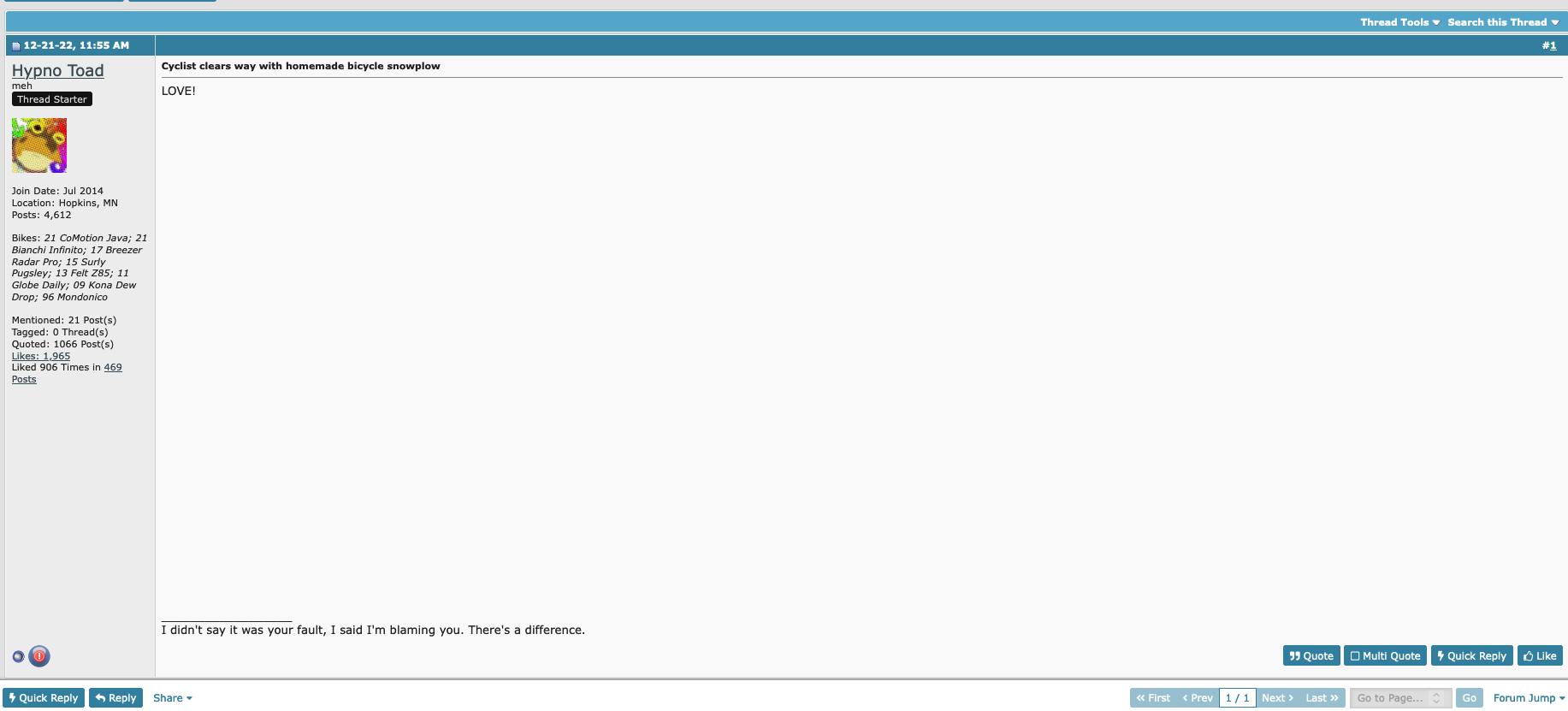
Any thoughts on what is going on? I have tried to look up my browser settings and make sure there is nothing strange. No weird extensions or anything. 85-90% of the content is usually there, just these weird exceptions.
Anther good example would be the "post your favorite christmas song" there are lots of blank posts for me on that one? But, I can access the videos on many of the posts?
To be clear, I do not believe the issue has to do with broken or missing links, as usually others seem to be able to see them.
In general the forum site works great for me, but I have a recurring problem where i will open a thread and the picture or video everyone is commenting is not there, just missing/blank. Here is the most recent example:
Cyclist clears way with homemade bicycle snowplow
This is what I see on that page:
Any thoughts on what is going on? I have tried to look up my browser settings and make sure there is nothing strange. No weird extensions or anything. 85-90% of the content is usually there, just these weird exceptions.
Anther good example would be the "post your favorite christmas song" there are lots of blank posts for me on that one? But, I can access the videos on many of the posts?
To be clear, I do not believe the issue has to do with broken or missing links, as usually others seem to be able to see them.
 12-22-22 | 05:28 AM
#2
Senior Member


Joined: Aug 2007
Posts: 5,998
Likes: 2,187
From: Evanston, IL
Bikes: many
Thanks for the link to the cool video. 
As to what your problem might be, I have few ideas. Do you have ad or tracker blockers running on your computer or network? If so, can you momentarily disable them to see if that fixes things? It's possible they are blocking an image or video link from time-to-time. For instance, I use Brave (which has built-in ad blocking), run pihole on a Raspberry Pi (again, ad blocking), and (on my phone) use DuckDuckGo's tracker blocker VPN. Maybe try a different web browser?
As to what your problem might be, I have few ideas. Do you have ad or tracker blockers running on your computer or network? If so, can you momentarily disable them to see if that fixes things? It's possible they are blocking an image or video link from time-to-time. For instance, I use Brave (which has built-in ad blocking), run pihole on a Raspberry Pi (again, ad blocking), and (on my phone) use DuckDuckGo's tracker blocker VPN. Maybe try a different web browser?
12-22-22 | 10:37 AM
#3

Facts just confuse people


Joined: Jul 2017
Posts: 19,424
Likes: 7,116
From: Mississippi
Bikes: Tarmac Disc Comp Di2 - 2020
Video on that page works for me. Take a few moments to start on my slow PC. Maybe yours is even slower!
 12-26-22 | 04:43 AM
#4

Senior Member

Joined: Jan 2010
Posts: 45,475
Likes: 23,620
Are you posting at work, where you can’t access something like Facebook and/or YouTube? I have experienced the same as you in the Addiction thread. IIRC, the photos were somehow tied to Facebook, which is blocked by my employer.
Last edited by indyfabz; 12-26-22 at 04:48 AM.
