


Route Tracking
 05-16-21 | 11:56 AM
#1
Thread Starter
Junior Member
Joined: May 2021
Posts: 8
Likes: 0
Route Tracking
Google Drive on my android phone will show my location, and will show the location of anyone who chooses location sharing with me. Is there a way to load a route map via gpx or klm file, so that another person can see where I am, where they are and can see my planned route? Is there, maybe, another software app that can do this?
 05-16-21 | 01:21 PM
#3
Senior Member

Joined: Feb 2016
Posts: 1,860
Likes: 821
From: SE Wisconsin
Bikes: Lemond '01 Maillot Jaune, Lemond '02 Victoire, Lemond '03 Poprad, Lemond '03 Wayzata DB conv(Poprad), '79 AcerMex Windsor Carrera Professional(pur new), '88 GT Tequesta(pur new), '01 Bianchi Grizzly, 1993 Trek 970 DB conv, Trek 8900 DB conv
I can't speak to the sharing aspect(seeing each other's location), but
1) If you expect to have a cell service signal during your ride, then
a) Plan your route in some route planning software (I use RWGPS mostly)
b) Extract a GPX format file of the route
c) Go to your Google Drive>NEW>More>My Google Maps
d) Import GPX file into a map
e) Name the map
f) Set sharing to "anyone with the link"
g) You now should have your route accessible on your phone and your location will be shown
h) It may be possible to save this map-route as an "offline google map" for use without cell service..I haven't tried it
2) If you don't expect to have a cell phone signal during your ride, then
i) Do 1a above
j) Extract a KML file of your route. Name it with your route name, i.e. "Katy Trail"
k) Download and install the app Maps.Me.
l) Download the states and large cities you'll be in from within Maps.Me
m) Email the KML file from j) above to yourself
n) On your phone, open the email & KML file. If your phone has Google Earth on it, you may get a popup asking which app should open the KML file (Google Earth or Maps.Me, choose Maps.Me)
o) You'll now have an offline map and route available in Maps.Me and your location will be shown. Tap the Star on the bottom of your open Maps.Me app(second from right) and you'll see the Bookmarks page..turn the route on and off with the check box in front of you route.
p) Again..no idea on sharing..though the KML file can be emailed to a friend and they can load the same setup you've just done.
Personal preference..but I don't use my phone for navigation(though have things loaded so it can serve as a backup) as it's safer to use a dedicated GPS device. The phone (for me) is more of a communication and safety device. If I crash somewhere and need help, I don't want my phone low on power due to using it for navigation.
1) If you expect to have a cell service signal during your ride, then
a) Plan your route in some route planning software (I use RWGPS mostly)
b) Extract a GPX format file of the route
c) Go to your Google Drive>NEW>More>My Google Maps
d) Import GPX file into a map
e) Name the map
f) Set sharing to "anyone with the link"
g) You now should have your route accessible on your phone and your location will be shown
h) It may be possible to save this map-route as an "offline google map" for use without cell service..I haven't tried it
2) If you don't expect to have a cell phone signal during your ride, then
i) Do 1a above
j) Extract a KML file of your route. Name it with your route name, i.e. "Katy Trail"
k) Download and install the app Maps.Me.
l) Download the states and large cities you'll be in from within Maps.Me
m) Email the KML file from j) above to yourself
n) On your phone, open the email & KML file. If your phone has Google Earth on it, you may get a popup asking which app should open the KML file (Google Earth or Maps.Me, choose Maps.Me)
o) You'll now have an offline map and route available in Maps.Me and your location will be shown. Tap the Star on the bottom of your open Maps.Me app(second from right) and you'll see the Bookmarks page..turn the route on and off with the check box in front of you route.
p) Again..no idea on sharing..though the KML file can be emailed to a friend and they can load the same setup you've just done.
Personal preference..but I don't use my phone for navigation(though have things loaded so it can serve as a backup) as it's safer to use a dedicated GPS device. The phone (for me) is more of a communication and safety device. If I crash somewhere and need help, I don't want my phone low on power due to using it for navigation.
05-16-21 | 01:57 PM
#5
Thread Starter
Junior Member
Joined: May 2021
Posts: 8
Likes: 0
I can't speak to the sharing aspect(seeing each other's location), but
1) If you expect to have a cell service signal during your ride, then
a) Plan your route in some route planning software (I use RWGPS mostly)
b) Extract a GPX format file of the route
c) Go to your Google Drive>NEW>More>My Google Maps
d) Import GPX file into a map
e) Name the map
f) Set sharing to "anyone with the link"
g) You now should have your route accessible on your phone and your location will be shown
h) It may be possible to save this map-route as an "offline google map" for use without cell service..I haven't tried it
2) If you don't expect to have a cell phone signal during your ride, then
i) Do 1a above
j) Extract a KML file of your route. Name it with your route name, i.e. "Katy Trail"
k) Download and install the app Maps.Me.
l) Download the states and large cities you'll be in from within Maps.Me
m) Email the KML file from j) above to yourself
n) On your phone, open the email & KML file. If your phone has Google Earth on it, you may get a popup asking which app should open the KML file (Google Earth or Maps.Me, choose Maps.Me)
o) You'll now have an offline map and route available in Maps.Me and your location will be shown. Tap the Star on the bottom of your open Maps.Me app(second from right) and you'll see the Bookmarks page..turn the route on and off with the check box in front of you route.
p) Again..no idea on sharing..though the KML file can be emailed to a friend and they can load the same setup you've just done.
Personal preference..but I don't use my phone for navigation(though have things loaded so it can serve as a backup) as it's safer to use a dedicated GPS device. The phone (for me) is more of a communication and safety device. If I crash somewhere and need help, I don't want my phone low on power due to using it for navigation.
1) If you expect to have a cell service signal during your ride, then
a) Plan your route in some route planning software (I use RWGPS mostly)
b) Extract a GPX format file of the route
c) Go to your Google Drive>NEW>More>My Google Maps
d) Import GPX file into a map
e) Name the map
f) Set sharing to "anyone with the link"
g) You now should have your route accessible on your phone and your location will be shown
h) It may be possible to save this map-route as an "offline google map" for use without cell service..I haven't tried it
2) If you don't expect to have a cell phone signal during your ride, then
i) Do 1a above
j) Extract a KML file of your route. Name it with your route name, i.e. "Katy Trail"
k) Download and install the app Maps.Me.
l) Download the states and large cities you'll be in from within Maps.Me
m) Email the KML file from j) above to yourself
n) On your phone, open the email & KML file. If your phone has Google Earth on it, you may get a popup asking which app should open the KML file (Google Earth or Maps.Me, choose Maps.Me)
o) You'll now have an offline map and route available in Maps.Me and your location will be shown. Tap the Star on the bottom of your open Maps.Me app(second from right) and you'll see the Bookmarks page..turn the route on and off with the check box in front of you route.
p) Again..no idea on sharing..though the KML file can be emailed to a friend and they can load the same setup you've just done.
Personal preference..but I don't use my phone for navigation(though have things loaded so it can serve as a backup) as it's safer to use a dedicated GPS device. The phone (for me) is more of a communication and safety device. If I crash somewhere and need help, I don't want my phone low on power due to using it for navigation.
05-16-21 | 03:19 PM
#6
Senior Member
Joined: Feb 2016
Posts: 1,860
Likes: 821
From: SE Wisconsin
Bikes: Lemond '01 Maillot Jaune, Lemond '02 Victoire, Lemond '03 Poprad, Lemond '03 Wayzata DB conv(Poprad), '79 AcerMex Windsor Carrera Professional(pur new), '88 GT Tequesta(pur new), '01 Bianchi Grizzly, 1993 Trek 970 DB conv, Trek 8900 DB conv
That is my personal preference as well. I use a Garmin for navigation. My question is for my wife, who will driving a SAG vehicle. I want her to see, on a map, where she is, where I am and what my planned route is. The Google Drive as it is, will show where she is and where I am on the map. Just need to be able to import my planned route.
05-16-21 | 03:36 PM
#7
Senior Member
Joined: Feb 2016
Posts: 1,860
Likes: 821
From: SE Wisconsin
Bikes: Lemond '01 Maillot Jaune, Lemond '02 Victoire, Lemond '03 Poprad, Lemond '03 Wayzata DB conv(Poprad), '79 AcerMex Windsor Carrera Professional(pur new), '88 GT Tequesta(pur new), '01 Bianchi Grizzly, 1993 Trek 970 DB conv, Trek 8900 DB conv
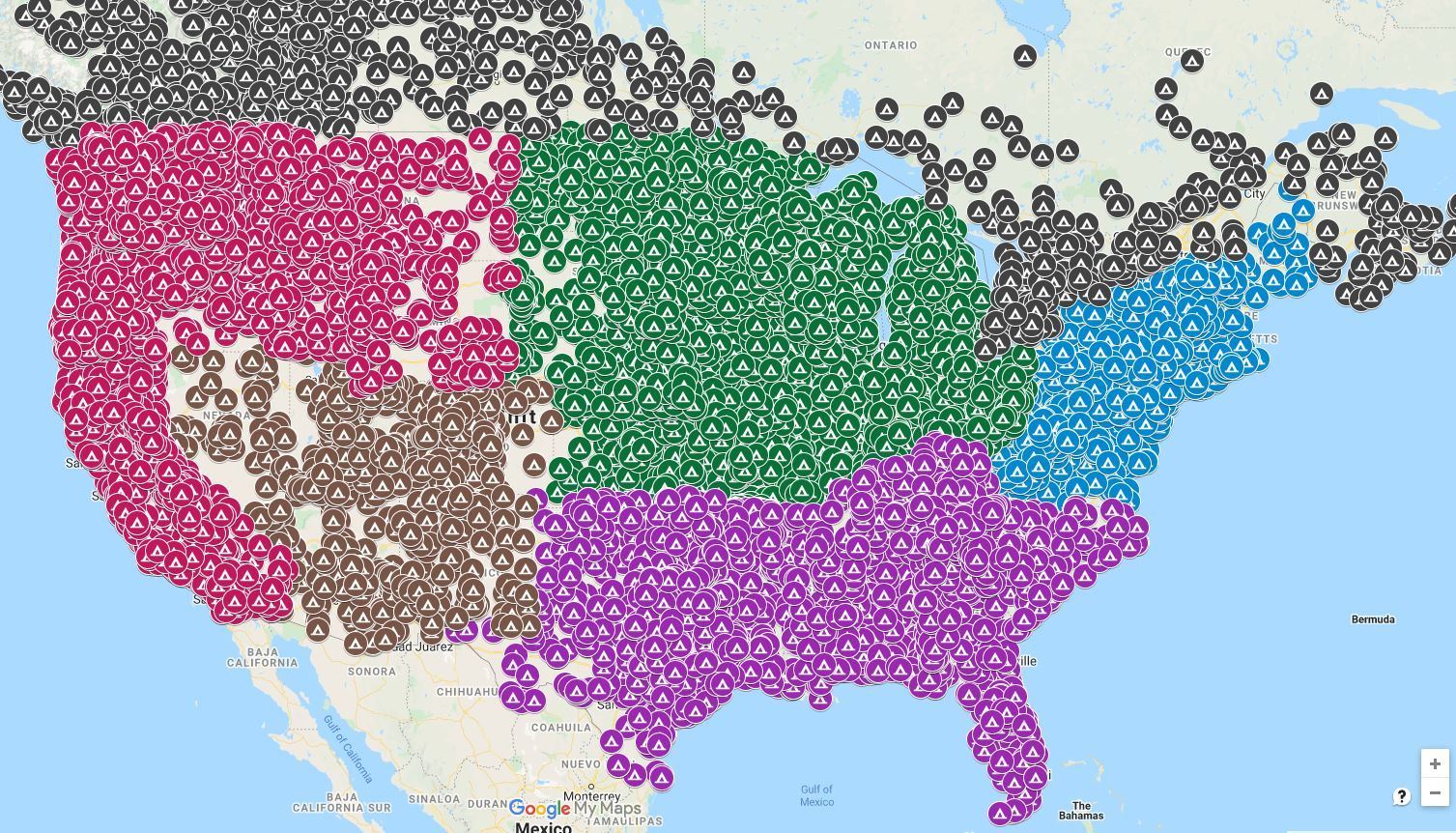
I managed to download some data that gives the lat-lon of something like 14,000 public campgrounds in the USA and Canada(national parks, forests, recreation areas, COE, utility, military, county parks, city parks, state parks, state forests..............). When planning a trip/tour I use the google maps workup to plot the route on the campsite map to see what campgrounds might be near the route... or I adjust the route as needed. Sometimes it can be hard..or at least very tedious, to find small campgrounds unless you specifically look at local county/city websites, one by one.. There may be a guide that has all this info(I don't have one). Working up the data electronically is easy and fast.
05-16-21 | 04:12 PM
#8
Senior Member

Joined: Sep 2015
Posts: 2,179
Likes: 202
From: QC Canada
Bikes: Custom built LHT & Troll
Would you happen to be able to share a link?
05-16-21 | 04:50 PM
#9
Senior Member
Joined: Feb 2016
Posts: 1,860
Likes: 821
From: SE Wisconsin
Bikes: Lemond '01 Maillot Jaune, Lemond '02 Victoire, Lemond '03 Poprad, Lemond '03 Wayzata DB conv(Poprad), '79 AcerMex Windsor Carrera Professional(pur new), '88 GT Tequesta(pur new), '01 Bianchi Grizzly, 1993 Trek 970 DB conv, Trek 8900 DB conv
ALL US AND CANADA CAMPGROUNDS LOCATOR: STATE PARKS NATIONAL PARKS FORESTS MORE california oregon washington new york pennsylvania more
I found a couple errors in the data as I worked it up and sent corrections to the site owner. Apparently the guy (former engineer?) pictured on the site passed away 5-6? years ago. He built the site as a project during his retirement. I swapped a couple emails with his son. He said he's continuing to let the site run as is, but didn't know how long that would continue. I do remember I ran across a similar, commercial website that offers basically what this site does with a few more bells and whistles..but you need to subscribe to access it. I was really surprised he offered the base data as a download...very unusual in the non-public large-data world.
Just a few campgrounds available . A bit more useful once you zoom in.
I found a couple errors in the data as I worked it up and sent corrections to the site owner. Apparently the guy (former engineer?) pictured on the site passed away 5-6? years ago. He built the site as a project during his retirement. I swapped a couple emails with his son. He said he's continuing to let the site run as is, but didn't know how long that would continue. I do remember I ran across a similar, commercial website that offers basically what this site does with a few more bells and whistles..but you need to subscribe to access it. I was really surprised he offered the base data as a download...very unusual in the non-public large-data world.
Just a few campgrounds available
. A bit more useful once you zoom in.
05-16-21 | 07:15 PM
#10
Senior Member


Joined: Aug 2010
Posts: 12,726
Likes: 2,105
From: Madison, WI
Bikes: 1961 Ideor, 1966 Perfekt 3 Speed AB Hub, 1994 Bridgestone MB-6, 2006 Airnimal Joey, 2009 Thorn Sherpa, 2013 Thorn Nomad MkII, 2015 VO Pass Hunter, 2017 Lynskey Backroad, 2017 Raleigh Gran Prix, 1980s Bianchi Mixte on a trainer. Others are now gone.
That is my personal preference as well. I use a Garmin for navigation. My question is for my wife, who will driving a SAG vehicle. I want her to see, on a map, where she is, where I am and what my planned route is. The Google Drive as it is, will show where she is and where I am on the map. Just need to be able to import my planned route.
05-17-21 | 04:27 AM
#11
Thread Starter
Junior Member
Joined: May 2021
Posts: 8
Likes: 0
Again, I am not using the phone for navigation.
05-17-21 | 06:36 AM
#12

Senior Member

Joined: Aug 2006
Posts: 12,037
Likes: 827
From: Tallahassee, FL
Bikes: Several
In most cases where there are a lot of road choices, like in or near town, there is a cell signal. Out on the open road your route is unlikely to be very complicated. Also most folks I know who use sag are never very far from them. The leave camp and typically see them down the road for second breakfast or at the latest lunch and again at least once for a break in the afternoon. Most of the folks I made friends with on my tours seemed to meet their sag 3 or 4 times during a 60 mile day. I'd wager they were seldom unaware of pretty close to exactly where each other were.
Also if they wanted to be in touch where there was no cell signal they were in range of Family Service Radio or walkie talkie most of the time. I don't recall any of them bothering with more than the cell phone though.
I have no first hand experience with using sag, but have befriended and hung out with other folks using sag on long tours. Some of them we camped along side and spent time with quite a bit.
__________________
Pete in Tallahassee
Check out my profile, articles, and trip journals at:
https:/www.crazyguyonabike.com/staehpj1
Pete in Tallahassee
Check out my profile, articles, and trip journals at:
https:/www.crazyguyonabike.com/staehpj1
05-17-21 | 06:46 AM
#13
Senior Member
Joined: Sep 2015
Posts: 2,179
Likes: 202
From: QC Canada
Bikes: Custom built LHT & Troll
I don't understand where the problem is. The SAG driver will use a navigation system. For the sake of simplicity, assume Google maps on an Android device. The driver will therefore see "his/her" route and location, to which you will want to add a marker showing your position (a feature called location sharing) and perhaps make sure that the SAG's route is the same as yours - the simplest solution to ensure that routes are identical would be to share your map, including the directions layer. OTOH, you may not want to bother with this unless both routes are considerably different (let's say that you break down on a trail or dirt road, whereas the driver uses a highway, it'll be very simple to reroute the driver to the nearest access point).
So - share location and let the driver fiddle with routing.
So - share location and let the driver fiddle with routing.
05-17-21 | 08:50 AM
#14
bicycle tourist
Joined: Dec 2007
Posts: 2,626
Likes: 464
From: Austin, Texas, USA
Bikes: Trek 520, Lightfoot Ranger, Trek 4500
In most cases where there are a lot of road choices, like in or near town, there is a cell signal. Out on the open road your route is unlikely to be very complicated.
I have no first hand experience with using sag, but have befriended and hung out with other folks using sag on long tours. Some of them we camped along side and spent time with quite a bit.
I have no first hand experience with using sag, but have befriended and hung out with other folks using sag on long tours. Some of them we camped along side and spent time with quite a bit.
I don't have much experience with SAG but do have some more experience with multiple cyclists who don't always ride together lock-step but meet up through the day. In that context, my experience has been similar:
1. Wide open road between towns usually not a big deal. There is only one route and not too difficult to get some rough sync points (e.g. at the intersection). It can be useful to make sure SAG/cyclists are well on lookout for each other. Once coming back from X-country skiing, we got to end point early and started hitchhiking back. Unfortunate the SAG driver, my father drove right past us because we was driving the interstate and we were walking on the frontage road... we weren't where he expected us to be and while we saw him, he drove right past.
2. Cities can be more chaotic. I've been in situations where cyclists missed each other, both in Guatemala and in Russia. In the latter case, we separated for ~10 days after missing each other. Specific points can be more difficult to agree in advance and perhaps sometimes easier to agree on a very specific point e.g. meet @ hotel...
3. In both cases, it can be useful to have a cell phone to send a SMS when you are in contact to help synchronize again.
So at least with coordinating with other cyclists who are together riding a similar route, I tend to be less focused on detailed tracking on online devices and a much looser level of coordination with slightly different approaches in sparsely populated areas between cities (e.g. less likely to have phone service) and more populated areas (e.g. more likely to have phone service).
05-17-21 | 10:28 AM
#16
Senior Member
Joined: Oct 2013
Posts: 1,221
Likes: 448
From: Highlands Ranch, CO
Bikes: '13 Diamondback Hybrid Commuter, '17 Spec Roubaix Di2, '17 Spec Camber 29'er, '19 CDale Topstone Gravel
Google Drive on my android phone will show my location, and will show the location of anyone who chooses location sharing with me. Is there a way to load a route map via gpx or klm file, so that another person can see where I am, where they are and can see my planned route? Is there, maybe, another software app that can do this?
05-17-21 | 11:05 AM
#17

Senior Member

Joined: Jan 2010
Posts: 45,188
Likes: 23,362
Unless I make a mistake when I make my own cue sheets.  Can remember two incidents where that happened.
The first time I made the stated left at a T intersection, which should have been a right. Fortunately, I have a great sense of direction and quickly realized that if I needed to be going in the opposite direction. Just after I reversed course a motorist came by. Asked him if I was heading towards Heggins. He confirmed that I was.
The second time I was giving out extra copies to a young couple in Wallace, ID. They were trying to get to ACA's Northern Tier route and only had a pretty high level map. They had come back to town after trying to ride the Pioneer Trail marked on their map. They thought it was a bike trail, but it's really a backpacking trail that's is not rideable in that area. As I was handing them one of my cue sheets I happened to notice there was a turn marked as a left that should have been a right. I fixed it for them, but I don't think I instilled much confidence in them. Thing was that, based on where they had come from, they could have easily picked up the Northern Tier with a better planning. Because they had opted to ride the Trail of the CdA and thought the Pioneer Trail would also be flat (and rideable) they were now staring at the north end of the Bitterroot range. Wonder if they ever made their destination.
Can remember two incidents where that happened.The first time I made the stated left at a T intersection, which should have been a right. Fortunately, I have a great sense of direction and quickly realized that if I needed to be going in the opposite direction. Just after I reversed course a motorist came by. Asked him if I was heading towards Heggins. He confirmed that I was.
The second time I was giving out extra copies to a young couple in Wallace, ID. They were trying to get to ACA's Northern Tier route and only had a pretty high level map. They had come back to town after trying to ride the Pioneer Trail marked on their map. They thought it was a bike trail, but it's really a backpacking trail that's is not rideable in that area. As I was handing them one of my cue sheets I happened to notice there was a turn marked as a left that should have been a right. I fixed it for them, but I don't think I instilled much confidence in them. Thing was that, based on where they had come from, they could have easily picked up the Northern Tier with a better planning. Because they had opted to ride the Trail of the CdA and thought the Pioneer Trail would also be flat (and rideable) they were now staring at the north end of the Bitterroot range. Wonder if they ever made their destination.
05-17-21 | 01:27 PM
#18
Senior Member
Joined: Aug 2010
Posts: 12,726
Likes: 2,105
From: Madison, WI
Bikes: 1961 Ideor, 1966 Perfekt 3 Speed AB Hub, 1994 Bridgestone MB-6, 2006 Airnimal Joey, 2009 Thorn Sherpa, 2013 Thorn Nomad MkII, 2015 VO Pass Hunter, 2017 Lynskey Backroad, 2017 Raleigh Gran Prix, 1980s Bianchi Mixte on a trainer. Others are now gone.
05-18-21 | 07:46 AM
#19
Senior Member
Joined: Sep 2015
Posts: 2,179
Likes: 202
From: QC Canada
Bikes: Custom built LHT & Troll
ALL US AND CANADA CAMPGROUNDS LOCATOR: STATE PARKS NATIONAL PARKS FORESTS MORE california oregon washington new york pennsylvania more
I found a couple errors in the data as I worked it up and sent corrections to the site owner. Apparently the guy (former engineer?) pictured on the site passed away 5-6? years ago. He built the site as a project during his retirement. I swapped a couple emails with his son. He said he's continuing to let the site run as is, but didn't know how long that would continue. I do remember I ran across a similar, commercial website that offers basically what this site does with a few more bells and whistles..but you need to subscribe to access it. I was really surprised he offered the base data as a download...very unusual in the non-public large-data world.
Just a few campgrounds available. A bit more useful once you zoom in.
I found a couple errors in the data as I worked it up and sent corrections to the site owner. Apparently the guy (former engineer?) pictured on the site passed away 5-6? years ago. He built the site as a project during his retirement. I swapped a couple emails with his son. He said he's continuing to let the site run as is, but didn't know how long that would continue. I do remember I ran across a similar, commercial website that offers basically what this site does with a few more bells and whistles..but you need to subscribe to access it. I was really surprised he offered the base data as a download...very unusual in the non-public large-data world.
Just a few campgrounds available
. A bit more useful once you zoom in. thanks for this.
05-19-21 | 07:55 PM
#20
climber has-been

Joined: Dec 2004
Posts: 9,149
Likes: 6,044
From: Palo Alto, CA
Bikes: Scott Addict RC Pro & R1, Felt Z1
https://support.garmin.com/en-US/?fa...FS8USjKnXT0ZnA
__________________
Ride, Rest, Repeat. ROUVY: terrymorse

Ride, Rest, Repeat. ROUVY: terrymorse
05-19-21 | 09:03 PM
#21
climber has-been
Joined: Dec 2004
Posts: 9,149
Likes: 6,044
From: Palo Alto, CA
Bikes: Scott Addict RC Pro & R1, Felt Z1
https://support.garmin.com/en-US/?fa...FS8USjKnXT0ZnA
__________________
Ride, Rest, Repeat. ROUVY: terrymorse
Ride, Rest, Repeat. ROUVY: terrymorse
05-20-21 | 06:00 AM
#22
Thread Starter
Junior Member
Joined: May 2021
Posts: 8
Likes: 0
I use Livetrack on every ride. Livetrack sends a link to a designated person so that they can see where you are and your planned route. It does not do what I desire, which is to also show the location of the person viewing the Livetrack link. You may laugh, but some people are not good at putting the Livetrack information together with their location. It is why I desire all 3 things viewable at the same time on one screen or one window.
05-20-21 | 06:44 AM
#23
climber has-been
Joined: Dec 2004
Posts: 9,149
Likes: 6,044
From: Palo Alto, CA
Bikes: Scott Addict RC Pro & R1, Felt Z1
I use Livetrack on every ride. Livetrack sends a link to a designated person so that they can see where you are and your planned route. It does not do what I desire, which is to also show the location of the person viewing the Livetrack link. You may laugh, but some people are not good at putting the Livetrack information together with their location. It is why I desire all 3 things (rider, sag car, route) viewable at the same time on one screen or one window.
The sag car could be just another rider.
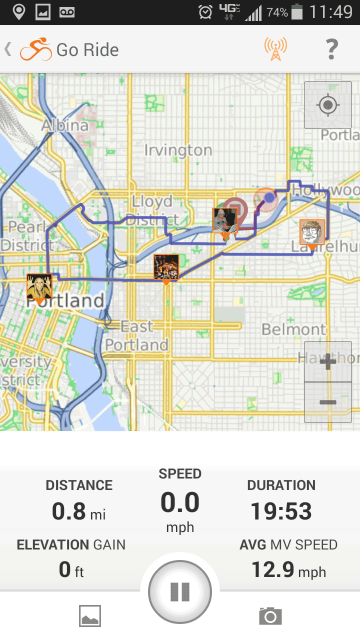
Ride with GPS mobile app Group Live Logging
__________________
Ride, Rest, Repeat. ROUVY: terrymorse
Ride, Rest, Repeat. ROUVY: terrymorse
Last edited by terrymorse; 05-20-21 at 08:04 AM. Reason: added screen shot
05-20-21 | 04:56 PM
#25
Thread Starter
Junior Member
Joined: May 2021
Posts: 8
Likes: 0
Edbu Gmaps location sharing would show both, and do tbt navigation for the driver. What feature exactly is missing?