


E Ink for Maps and or Cue Sheets?
 04-25-22 | 08:55 AM
#1

Thread Starter
Senior Member


Joined: Aug 2006
Posts: 12,037
Likes: 827
From: Tallahassee, FL
Bikes: Several
E Ink for Maps and or Cue Sheets?
I have a couple old Kindle 3s that had been unused for a while. The batteries had kind of given out, but realized that with some fiddling they were pretty easily patched to the latest upgrade level and refreshed with new batteries. There is a hack that I used inthe past that makes the kindle stay on the page you are on when it sleeps rather than go to a "screen saver" page. Since it is the page change that uses battery it can keep the map on the page forever with no battery drain until you need to change maps. As a result the battery would last a very long time if only using for your maps and navigating your route since there wouldn't be all that many page changes. Since I put in a new battery, I am guessing a charge will last for months of touring.
It is a pretty nice monochrome display and old kindles can be had for a song. You can use it for its original purpose as an ebook reader too.
The hack that keeps the map displayed is pretty easy on my Kindle 3 and involved typing two short commands into the search field. One to enter debug mode and one to disable the screensaver. Going back to normal mode is just the opposite. Not sure about other models, but it works for my kindle 3 keyboard model. A quick search for "turning off screen saver mode on kindle" should provide some info for various models. I think many of them you just type ~ds.
For mine it was:
How to disable Amazon Kindle3 Keyboard screensaver
It is a pretty nice monochrome display and old kindles can be had for a song. You can use it for its original purpose as an ebook reader too.
The hack that keeps the map displayed is pretty easy on my Kindle 3 and involved typing two short commands into the search field. One to enter debug mode and one to disable the screensaver. Going back to normal mode is just the opposite. Not sure about other models, but it works for my kindle 3 keyboard model. A quick search for "turning off screen saver mode on kindle" should provide some info for various models. I think many of them you just type ~ds.
For mine it was:
How to disable Amazon Kindle3 Keyboard screensaver
- Press Home button.
- Press Del button. This will bring up the search box.
- Type ;debugOn and press Enter.
- Type ~disableScreensaver and press Enter.
- Type ;debugOff and press Enter.
- Press Home button.
- Press Del button. This will bring up the search box.
- Type ;debugOn and press Enter.
- Type ~resumeScreensaver and press Enter.
- Type ;debugOff and press Enter.
__________________
Pete in Tallahassee
Check out my profile, articles, and trip journals at:
https:/www.crazyguyonabike.com/staehpj1
Pete in Tallahassee
Check out my profile, articles, and trip journals at:
https:/www.crazyguyonabike.com/staehpj1
Last edited by staehpj1; 04-25-22 at 09:00 AM.
 04-25-22 | 09:55 AM
#2
Senior Member

Joined: Sep 2015
Posts: 2,179
Likes: 202
From: QC Canada
Bikes: Custom built LHT & Troll
Interesting. Would you happen to know if something can be done with the PaperWhite? (it can display the cover page of an Amazon book, but not from pdf files... and I do not feel like publishing my route book 
04-25-22 | 02:24 PM
#3
Thread Starter
Senior Member
Joined: Aug 2006
Posts: 12,037
Likes: 827
From: Tallahassee, FL
Bikes: Several
https://blog.the-ebook-reader.com/20...de-on-kindles/
Lots of stuff if you dig on the mobiread forums including this:
Disable screensaver/sleep mode on Paperwhite
Oh, and by the way, pulling the battery resets those settings back to the original settings at least on the kindle 3. Just found that out when the new battery arrived for my second kindle 3
There are other easy sounding non scarey answers that show up in the search. Also some possibly more scarey ones that involve jail breaking the kindle. Quick enough to put it back in the no screensaver mode though. I keep a little reminder note in the folder to remind me of the syntax.
Also fwiw. The manual switch is disabled by the change on the K3 while the screensaver is toggled off, not that that is a problem.
__________________
Pete in Tallahassee
Check out my profile, articles, and trip journals at:
https:/www.crazyguyonabike.com/staehpj1
Pete in Tallahassee
Check out my profile, articles, and trip journals at:
https:/www.crazyguyonabike.com/staehpj1
Last edited by staehpj1; 04-25-22 at 02:31 PM.
04-25-22 | 04:30 PM
#5
Thread Starter
Senior Member
Joined: Aug 2006
Posts: 12,037
Likes: 827
From: Tallahassee, FL
Bikes: Several
I have tried this when backpacking and it wasn't the greatest solution with the maps I tried, but with smaller map sections I think it might work well. ACA maps may work well. Same for cue sheets.
__________________
Pete in Tallahassee
Check out my profile, articles, and trip journals at:
https:/www.crazyguyonabike.com/staehpj1
Pete in Tallahassee
Check out my profile, articles, and trip journals at:
https:/www.crazyguyonabike.com/staehpj1
04-25-22 | 05:07 PM
#6
Senior Member
Joined: Sep 2015
Posts: 2,179
Likes: 202
From: QC Canada
Bikes: Custom built LHT & Troll
The idea is, I think, to create a simplified map (topological, i.e. something like transit maps, showing points on route, but not at scale and not correlated with actual lat/long). Like a glorified cue sheet.
I'll eventually show what I have in mind, (when I can find the time....)
I'll eventually show what I have in mind, (when I can find the time....)
04-26-22 | 05:08 AM
#7
Thread Starter
Senior Member
Joined: Aug 2006
Posts: 12,037
Likes: 827
From: Tallahassee, FL
Bikes: Several
The idea is, I think, to create a simplified map (topological, i.e. something like transit maps, showing points on route, but not at scale and not correlated with actual lat/long). Like a glorified cue sheet.
I'll eventually show what I have in mind, (when I can find the time....)
I'll eventually show what I have in mind, (when I can find the time....)
I think they could be at scale if the pages were small enough bites of the whole map. I could also see using something pretty close to the ACA maps and cue sheets possibly even as is. The biggest problem with them is they were designed to be read in color. The ACA panels would be fine if the topo or other background were removed or simplified. I could envision having the pages alternate between the map panel and the cue sheet so you could flip a page to get the one you want. Unfortunately getting really easily readable images from the paper maps is probably pretty difficult or impossible, so they'd most likely need to be generated using an app and the gpx files. I may try scanning some just to see how good/bad they are.
The thing is that before I'd go to the trouble of generating the panels for a long trip I am likely to just use the app. The thing that might still tempt me to use the kindle is the battery issue. I figure I could go coast to coast and never charge the kindle using it just for maps. If I chose to I could turn off my phone and only turn it on for a few minutes every couple days to text or email home or to get local directions. That or even decide to go off grid and leave it home. That would be a novelty in this day and age. I probably wouldn't actually do that, but...
Please do share a sample when you do generate a map.
__________________
Pete in Tallahassee
Check out my profile, articles, and trip journals at:
https:/www.crazyguyonabike.com/staehpj1
Pete in Tallahassee
Check out my profile, articles, and trip journals at:
https:/www.crazyguyonabike.com/staehpj1
04-26-22 | 08:30 AM
#8
Senior Member
Joined: Sep 2015
Posts: 2,179
Likes: 202
From: QC Canada
Bikes: Custom built LHT & Troll
I dug up two unfinished plans from 2 years ago, when we we contemplating riding from Incheon to Busan. It may convey the idea.
On the left, a screen capture from bRouter. On the right, a topological rendering generated with Google Sheet. These simplified maps could be used as an index for a more comprehensive travel kit - click on a segment to go to the larger scale and perhaps additional material.
[WRT keeping a Kindle screen on -- quick test suggests that preventing sleep drains the battery at the rate of 10% / day, vs probable 1% / day for a sleeping device, so I think I'll stick to hitting the power button and wait 2 seconds for the display to come on. Onyx BOOX allow you to customize the lockscreen. Too bad the Kindle doesn't.
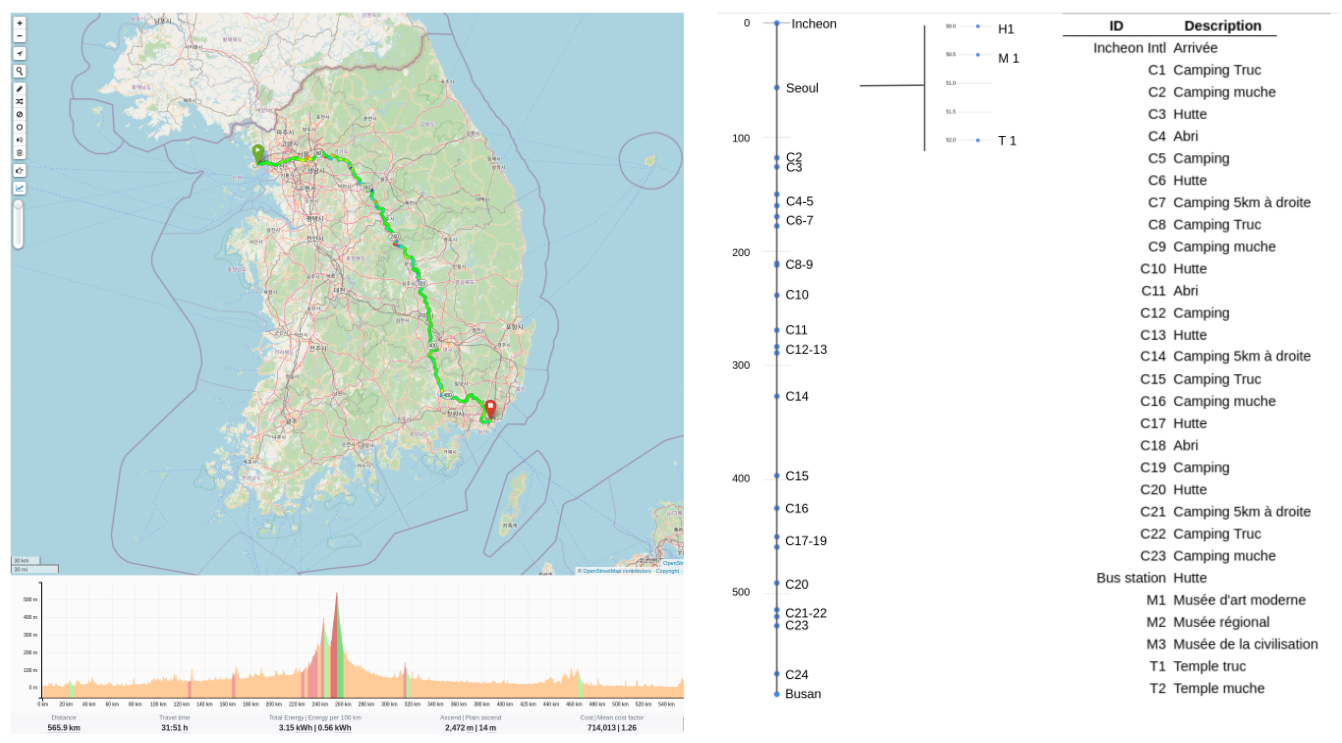
brputer map on the left, topological (draft) on the right.
On the left, a screen capture from bRouter. On the right, a topological rendering generated with Google Sheet. These simplified maps could be used as an index for a more comprehensive travel kit - click on a segment to go to the larger scale and perhaps additional material.
[WRT keeping a Kindle screen on -- quick test suggests that preventing sleep drains the battery at the rate of 10% / day, vs probable 1% / day for a sleeping device, so I think I'll stick to hitting the power button and wait 2 seconds for the display to come on. Onyx BOOX allow you to customize the lockscreen. Too bad the Kindle doesn't.
brputer map on the left, topological (draft) on the right.
04-26-22 | 02:27 PM
#9
Thread Starter
Senior Member
Joined: Aug 2006
Posts: 12,037
Likes: 827
From: Tallahassee, FL
Bikes: Several
[WRT keeping a Kindle screen on -- quick test suggests that preventing sleep drains the battery at the rate of 10% / day, vs probable 1% / day for a sleeping device, so I think I'll stick to hitting the power button and wait 2 seconds for the display to come on. Onyx BOOX allow you to customize the lockscreen. Too bad the Kindle doesn't.
BTW, on mine I can completely make the screen go blank and apparently shut it fully down by holding the power switch for maybe 5 seconds. When I flip the switch again it comes back where it was. That is a Kindle 3 though.
__________________
Pete in Tallahassee
Check out my profile, articles, and trip journals at:
https:/www.crazyguyonabike.com/staehpj1
Pete in Tallahassee
Check out my profile, articles, and trip journals at:
https:/www.crazyguyonabike.com/staehpj1
04-26-22 | 02:36 PM
#10
Senior Member
Joined: Sep 2015
Posts: 2,179
Likes: 202
From: QC Canada
Bikes: Custom built LHT & Troll
I wonder what is draining it. Is some function left on? Maybe wifi or something? Mine didn't seem to be draining the battery at all as far as I noticed. I'll have to take better notice of how it does over a more extended period. I have never really tested, but it I am pretty sure that in the past it has sat with a page left on the display for a few weeks and I didn't notice that the battery was drained. I'll do that now to verify.
BTW, on mine I can completely make the screen go blank and apparently shut it fully down by holding the power switch for maybe 5 seconds. When I flip the switch again it comes back where it was. That is a Kindle 3 though.
BTW, on mine I can completely make the screen go blank and apparently shut it fully down by holding the power switch for maybe 5 seconds. When I flip the switch again it comes back where it was. That is a Kindle 3 though.
04-27-22 | 07:02 AM
#11
Thread Starter
Senior Member
Joined: Aug 2006
Posts: 12,037
Likes: 827
From: Tallahassee, FL
Bikes: Several
On a little different note... I have always been interested in a color e-Ink reader. I have considered various options.
First I guess I should mention what I want it to be used for.
A tablet (chromebook?) is a possible solution. I really like my Chromebook and could see forcing it into use, but for navigation battery life, while good may not be enough in all cases. It might run out of battery some really long days unless I either turned it off for some portions of the day or charged at some point in the day between riding and reading. Some extra battery capacity would need to be carried in the form of a power wallet if charging wasn't available every day at some point. It might work out for throwing in my day pack for local hiking, canoeing, kayaking, and so on for guide books and field guides. The problem with that is that I haven't been willing to spend $$$ to buy all those guidebooks in e format.
The color eReaders require that you remove the DRM to load books from amazon or other sources with drm. Possibly a problem if you want to buy books mid tour. Also I figure that I'd spend over $300 for a Pocketbook InkPad Color, E-Book Reader and then a bundle on guidebooks. I would probably be able be into it for $1k total (reader and books) pretty quickly if I really started buying all the guide books that caught my eye.
First I guess I should mention what I want it to be used for.
- Obviously, I have already mentioned using it for map and cue sheet navigation as one thing. That requires good battery life since it wants to be on all day.
- Another use is field guides. I have a small fortune invested in paper field guides. They are great, but they have one big problem they are big and heavy. If I go out mushroom hunting, even just my mushroom books would be way more than I want to carry. Even just my one favorite for the area is a big book. Then when i get out there I may see a bird i want to look up, or may want to identify a tree, or a snake, or whatever. If there is a good connection for the phone a google search might suffice, but wouldn't it be nice to have all of those familiar field guides at your finger tips? Having the equivalent of 50+ pounds of field guides in an 8 ounce package would be awesome. Of course that would mean spending a small fortune to but the ebook versions of all of the field guides I already bought in paper. It galls me that they charge pretty much the full price for the intellectual property thay I alreaddy bought. I figure that yes I should pay something for the conversion to e-format, but not all that much. It ought to be a more nomnal fee for those who have purchased the paper book. These days folks are pretty likely to have records of purchases so proof of purchase is likely to be easy.
- Obviously normal reading is another use.
A tablet (chromebook?) is a possible solution. I really like my Chromebook and could see forcing it into use, but for navigation battery life, while good may not be enough in all cases. It might run out of battery some really long days unless I either turned it off for some portions of the day or charged at some point in the day between riding and reading. Some extra battery capacity would need to be carried in the form of a power wallet if charging wasn't available every day at some point. It might work out for throwing in my day pack for local hiking, canoeing, kayaking, and so on for guide books and field guides. The problem with that is that I haven't been willing to spend $$$ to buy all those guidebooks in e format.
The color eReaders require that you remove the DRM to load books from amazon or other sources with drm. Possibly a problem if you want to buy books mid tour. Also I figure that I'd spend over $300 for a Pocketbook InkPad Color, E-Book Reader and then a bundle on guidebooks. I would probably be able be into it for $1k total (reader and books) pretty quickly if I really started buying all the guide books that caught my eye.
__________________
Pete in Tallahassee
Check out my profile, articles, and trip journals at:
https:/www.crazyguyonabike.com/staehpj1
Pete in Tallahassee
Check out my profile, articles, and trip journals at:
https:/www.crazyguyonabike.com/staehpj1
Last edited by staehpj1; 04-27-22 at 07:19 AM.
04-27-22 | 07:54 AM
#12
Senior Member
Joined: Sep 2015
Posts: 2,179
Likes: 202
From: QC Canada
Bikes: Custom built LHT & Troll
You are probably familiar with Onyx. I have an older B&W Note that I should upgrade. My thinking was B&W (with light and faster processor) but you use case is spot on. Things to think about
04-27-22 | 08:03 AM
#13
Senior Member

Joined: Sep 2007
Posts: 15,263
Likes: 1,763
From: Far beyond the pale horizon.
Of course that would mean spending a small fortune to but the ebook versions of all of the field guides I already bought in paper. It galls me that they charge pretty much the full price for the intellectual property thay I alreaddy bought. I figure that yes I should pay something for the conversion to e-format, but not all that much. It ought to be a more nomnal fee for those who have purchased the paper book. These days folks are pretty likely to have records of purchases so proof of purchase is likely to be easy.
Last edited by njkayaker; 04-27-22 at 08:09 AM.
04-27-22 | 08:07 AM
#14
Thread Starter
Senior Member
Joined: Aug 2006
Posts: 12,037
Likes: 827
From: Tallahassee, FL
Bikes: Several
I have read the specs, but not actually experienced using them. The numbers have kept me from bothering to seek one out to try.
__________________
Pete in Tallahassee
Check out my profile, articles, and trip journals at:
https:/www.crazyguyonabike.com/staehpj1
Pete in Tallahassee
Check out my profile, articles, and trip journals at:
https:/www.crazyguyonabike.com/staehpj1
04-27-22 | 08:31 AM
#15
Senior Member
Joined: Sep 2007
Posts: 15,263
Likes: 1,763
From: Far beyond the pale horizon.
04-27-22 | 08:52 AM
#16
Thread Starter
Senior Member
Joined: Aug 2006
Posts: 12,037
Likes: 827
From: Tallahassee, FL
Bikes: Several
I always figured that what held it back more than anything else was that people wanted it to be something it isn't. By that I mean a fast enough display for video. I think that is not what it is or should be, I do want decent resolution and color reproduction though, at least for some potential uses. For just reading text the original Kindle models were already great IMO.
__________________
Pete in Tallahassee
Check out my profile, articles, and trip journals at:
https:/www.crazyguyonabike.com/staehpj1
Pete in Tallahassee
Check out my profile, articles, and trip journals at:
https:/www.crazyguyonabike.com/staehpj1
04-27-22 | 10:14 AM
#17
Thread Starter
Senior Member
Joined: Aug 2006
Posts: 12,037
Likes: 827
From: Tallahassee, FL
Bikes: Several
I wonder what is draining it. Is some function left on? Maybe wifi or something? Mine didn't seem to be draining the battery at all as far as I noticed. I'll have to take better notice of how it does over a more extended period. I have never really tested, but it I am pretty sure that in the past it has sat with a page left on the display for a few weeks and I didn't notice that the battery was drained. I'll do that now to verify.
BTW, on mine I can completely make the screen go blank and apparently shut it fully down by holding the power switch for maybe 5 seconds. When I flip the switch again it comes back where it was. That is a Kindle 3 though.
BTW, on mine I can completely make the screen go blank and apparently shut it fully down by holding the power switch for maybe 5 seconds. When I flip the switch again it comes back where it was. That is a Kindle 3 though.
__________________
Pete in Tallahassee
Check out my profile, articles, and trip journals at:
https:/www.crazyguyonabike.com/staehpj1
Pete in Tallahassee
Check out my profile, articles, and trip journals at:
https:/www.crazyguyonabike.com/staehpj1
05-05-22 | 03:02 PM
#18
Thread Starter
Senior Member
Joined: Aug 2006
Posts: 12,037
Likes: 827
From: Tallahassee, FL
Bikes: Several
After living with the disabled screensaver on the kindle 3 around home for a while I have found the battery life disappointing. I used it for an hour per day and hard shut it down between uses. I didn't keep track but it didn't take all that long before it started warning about plugging it in. I am pretty sure it does better in the normal mode battery wise. Not sure why.
I think I'll try not turning it off between uses just to see how much better or worse it is before giving up and turning the screen saver back on.
I think I'll try not turning it off between uses just to see how much better or worse it is before giving up and turning the screen saver back on.
__________________
Pete in Tallahassee
Check out my profile, articles, and trip journals at:
https:/www.crazyguyonabike.com/staehpj1
Pete in Tallahassee
Check out my profile, articles, and trip journals at:
https:/www.crazyguyonabike.com/staehpj1
05-13-22 | 07:07 PM
#19
QR-disc must die!!!
Joined: Sep 2018
Posts: 703
Likes: 199
From: Shenandoah Valley, Northern Virginia.
Bikes: '99 Trek 520, '20 Kona Sutra (FOR SALE 48cm), '21 Simon-Bikes mini-velo and a chromoly-framed folding bicycle with drop-bars and V-brakes, that rolls even while folded.
You definitely need something that allows you to use your map image as the screensaver. The 2012 Nook that I just unearthed from a moving crate doesn't appear to allow this, either. Some kind of override is needed.
05-13-22 | 08:44 PM
#20
QR-disc must die!!!
Joined: Sep 2018
Posts: 703
Likes: 199
From: Shenandoah Valley, Northern Virginia.
Bikes: '99 Trek 520, '20 Kona Sutra (FOR SALE 48cm), '21 Simon-Bikes mini-velo and a chromoly-framed folding bicycle with drop-bars and V-brakes, that rolls even while folded.
I didn't have any image manipulation software onhand that I could use to properly change the aspect ratio (maybe I should try the free software called Gimp) so this Nook is displaying a landscape image within the portrait screen.
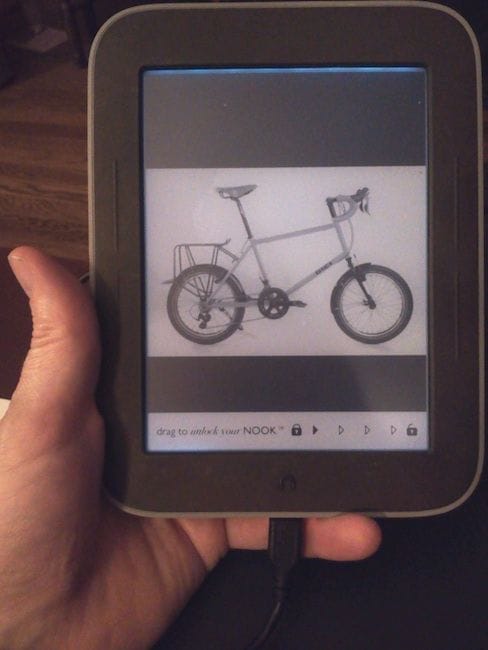
Can something like that be done on your Kindle3?
05-13-22 | 09:48 PM
#21
Senior Member
Joined: Sep 2015
Posts: 2,179
Likes: 202
From: QC Canada
Bikes: Custom built LHT & Troll
The hack on a Kindle Paperwhite is to create a PDF with the picture you want to display on the cover, convert it to a MOBI book and set the Kindle to use the book cover as lockscreen. (Which means that the PDF much be the active book).
So while it can be done, a much simpler alternative is to turn the kindle and go to whatever content you want to access.
So while it can be done, a much simpler alternative is to turn the kindle and go to whatever content you want to access.
05-14-22 | 04:35 AM
#22
Thread Starter
Senior Member
Joined: Aug 2006
Posts: 12,037
Likes: 827
From: Tallahassee, FL
Bikes: Several
All of this sounds great to get a map on the screen. Not sure how workable it would be for a trip with dozens of paper map pages. It seems like that might be unworkable or at least tedious. Am I missing something or are we talking about making a book file for every map panel and changing books to change map panels. A long trip would have quite a few book files. The Trans America has what 12 map sheets with about a dozen map panels on each? The narrative text directions and other info for each section could be included in each book on the pages, but I don't see myself creating all those books. Navigating book to book may not be too bad if the title names are obvious in their order.
I am asuming regular maps which require plenty of panels to cover a long trip. Gauvin's simplified maps might be one solution, but to be honest, I am not sure they scratch my itch for the feedback of a map. Also I think they would work really well as a sheet of physical paper with less benefit to bothering with a screen. I could see myself using them along with the local maps as a general overview. Since my travel tends to be in the US that would likely be the free US state maps.
Edit: I should have followed up and mentioned that it seems like the battery is holding up better in usage with the screensaver hack turned off (back in default setup). This is true even compared to when I turned the kindle off with a hard shutdown when not in use. I did not do real testing with close controls on usage, but just used it for a usage where I don't turn pages much for an hour or so per day. The results are just my impression of how the battery seemed to be holding up, but I am pretty sure I am not misinterpreting it. So the hack is pretty useless IMO. I have kind of given up on using my current kindle for navigation. Future models may or may not be worth another look.
I am asuming regular maps which require plenty of panels to cover a long trip. Gauvin's simplified maps might be one solution, but to be honest, I am not sure they scratch my itch for the feedback of a map. Also I think they would work really well as a sheet of physical paper with less benefit to bothering with a screen. I could see myself using them along with the local maps as a general overview. Since my travel tends to be in the US that would likely be the free US state maps.
Edit: I should have followed up and mentioned that it seems like the battery is holding up better in usage with the screensaver hack turned off (back in default setup). This is true even compared to when I turned the kindle off with a hard shutdown when not in use. I did not do real testing with close controls on usage, but just used it for a usage where I don't turn pages much for an hour or so per day. The results are just my impression of how the battery seemed to be holding up, but I am pretty sure I am not misinterpreting it. So the hack is pretty useless IMO. I have kind of given up on using my current kindle for navigation. Future models may or may not be worth another look.
__________________
Pete in Tallahassee
Check out my profile, articles, and trip journals at:
https:/www.crazyguyonabike.com/staehpj1
Pete in Tallahassee
Check out my profile, articles, and trip journals at:
https:/www.crazyguyonabike.com/staehpj1
Last edited by staehpj1; 05-14-22 at 06:29 AM.
05-14-22 | 07:01 AM
#23
Thread Starter
Senior Member
Joined: Aug 2006
Posts: 12,037
Likes: 827
From: Tallahassee, FL
Bikes: Several
A bit off topic for the thread, but what bike is that in your picture? Have you toured on a mini velo?
__________________
Pete in Tallahassee
Check out my profile, articles, and trip journals at:
https:/www.crazyguyonabike.com/staehpj1
Pete in Tallahassee
Check out my profile, articles, and trip journals at:
https:/www.crazyguyonabike.com/staehpj1
05-14-22 | 02:10 PM
#24
QR-disc must die!!!
Joined: Sep 2018
Posts: 703
Likes: 199
From: Shenandoah Valley, Northern Virginia.
Bikes: '99 Trek 520, '20 Kona Sutra (FOR SALE 48cm), '21 Simon-Bikes mini-velo and a chromoly-framed folding bicycle with drop-bars and V-brakes, that rolls even while folded.
Originally Posted by staehpj1
A bit off topic for the thread, but what bike is that in your picture? Have you toured on a mini velo?
05-14-22 | 03:06 PM
#25
Thread Starter
Senior Member
Joined: Aug 2006
Posts: 12,037
Likes: 827
From: Tallahassee, FL
Bikes: Several
It's a Simon-Bikes.de promo photo. They have one frameset, which they use to offer a variety of different bicycles. I do have the frameset and am equipping it to be my touring/utility bicycle. I've not toured on a mini-velo yet. but I currently ride a 20" folding bicycle for all of my everyday riding.
I suspect that I'd like a mini velo. I hope you will post about your's here when you progress with the project.
__________________
Pete in Tallahassee
Check out my profile, articles, and trip journals at:
https:/www.crazyguyonabike.com/staehpj1
Pete in Tallahassee
Check out my profile, articles, and trip journals at:
https:/www.crazyguyonabike.com/staehpj1