


Storage for pictures
 05-25-15 | 08:59 AM
#1

Thread Starter
Senior Member
Joined: Jun 2012
Posts: 660
Likes: 6
From: Winnipeg, Manitoba, Canada
Bikes: Trek 520 total custom build, Cannondale Mountain Tandem, Oryx Mountain Bike
Storage for pictures
Good day! I am not planning on taking a computer with me on my upcoming 80 day tour. However, I want to be able to download my pictures and videos daily, or every couple days for sure. Is there a device of some sort that I can use to do this? I have several cards for each camera that I am taking, and I'm not planning on taking thousands of pictures but I wanted to get them off the memory card just in case I loose something along the way. (stuff happens, right?)

 05-25-15 | 03:02 PM
#3
Senior Member

Joined: Dec 2010
Posts: 9,685
Likes: 2,603
From: northern Deep South
Bikes: Fuji Touring, Novara Randonee
You've said "no" to a computer, but if you were to take a netbook, you could have everything backed up on the netbook drive. Add in a couple thumb drives, and you could mail those back home weekl yor monthly to have an extra backup.
You might try hooking your camera up to motel or library computers, but that's going to be kind of iffy.
You might try hooking your camera up to motel or library computers, but that's going to be kind of iffy.
05-25-15 | 03:14 PM
#4

Senior Member


Joined: Nov 2014
Posts: 27,576
Likes: 5,455
From: Eugene, Oregon, USA
If you buy a phone like:
Samsung S4 Zoom
Samsung K Zoom
Samsung S5 Zoom
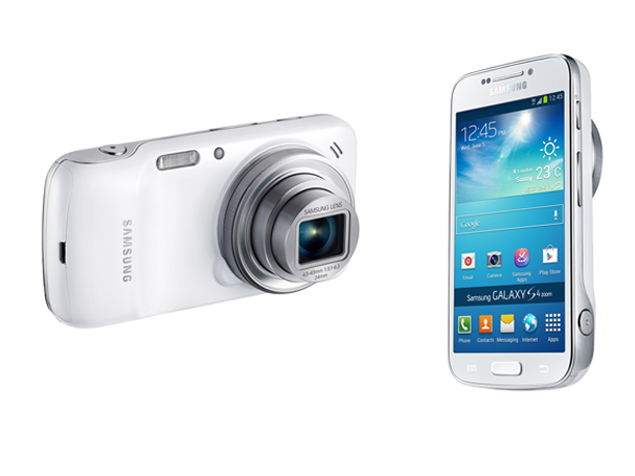
I believe they are all GSM (ATT, T-Mobile, etc).
Then there should be some way to upload your photos into the "cloud"
So far I've avoided that myself, but it should be easy to set up.
Many cameras are also WIFI enabled, so you should be able to upload photos to the net at WIFI hotspots without a computer. Or, you could transfer cards to a network capable device. Some phones take micro-SD cards. Cameras often take SD cards, but are microSD compatible.
Samsung S4 Zoom
Samsung K Zoom
Samsung S5 Zoom
I believe they are all GSM (ATT, T-Mobile, etc).
Then there should be some way to upload your photos into the "cloud"
So far I've avoided that myself, but it should be easy to set up.
Many cameras are also WIFI enabled, so you should be able to upload photos to the net at WIFI hotspots without a computer. Or, you could transfer cards to a network capable device. Some phones take micro-SD cards. Cameras often take SD cards, but are microSD compatible.
05-26-15 | 07:04 AM
#5
Junior Member
Joined: Aug 2012
Posts: 18
Likes: 0
From: Toronto, Ontario, Canada
Bikes: 2012 Trek 8.5 DS
05-26-15 | 01:23 PM
#6

aka Tom Reingold

Joined: Jan 2009
Posts: 44,182
Likes: 6,420
From: New York, NY, and High Falls, NY, USA
Bikes: 1962 Rudge Sports, 1971 Raleigh Super Course, 1971 Raleigh Pro Track, 1974 Raleigh International, 1975 Viscount Fixie, 1982 McLean, 1996 Lemond (Ti), 2002 Burley Zydeco tandem
__________________
Tom Reingold, tom@noglider.com
New York City and High Falls, NY
Blogs: The Experienced Cyclist; noglider's ride blog
“When man invented the bicycle he reached the peak of his attainments.” — Elizabeth West, US author
Please email me rather than PM'ing me. Thanks.
Tom Reingold, tom@noglider.com
New York City and High Falls, NY
Blogs: The Experienced Cyclist; noglider's ride blog
“When man invented the bicycle he reached the peak of his attainments.” — Elizabeth West, US author
Please email me rather than PM'ing me. Thanks.
05-26-15 | 02:50 PM
#7
Junior Member
Joined: Aug 2012
Posts: 18
Likes: 0
From: Toronto, Ontario, Canada
Bikes: 2012 Trek 8.5 DS
05-26-15 | 03:58 PM
#8

Hogosha Sekai
Joined: Jun 2011
Posts: 6,674
Likes: 26
From: STS
Bikes: Leader 725, Centurion Turbo, Scwhinn Peloton, Schwinn Premis, GT Tequesta, Bridgestone CB-2,72' Centurion Lemans, 72 Raleigh Competition
I dunno about you but I can post to my photogallery sites etc with my phone.. I can also put my camera's sd card in my phone, hope this helps.
Edit: Depending on your phone and/or camera, you can probably link it via USB to your phone as well instead of swapping SD cards all the time...
Edit: Depending on your phone and/or camera, you can probably link it via USB to your phone as well instead of swapping SD cards all the time...
05-26-15 | 04:28 PM
#9

Junior Member
Joined: May 2015
Posts: 14
Likes: 0
I think using a smartphone like
Samsung S4 Zoom
Samsung K Zoom
Samsung S5 Zoom
and storing files using cloud service will be better and simple for you , cause these devices are highly recommended for taking pictures , so a 3g internet connection , an account for any cloud service and there you go
Samsung S4 Zoom
Samsung K Zoom
Samsung S5 Zoom
and storing files using cloud service will be better and simple for you , cause these devices are highly recommended for taking pictures , so a 3g internet connection , an account for any cloud service and there you go
05-26-15 | 06:30 PM
#11
Senior Member
Joined: Feb 2011
Posts: 4,681
Likes: 253
From: Minnesota
Bikes: N+1=5
If you have an iPhone, they can go to iCloud automatically. You can also cause them to go to DropBox automatically. The photo capability of last year's cell phones is pretty excellent. You can also get lenses that you can attach to the phone to give you some different perspectives.
J.
J.
05-26-15 | 10:38 PM
#12
Thread Starter
Senior Member
Joined: Jun 2012
Posts: 660
Likes: 6
From: Winnipeg, Manitoba, Canada
Bikes: Trek 520 total custom build, Cannondale Mountain Tandem, Oryx Mountain Bike
05-26-15 | 10:51 PM
#13
Thread Starter
Senior Member
Joined: Jun 2012
Posts: 660
Likes: 6
From: Winnipeg, Manitoba, Canada
Bikes: Trek 520 total custom build, Cannondale Mountain Tandem, Oryx Mountain Bike
I dunno about you but I can post to my photogallery sites etc with my phone.. I can also put my camera's sd card in my phone, hope this helps.
Edit: Depending on your phone and/or camera, you can probably link it via USB to your phone as well instead of swapping SD cards all the time...
Edit: Depending on your phone and/or camera, you can probably link it via USB to your phone as well instead of swapping SD cards all the time...
Nikon D5000 doesn't have WiFi. Great idea though. Although my FoPro has WiFi, so that will work.
05-26-15 | 11:36 PM
#14
Senior Member
Joined: Nov 2014
Posts: 27,576
Likes: 5,455
From: Eugene, Oregon, USA
Some phones have a MicroSD slot
Cameras usually use a full sized SD card, but there is a simple adapter from MicroSD to SD.
So, you could physically transfer photos to your phone if it doesn't work via WIFI.
Cameras usually use a full sized SD card, but there is a simple adapter from MicroSD to SD.
So, you could physically transfer photos to your phone if it doesn't work via WIFI.
05-27-15 | 05:32 AM
#15
Junior Member
Joined: Aug 2012
Posts: 18
Likes: 0
From: Toronto, Ontario, Canada
Bikes: 2012 Trek 8.5 DS
If you don't need the screen to view the photos, the WD is the way to go. The Hyperdrive is expensive: I believe the Hyperdrive that I linked to does not include a hard drive, but if you have a spare notebook HDD lying around, it is something to keep in mind.
05-27-15 | 09:30 AM
#16
Hogosha Sekai
Joined: Jun 2011
Posts: 6,674
Likes: 26
From: STS
Bikes: Leader 725, Centurion Turbo, Scwhinn Peloton, Schwinn Premis, GT Tequesta, Bridgestone CB-2,72' Centurion Lemans, 72 Raleigh Competition
I can take a 32 gig class 10 sd card out of my camera and put it in my iPhone 5S and the phone will read it? Then send to cloud? Sorry, I don't understand your edit statement. If I don't have a commuter, how would I use a USB? Thanks.
Nikon D5000 doesn't have WiFi. Great idea though. Although my FoPro has WiFi, so that will work.
Nikon D5000 doesn't have WiFi. Great idea though. Although my FoPro has WiFi, so that will work.
2: Maybe... whereas I know micro to mini usb cords exist, I do not know about the proprietary apple connector to either type cords existing. I also don't know if apple has apps for linking your camera and phone. (again android user)
Good luck though! Sounds like you got some better answers from the others.

