


Wahoo Element, cannot set Di2 shifting to 1x?
 05-31-19 | 03:36 PM
#1
Thread Starter
Full Member
Joined: Mar 2015
Posts: 292
Likes: 69
From: Gatineau, Quebec
Bikes: Lynskey GR270
Wahoo Element, cannot set Di2 shifting to 1x?
Hi all:I have an Elemnt Bolt, and am trying to set the Di2 shifting to 1x. In the Android Elemnt app, it displays an option for 1x, 2x, and 3x front chainring, but it's set to 2 and I cannot change it. I can change the small and big ring teeth count, but they cannot be the same.I've tried unpairing the Di2 sensor from the Bolt and repairing it, but the settings are preserved by either Bolt or App; the friendly name I've given the sensor is remembered, so is the sprocket config. Is anyone with an Android device able to set the number of front chainrings for they Di2 setup?Thanks!
 02-27-22 | 12:35 PM
#2
Junior Member
Joined: Apr 2016
Posts: 11
Likes: 1
Hi all:I have an Elemnt Bolt, and am trying to set the Di2 shifting to 1x. In the Android Elemnt app, it displays an option for 1x, 2x, and 3x front chainring, but it's set to 2 and I cannot change it. I can change the small and big ring teeth count, but they cannot be the same.I've tried unpairing the Di2 sensor from the Bolt and repairing it, but the settings are preserved by either Bolt or App; the friendly name I've given the sensor is remembered, so is the sprocket config. Is anyone with an Android device able to set the number of front chainrings for they Di2 setup?Thanks!
02-27-22 | 04:04 PM
#3

Facts just confuse people


Joined: Jul 2017
Posts: 19,339
Likes: 7,057
From: Mississippi
Bikes: Tarmac Disc Comp Di2 - 2020
Very old post. Why not just ask your own question in your own thread even though this might be similar. Then there won't be any confusion as to who is being responded too.
Your Di2 stuff displayed by your Wahoo or any other device capable of displaying Di2 info are probably just a reflection of how Di2 is set up on your bike. So I'd look in eTube project and see if it thinks your bike is 1x.
However if you aren't familiar with Di2 setup, this is someplace maybe you should let a bike shop deal with.
Welcome to BF mathiaspap !
Though you have lurked for a very long time evidently.
Your Di2 stuff displayed by your Wahoo or any other device capable of displaying Di2 info are probably just a reflection of how Di2 is set up on your bike. So I'd look in eTube project and see if it thinks your bike is 1x.
However if you aren't familiar with Di2 setup, this is someplace maybe you should let a bike shop deal with.
Welcome to BF mathiaspap !
Though you have lurked for a very long time evidently.
 02-28-22 | 06:21 AM
#4
Thread Starter
Full Member
Joined: Mar 2015
Posts: 292
Likes: 69
From: Gatineau, Quebec
Bikes: Lynskey GR270
I exchanged a few emails with Wahoo, but nothing ever came out of it. They were basically saying (IIRC) that if you have a mountain bike derailleur, you should have mountain bike shifters as this is how the software determined 1x vs 2x. At the time, having road shifters was locking the system in 2x mode. This may have changed since then.
In my case, I have a Deore XT rear derailleur with Ultegra road shifters. E-tube was perfectly fine with it but not the Wahoo unit. I gave up.
In my case, I have a Deore XT rear derailleur with Ultegra road shifters. E-tube was perfectly fine with it but not the Wahoo unit. I gave up.
02-28-22 | 06:30 AM
#5
Junior Member
Joined: Apr 2016
Posts: 11
Likes: 1
ChinookTx
Thank you so much, appreciate you taking the time to get back to me.
I have also spoken to Wahoo and these are my ‘findings’.
Normally these setting should be regulated from the Shimano etube app, however these settings are under the syncro shift options, which in our case is not activated as we do not have a front derailleur. So in short e tube project is of no help to us.
Garmin has the option to override these settings but Wahoo does not, so again we are stuck…..
My only thought is that potentially the Professional E Tube Windows app that Bike Shops have may have more options, but have not tried it yet.
Thank you so much, appreciate you taking the time to get back to me.
I have also spoken to Wahoo and these are my ‘findings’.
Normally these setting should be regulated from the Shimano etube app, however these settings are under the syncro shift options, which in our case is not activated as we do not have a front derailleur. So in short e tube project is of no help to us.
Garmin has the option to override these settings but Wahoo does not, so again we are stuck…..
My only thought is that potentially the Professional E Tube Windows app that Bike Shops have may have more options, but have not tried it yet.
02-28-22 | 02:02 PM
#6

Di2 fanatic
Joined: Aug 2019
Posts: 170
Likes: 82
From: The Netherlands
No, the E-Tube for Windows/professional does not have more options, other than error checking / battery drain diagnostics and some reporting.
I'll have a look at my Di2 MTB tomorrow. I've never seen Di2 gear info carry over from the bike to a head unit though. On every device I've used (Garmin/Wahoo/Sigma), I've always had to set the gear data myself
I'll have a look at my Di2 MTB tomorrow. I've never seen Di2 gear info carry over from the bike to a head unit though. On every device I've used (Garmin/Wahoo/Sigma), I've always had to set the gear data myself
 02-28-22 | 02:30 PM
#9
Junior Member
Joined: Apr 2016
Posts: 11
Likes: 1
FYI this is the response from Wahoo support
Thanks for reaching out to the Wahoo Fitness support team!
The number of chainrings is not configurable as the app gets the gearing (1x,2x,3x) from the Di2 system and this would need to be set in the etube project or by contacting Shimano or your local bike shop that is familiar with Di2.
Thanks for reaching out to the Wahoo Fitness support team!
The number of chainrings is not configurable as the app gets the gearing (1x,2x,3x) from the Di2 system and this would need to be set in the etube project or by contacting Shimano or your local bike shop that is familiar with Di2.
03-01-22 | 06:08 AM
#10
Di2 fanatic
Joined: Aug 2019
Posts: 170
Likes: 82
From: The Netherlands
So.. yeah..
Looks like the ELEMNT app doesn't let you set the number of chainrings. Bit odd, and probably Wahoo's fault. Their app<>Di2 isn't great
(I love my Wahoo devices, but definitely prefer Garmin's Di2 support)
Anyway, here are some screenshots.
I disconnected my MTB shift lever, and connected the ST-R8070 to my MTB. For some reason E-Tube still lists the MTB shifter (but no 'settings' for it and its page cannot be opened).
My MTB doesn't show the front chainrings option, so.. I have no idea how Wahoo does that.
Since the app decides for you, why would they bother showing the 1x - 2x - 3x boxes at all? They even hide them when the system is in 1x mode.
Also... there is only one 3x Di2 front derailleur... and that is a mountain bike FD..
Personally I don't really pay attention to the Wahoo app settings for Di2 gearing. I tend to ignore them completely. I only just noticed that my Di2 chainrings are set to 50x34 instead of 53x39 :}.
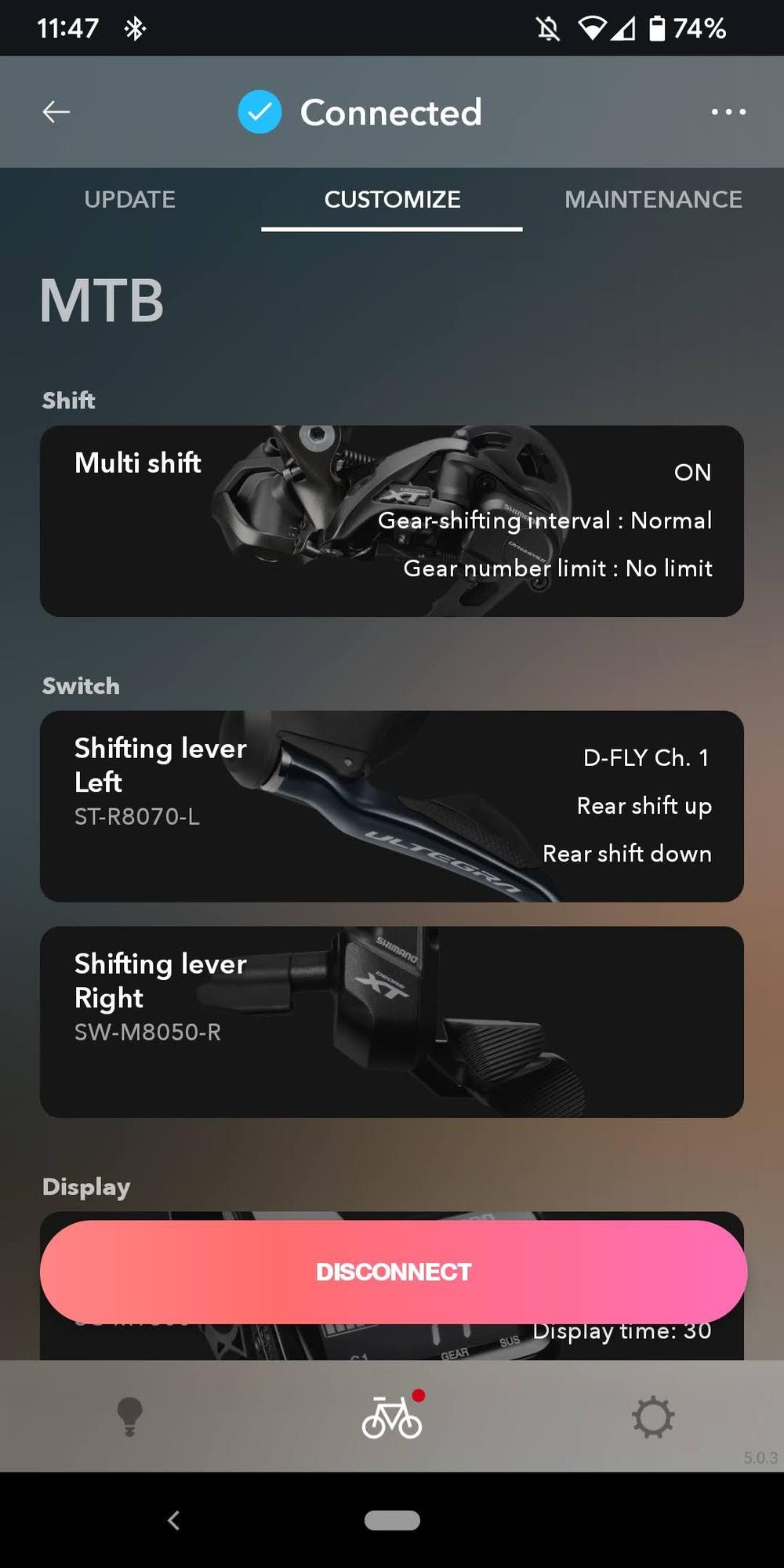
MTB, with only ST-R8070 connected
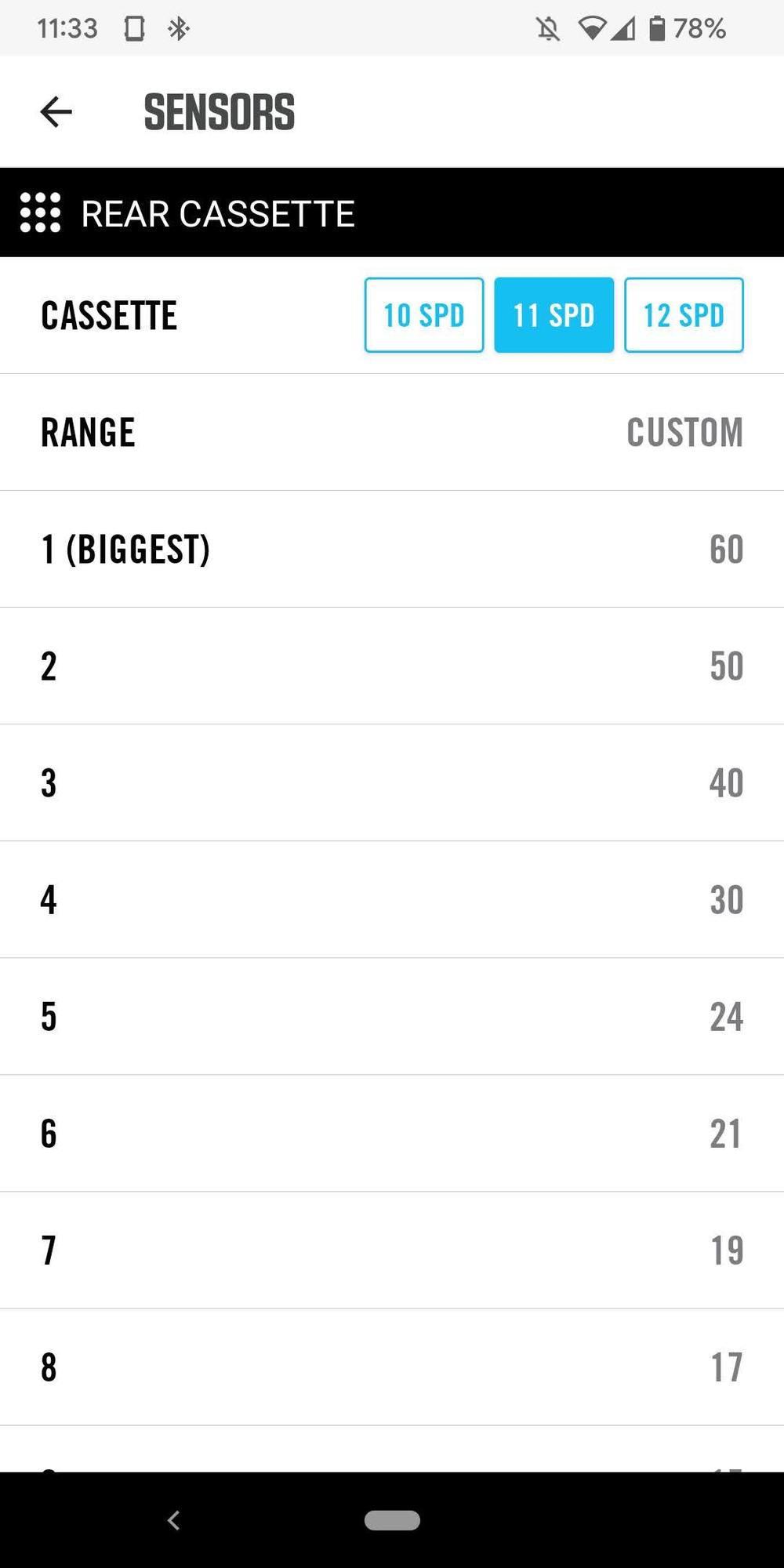
MTB
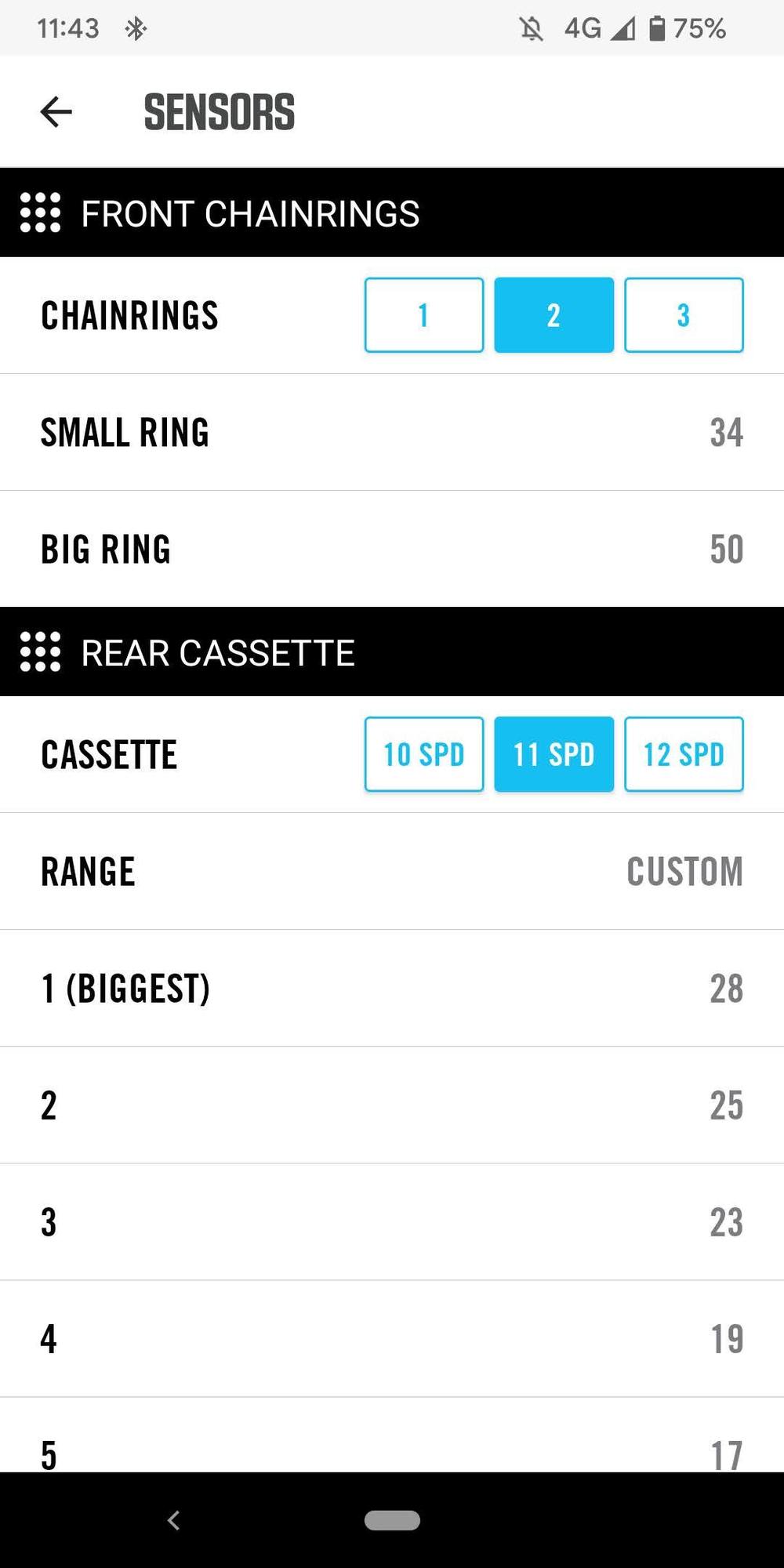
Road bike
Looks like the ELEMNT app doesn't let you set the number of chainrings. Bit odd, and probably Wahoo's fault. Their app<>Di2 isn't great
(I love my Wahoo devices, but definitely prefer Garmin's Di2 support)
Anyway, here are some screenshots.
I disconnected my MTB shift lever, and connected the ST-R8070 to my MTB. For some reason E-Tube still lists the MTB shifter (but no 'settings' for it and its page cannot be opened).
My MTB doesn't show the front chainrings option, so.. I have no idea how Wahoo does that
.Since the app decides for you, why would they bother showing the 1x - 2x - 3x boxes at all? They even hide them when the system is in 1x mode.
Also... there is only one 3x Di2 front derailleur... and that is a mountain bike FD..
Personally I don't really pay attention to the Wahoo app settings for Di2 gearing. I tend to ignore them completely. I only just noticed that my Di2 chainrings are set to 50x34 instead of 53x39 :}.
MTB, with only ST-R8070 connected
MTB
Road bike

Thread
Thread Starter
Forum
Replies
Last Post
metalheart44
Electronics, Lighting, & Gadgets
29
03-22-18 09:38 AM
part_robot
Road Cycling
5
02-15-15 11:58 AM
