


Power Tap Data Download Problems
 05-22-07 | 06:53 PM
#1

Thread Starter
hooray for spring
Joined: Jul 2004
Posts: 1,067
Likes: 0
From: Palmdale, CA
Bikes: 2008 Look 586
Power Tap Data Download Problems
Has anyone had any data download problems regarding their powertap? I don't have any serial ports so I bought the USB cradle for it. I installed the drivers and loaded up cycling peaks. Cycling peaks times out and says theres no unit found. Same for PowerAgent. I've spoken to Saris and I've done everything they can think of. This totally sucks and I might have to sell my power tap if I can't download data off it.
Can anyone help?
Can anyone help?
 05-22-07 | 07:37 PM
#2

Dirt-riding heretic
Joined: Aug 2005
Posts: 17,413
Likes: 8
From: Gig Harbor, WA
Bikes: Lynskey R230/Red, Blue Triad SL/Red, Cannondale Scalpel 3/X9
Sometimes it takes a really firm push to seat the powertap in the cradle. Push till you really feel a click.
Otherwise, you have to make sure you install the poweragent software and the USB driver before you try to connect. Once you install the USB driver, the powertap will only work in one of the USB ports, so make sure you're using the "correct" one, whatever that may be.
That's all I can think of...
Otherwise, you have to make sure you install the poweragent software and the USB driver before you try to connect. Once you install the USB driver, the powertap will only work in one of the USB ports, so make sure you're using the "correct" one, whatever that may be.
That's all I can think of...
__________________
"Unless he was racing there was no way he could match my speed."
"Unless he was racing there was no way he could match my speed."
05-22-07 | 10:54 PM
#4


100 kW :)

Joined: May 2004
Posts: 401
Likes: 0
From: San Jose, CA
Bikes: '08 Specialized Tarmac SL2
I had exactly same problem on my Vista laptop. The first thing to check is if there any other software that may interfere with PowerAgent. It could be something like Windows ActiveSync.
In my case there were no interference with another software. PowerAgent was showing new COM port (COM11) but was unable to find PowerTap on it. You can find this information in Edit -> Application Settings -> Preferred Device Port. The default setting in the drop-down list is "Automatically detect port". Keep it this way, but if you open the list you'll see available COM ports.
Here is what I ended up doing to resolve the problem:
1) connect PowerTap's cradle to a USB port. There's no need to attach Powertap itself, but it won't hurt.
2) open Device Manager (right-click on Computer (or My Computer), select Manage and then Device Manager).
3) Navigate to Ports (COM & LPT) and click on "cross" to show the ports.
4) Your cradle will show up us one of the COM ports. Mine was COM11.
5) Right-click on the port and select Properties
6) Click on Port Settings tab
7) Click on Advanced button
8) There's COM Port Number drop-down list. From that list select COM3 or COM4. Disregard "in use" message and warning.
9) Start PowerAgent software. Make sure that PowerTap is in cradle and turned on. PowerAgent shoud find the PowerTap on the new port.
In my case there were no interference with another software. PowerAgent was showing new COM port (COM11) but was unable to find PowerTap on it. You can find this information in Edit -> Application Settings -> Preferred Device Port. The default setting in the drop-down list is "Automatically detect port". Keep it this way, but if you open the list you'll see available COM ports.
Here is what I ended up doing to resolve the problem:
1) connect PowerTap's cradle to a USB port. There's no need to attach Powertap itself, but it won't hurt.
2) open Device Manager (right-click on Computer (or My Computer), select Manage and then Device Manager).
3) Navigate to Ports (COM & LPT) and click on "cross" to show the ports.
4) Your cradle will show up us one of the COM ports. Mine was COM11.
5) Right-click on the port and select Properties
6) Click on Port Settings tab
7) Click on Advanced button
8) There's COM Port Number drop-down list. From that list select COM3 or COM4. Disregard "in use" message and warning.
9) Start PowerAgent software. Make sure that PowerTap is in cradle and turned on. PowerAgent shoud find the PowerTap on the new port.
05-22-07 | 11:07 PM
#6
Thread Starter
hooray for spring
Joined: Jul 2004
Posts: 1,067
Likes: 0
From: Palmdale, CA
Bikes: 2008 Look 586
Originally Posted by ifox
I had exactly same problem on my Vista laptop. The first thing to check is if there any other software that may interfere with PowerAgent. It could be something like Windows ActiveSync.
In my case there were no interference with another software. PowerAgent was showing new COM port (COM11) but was unable to find PowerTap on it. You can find this information in Edit -> Application Settings -> Preferred Device Port. The default setting in the drop-down list is "Automatically detect port". Keep it this way, but if you open the list you'll see available COM ports.
Here is what I ended up doing to resolve the problem:
1) connect PowerTap's cradle to a USB port. There's no need to attach Powertap itself, but it won't hurt.
2) open Device Manager (right-click on Computer (or My Computer), select Manage and then Device Manager).
3) Navigate to Ports (COM & LPT) and click on "cross" to show the ports.
4) Your cradle will show up us one of the COM ports. Mine was COM11.
5) Right-click on the port and select Properties
6) Click on Port Settings tab
7) Click on Advanced button
8) There's COM Port Number drop-down list. From that list select COM3 or COM4. Disregard "in use" message and warning.
9) Start PowerAgent software. Make sure that PowerTap is in cradle and turned on. PowerAgent shoud find the PowerTap on the new port.
In my case there were no interference with another software. PowerAgent was showing new COM port (COM11) but was unable to find PowerTap on it. You can find this information in Edit -> Application Settings -> Preferred Device Port. The default setting in the drop-down list is "Automatically detect port". Keep it this way, but if you open the list you'll see available COM ports.
Here is what I ended up doing to resolve the problem:
1) connect PowerTap's cradle to a USB port. There's no need to attach Powertap itself, but it won't hurt.
2) open Device Manager (right-click on Computer (or My Computer), select Manage and then Device Manager).
3) Navigate to Ports (COM & LPT) and click on "cross" to show the ports.
4) Your cradle will show up us one of the COM ports. Mine was COM11.
5) Right-click on the port and select Properties
6) Click on Port Settings tab
7) Click on Advanced button
8) There's COM Port Number drop-down list. From that list select COM3 or COM4. Disregard "in use" message and warning.
9) Start PowerAgent software. Make sure that PowerTap is in cradle and turned on. PowerAgent shoud find the PowerTap on the new port.
05-23-07 | 07:34 AM
#7

pan y agua
Joined: Aug 2005
Posts: 31,812
Likes: 1,234
From: Jacksonville
Bikes: Willier Zero 7; Merlin Extralight; Calfee Dragonfly tandem, Calfee Adventure tandem; Cervelo P2; Motebecane Ti Fly 29er; Motebecanne Phantom Cross; Schwinn Paramount Track bike
For some unknown reason, mine will change ports inexplicably. So, check and make sure its set on the right port.
Also I've found it helpful to have the PT in the cradle, turned on, displaying hose, before you open the cycling peaks software. If you open Cycling Peaks before you put the PT in the cradle (or the PT has timed out) sometimes Cycling peaks doesn't recognize it.
Also I've found it helpful to have the PT in the cradle, turned on, displaying hose, before you open the cycling peaks software. If you open Cycling Peaks before you put the PT in the cradle (or the PT has timed out) sometimes Cycling peaks doesn't recognize it.
05-23-07 | 07:45 AM
#8
Senior Member
Joined: Aug 2006
Posts: 2,510
Likes: 51
One time my powertap locked up and wouldn't download - the cpu said "host" but Cyclingpeaks said no device was recognized. I finally decided to remove the battery in the CPU and reinstall it. This unlocked the cpu and it has worked fine since. I thought I would lose my ride data for that day but it was still on the cpu and downloaded fine. This was the only problem I have ever had with mine.
05-23-07 | 08:05 AM
#9
Dirt-riding heretic
Joined: Aug 2005
Posts: 17,413
Likes: 8
From: Gig Harbor, WA
Bikes: Lynskey R230/Red, Blue Triad SL/Red, Cannondale Scalpel 3/X9
Originally Posted by merlinextraligh
turned on, displaying hose

__________________
"Unless he was racing there was no way he could match my speed."
"Unless he was racing there was no way he could match my speed."
05-23-07 | 08:38 AM
#10

I've had a ton of problems with the usb cradle. I basically need to leave it in the same port 100% of the time to guarantee that it works.
__________________
ElJamoquio didn't hate the world, per se; he was just constantly disappointed by humanity.
05-23-07 | 09:15 AM
#11
Senior Member
Joined: May 2006
Posts: 2,698
Likes: 0
From: San Diego, CA
Bikes: 1999 Norco ht mtb/2006 C'dale road bike/2007 Colnago CLX
Originally Posted by bbp
I've done that and it doesn't work. Depending on which port I plug it into it's either COM3 or COM4. It's the strangest thing. I guess I'm going to be returning the USB cradle.
 06-18-09 | 10:00 PM
#12

labeled rude by nOObs
Joined: Dec 2006
Posts: 2,359
Likes: 1
From: San Marcos, CA
Bikes: Tommasini Tecno, Pinarello Tandem, Milwaukee Bicycle Co. Fixed Gear, Serotta CSI Custom, Bianchi Campione del Monde, Cervelo P3 Carbon
One time my powertap locked up and wouldn't download - the cpu said "host" but Cyclingpeaks said no device was recognized. I finally decided to remove the battery in the CPU and reinstall it. This unlocked the cpu and it has worked fine since. I thought I would lose my ride data for that day but it was still on the cpu and downloaded fine. This was the only problem I have ever had with mine.

 So beware....
06-19-09 | 08:40 PM
So beware....
06-19-09 | 08:40 PM
#13
labeled rude by nOObs
Joined: Dec 2006
Posts: 2,359
Likes: 1
From: San Marcos, CA
Bikes: Tommasini Tecno, Pinarello Tandem, Milwaukee Bicycle Co. Fixed Gear, Serotta CSI Custom, Bianchi Campione del Monde, Cervelo P3 Carbon
One time my powertap locked up and wouldn't download - the cpu said "host" but Cyclingpeaks said no device was recognized. I finally decided to remove the battery in the CPU and reinstall it. This unlocked the cpu and it has worked fine since. I thought I would lose my ride data for that day but it was still on the cpu and downloaded fine. This was the only problem I have ever had with mine.
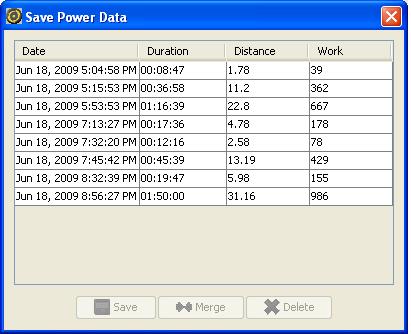
When I DL'd my PT today, yesterday's ride data was on there. Last night when I removed and reinstalled the battery the screen displayed zeros for all the values. I assumed that since the CPU had zeros for every value that there was no data. But in fact yesterday's data was still there.
 Thank you for your post. It gave me the courage to remove and reinstall the battery to unfreeze the CPU.
 06-20-09 | 06:44 AM
#14

Certified Train Wreck
Joined: Apr 2005
Posts: 677
Likes: 1
From: Montgomery, Alabama
Bikes: '07 Orbea Orca "06 Bianchi Castro Valley
I had exactly same problem on my Vista laptop. The first thing to check is if there any other software that may interfere with PowerAgent. It could be something like Windows ActiveSync.
In my case there were no interference with another software. PowerAgent was showing new COM port (COM11) but was unable to find PowerTap on it. You can find this information in Edit -> Application Settings -> Preferred Device Port. The default setting in the drop-down list is "Automatically detect port". Keep it this way, but if you open the list you'll see available COM ports.
Here is what I ended up doing to resolve the problem:
1) connect PowerTap's cradle to a USB port. There's no need to attach Powertap itself, but it won't hurt.
2) open Device Manager (right-click on Computer (or My Computer), select Manage and then Device Manager).
3) Navigate to Ports (COM & LPT) and click on "cross" to show the ports.
4) Your cradle will show up us one of the COM ports. Mine was COM11.
5) Right-click on the port and select Properties
6) Click on Port Settings tab
7) Click on Advanced button
8) There's COM Port Number drop-down list. From that list select COM3 or COM4. Disregard "in use" message and warning.
9) Start PowerAgent software. Make sure that PowerTap is in cradle and turned on. PowerAgent shoud find the PowerTap on the new port.
In my case there were no interference with another software. PowerAgent was showing new COM port (COM11) but was unable to find PowerTap on it. You can find this information in Edit -> Application Settings -> Preferred Device Port. The default setting in the drop-down list is "Automatically detect port". Keep it this way, but if you open the list you'll see available COM ports.
Here is what I ended up doing to resolve the problem:
1) connect PowerTap's cradle to a USB port. There's no need to attach Powertap itself, but it won't hurt.
2) open Device Manager (right-click on Computer (or My Computer), select Manage and then Device Manager).
3) Navigate to Ports (COM & LPT) and click on "cross" to show the ports.
4) Your cradle will show up us one of the COM ports. Mine was COM11.
5) Right-click on the port and select Properties
6) Click on Port Settings tab
7) Click on Advanced button
8) There's COM Port Number drop-down list. From that list select COM3 or COM4. Disregard "in use" message and warning.
9) Start PowerAgent software. Make sure that PowerTap is in cradle and turned on. PowerAgent shoud find the PowerTap on the new port.
__________________
www.websterhenry.com
www.websterhenry.com
06-20-09 | 10:36 AM
#15

I got home from my 2,000 kj commute and went to DL my ride data. CPU said "HOST" but neither Training Peaks nor PowerAgent would recognize it. I took it off the USB cradle several times and made sure I heard a good click. I then realized "hey the CPU displays "HOST" even when not in the cradle. I pushed mode and select and the screen wouldn't change. Just for kicks I docked it on the bike and gave the wheel a spin and still nothing. So I googled and found this thread. This post in particular caught my attention. When I removed and reinstalled the battery on the CPU I lost fours of ride data. So beware....
So beware....my apologies jrobe.
When I DL'd my PT today, yesterday's ride data was on there. Last night when I removed and reinstalled the battery the screen displayed zeros for all the values. I assumed that since the CPU had zeros for every value that there was no data. But in fact yesterday's data was still there.Thank you for your post. It gave me the courage to remove and reinstall the battery to unfreeze the CPU.
When I DL'd my PT today, yesterday's ride data was on there. Last night when I removed and reinstalled the battery the screen displayed zeros for all the values. I assumed that since the CPU had zeros for every value that there was no data. But in fact yesterday's data was still there.
Thank you for your post. It gave me the courage to remove and reinstall the battery to unfreeze the CPU. 07-28-11 | 10:41 AM
#17

fair weather cyclist
Joined: Sep 2006
Posts: 1,368
Likes: 12
From: Green Mountains
Bikes: Colnago c50
so i came home from this epic ride and go to download the file. it freezes half way through and then hangs on "HOST" even after i take it out.. took the battery out and put it back in and computer seems ok (although seems I lost my ride file which is annoying) but now it can't find the USB downloader on either of my computers. Think I fried the downloader?

Thread
Thread Starter
Forum
Replies
Last Post
bbbean
Electronics, Lighting, & Gadgets
0
08-23-17 10:31 AM
12strings
Electronics, Lighting, & Gadgets
12
09-27-15 10:08 AM
