


Loading maps on a Etrex30?
 12-23-23 | 05:05 PM
#1
Thread Starter
Newbie
Joined: Jan 2018
Posts: 22
Likes: 4
From: Ottawa
Loading maps on a Etrex30?
I just bought a used Etrex 30 for the purpose of bikepacking and cross country ski multi day trips. I like the battery life on this, but the map on it is useless. It only has highways. Is it worth buying the expensive Garmin map for my region (Canada), and every other I may visit, or are there good free maps I could upload to the device (like OSM), and how would I do that?
For national parks, I love the Avenza maps on my phone app. I don't suppose those work on a Garmin?
For national parks, I love the Avenza maps on my phone app. I don't suppose those work on a Garmin?
 12-24-23 | 02:07 AM
#2

Senior Member

Joined: Jun 2007
Posts: 1,591
Likes: 101
From: Walyalup, Australia
Bikes: Surly Long Haul Trucker, Salsa Mukluk, Riese & Muller Supercharger GT Rohloff (Forthcoming)
I would suggest checking out OSM maps for your region. OpenAndroMaps has been a good source of. various OSM maps for me. Maybe check that out?
12-24-23 | 07:11 AM
#3
Senior Member

Joined: Sep 2007
Posts: 15,293
Likes: 1,771
From: Far beyond the pale horizon.
It probably just has what Garmin calls the “Basemap”. This provides context for areas you don’t have a detailed map for. It’s “useless” in the same way a screwdriver is when you need a hammer.
Don’t buy maps. There are numerous sources of free maps.
The OSM maps are fine. It’s what Garmin provides on the Edge models.
Note that the built-in memory in the Etrex 30 isn’t very large. So, either you are going to keep the map size small or get a microSD card (not larger than 32GB).
The following is a fairly standard source for maps. The Edges require the “Latin” versions (Unicode doesn’t work on them). I suspect it’s the same for the Etrex (but I am not certain). Consider trying a small region first.
https://extract.bbbike.org/
You copy the img file to the “\Garmin” folder on one of the drives that shows up when you plug your device into your computer
Some (old?) devices can only use one map file. For these, the file has to be named “gmapsupp.img”.
For devices that can use multiple maps, the img file can be renamed to anything you like. The name the device displays is data inside the file.
===================
No, you can’t use your Avenza maps.
Don’t buy maps. There are numerous sources of free maps.
The OSM maps are fine. It’s what Garmin provides on the Edge models.
Note that the built-in memory in the Etrex 30 isn’t very large. So, either you are going to keep the map size small or get a microSD card (not larger than 32GB).
The following is a fairly standard source for maps. The Edges require the “Latin” versions (Unicode doesn’t work on them). I suspect it’s the same for the Etrex (but I am not certain). Consider trying a small region first.
https://extract.bbbike.org/
You copy the img file to the “\Garmin” folder on one of the drives that shows up when you plug your device into your computer
Some (old?) devices can only use one map file. For these, the file has to be named “gmapsupp.img”.
For devices that can use multiple maps, the img file can be renamed to anything you like. The name the device displays is data inside the file.
===================
No, you can’t use your Avenza maps.
Last edited by njkayaker; 12-24-23 at 07:35 AM.
12-24-23 | 07:31 AM
#4
Senior Member
Joined: Sep 2007
Posts: 15,293
Likes: 1,771
From: Far beyond the pale horizon.
I would suggest checking out OSM maps for your region. OpenAndroMaps has been a good source of. various OSM maps for me. Maybe check that out?
Last edited by njkayaker; 12-24-23 at 07:51 AM.
12-24-23 | 07:31 AM
#5
Senior Member

Joined: Aug 2010
Posts: 12,748
Likes: 2,111
From: Madison, WI
Bikes: 1961 Ideor, 1966 Perfekt 3 Speed AB Hub, 1994 Bridgestone MB-6, 2006 Airnimal Joey, 2009 Thorn Sherpa, 2013 Thorn Nomad MkII, 2015 VO Pass Hunter, 2017 Lynskey Backroad, 2017 Raleigh Gran Prix, 1980s Bianchi Mixte on a trainer. Others are now gone.
This might help:
https://www.userbeam.de/osm/maps/north-america/canada/
I do not remember how I managed to load these maps in my GPS, But I think it took some hoops and hurdles. Try this site, note that the column on left side has a Canada link:
https://www.gmaptool.eu/en/content/u...-topo-routable
https://www.userbeam.de/osm/maps/north-america/canada/
I do not remember how I managed to load these maps in my GPS, But I think it took some hoops and hurdles. Try this site, note that the column on left side has a Canada link:
https://www.gmaptool.eu/en/content/u...-topo-routable
12-24-23 | 05:26 PM
#7
Senior Member
Joined: Jun 2007
Posts: 1,591
Likes: 101
From: Walyalup, Australia
Bikes: Surly Long Haul Trucker, Salsa Mukluk, Riese & Muller Supercharger GT Rohloff (Forthcoming)
Whoops, sorry about that, I grabbed the wrong bookmark. I meant to refer to https://garmin.bbbike.org/. Whilst not specific to the Extrx, DCRainmaker has guidance on using the website/installing the maps at https://www.dcrainmaker.com/2019/08/...rmin-edge.html. Ray links to https://garmin.openstreetmap.nl/, which is no longer active but refers you to bbike.org.
Hopefully, that works.
Hopefully, that works.
12-29-23 | 02:27 PM
#8
Thread Starter
Newbie
Joined: Jan 2018
Posts: 22
Likes: 4
From: Ottawa
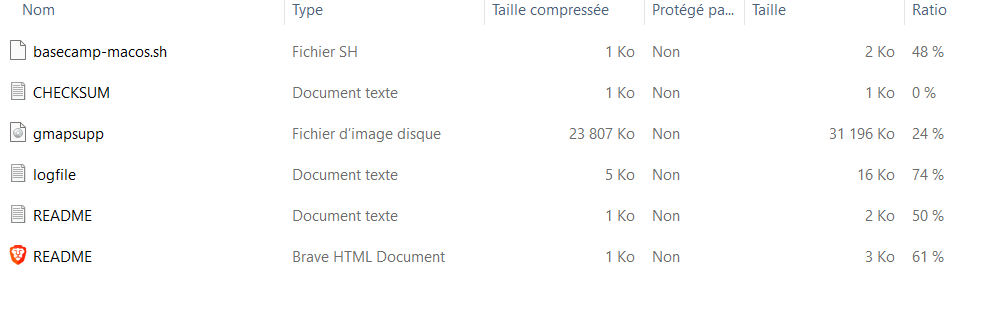
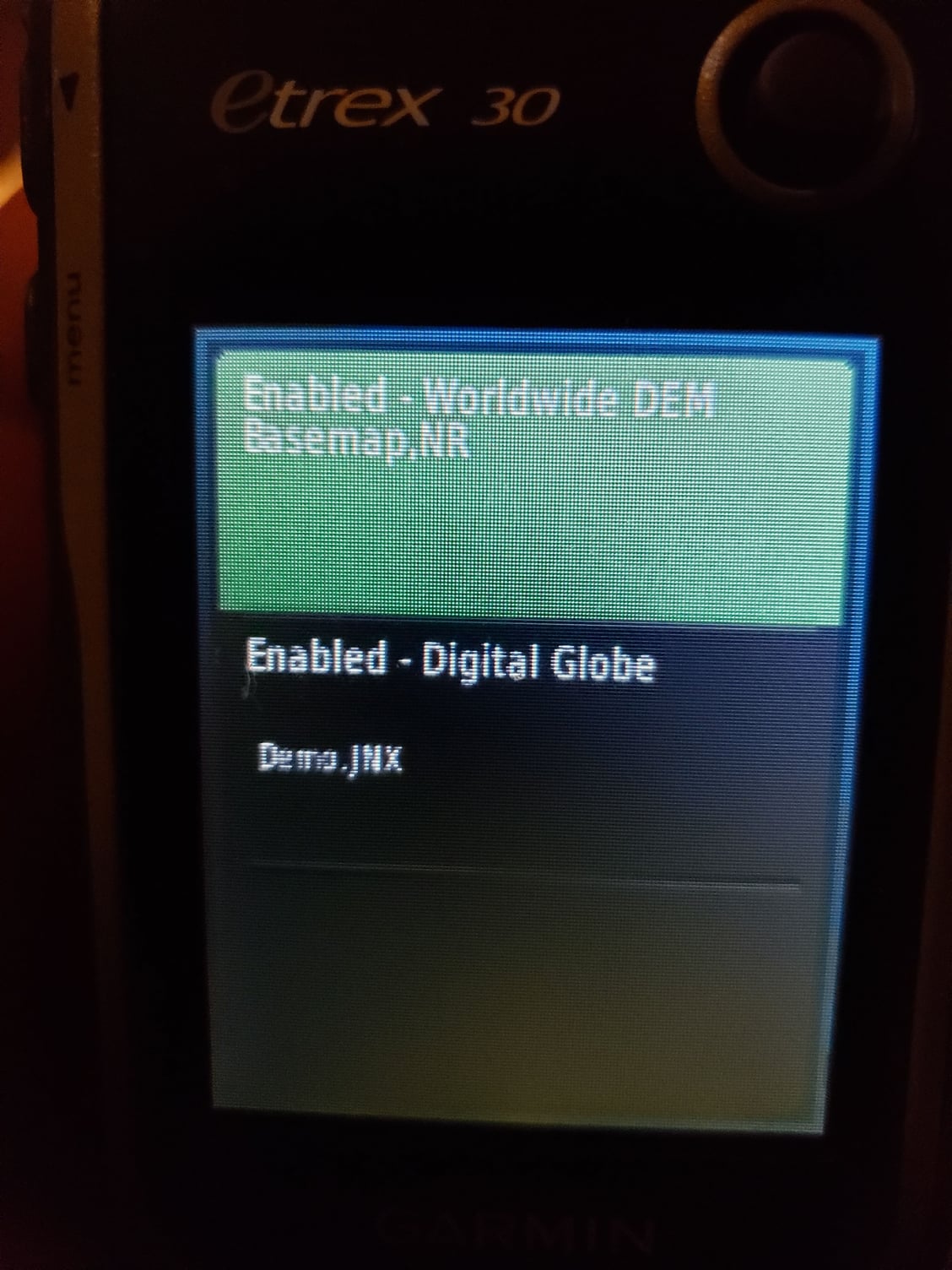
So I've spent an evening downloading files from all the mentioned sites, and trying to get the unit to read them, but the Etrex doesn't seem to be able to see any of the maps. I'm stuck with the basic 'map' which is entirely useless. I've tried creating a folder names Garmin on my card, and putting the files directly there, but it doesn't change anything. Any tips?
12-29-23 | 03:54 PM
#9
Senior Member
Joined: Sep 2007
Posts: 15,293
Likes: 1,771
From: Far beyond the pale horizon.
The maps gave to be in \Garmin.
The folder listing you showed doesn’t seem like it’s of \Garmin (none of the other files should be there).
If you have enough space, try putting it on the internal memory. If the map file is too big, create a smaller map.
Downloading lots of map files isn’t useful. Try one site.
The folder listing you showed doesn’t seem like it’s of \Garmin (none of the other files should be there).
If you have enough space, try putting it on the internal memory. If the map file is too big, create a smaller map.
Downloading lots of map files isn’t useful. Try one site.
12-29-23 | 04:49 PM
#10
Senior Member
Joined: Aug 2010
Posts: 12,748
Likes: 2,111
From: Madison, WI
Bikes: 1961 Ideor, 1966 Perfekt 3 Speed AB Hub, 1994 Bridgestone MB-6, 2006 Airnimal Joey, 2009 Thorn Sherpa, 2013 Thorn Nomad MkII, 2015 VO Pass Hunter, 2017 Lynskey Backroad, 2017 Raleigh Gran Prix, 1980s Bianchi Mixte on a trainer. Others are now gone.
I gave you two links in post number 5. At the first link, if you clicked on "How to Use", you got this:
https://www.userbeam.de/usage/
That should help you figure it out.
If you have several maps, they obviously have to have different file names. I think your Etrex is new enough for that to work. For example you could change the name GMAPSUPP.IMG to 2023_12_TOPO.IMG but you have to have the <dot>IMG file type. But if it works like the older Garmin 60CSX, the unit will use the map labeled as GMAPSUPP.IMG and you can't use a different map without changing the file name, but I think your Etrex is new enough that it can use multiple maps.
If your Etrex is like my Garmin 62/64 series, you can select the map you want to have on your screen by "enabling" it. I suggest you "disable" any maps you are not using.
The manual should tell you how to enable or disable maps, if your Etrex works like my Garmin 62/64, from the map screen select Menu, Setup Map <Enter>, Select Map <Enter>, then you get a list of the maps in the unit and that list says which are enabled or disabled. Click on one that you want to change from enable to disable, etc.
I use different maps for biking, hiking, kayaking, car driving, etc. Nothing wrong with multiple maps if you want maps for skiing and for biking.
Since I have a lot of maps on my GPS units, I put most of them on the Micro SD card and sometimes I use the month and year in the file name to remind me how long it has been since I updated that map. Do not use a Micro SD card larger than 32 gb.
https://www.userbeam.de/usage/
That should help you figure it out.
If you have several maps, they obviously have to have different file names. I think your Etrex is new enough for that to work. For example you could change the name GMAPSUPP.IMG to 2023_12_TOPO.IMG but you have to have the <dot>IMG file type. But if it works like the older Garmin 60CSX, the unit will use the map labeled as GMAPSUPP.IMG and you can't use a different map without changing the file name, but I think your Etrex is new enough that it can use multiple maps.
If your Etrex is like my Garmin 62/64 series, you can select the map you want to have on your screen by "enabling" it. I suggest you "disable" any maps you are not using.
The manual should tell you how to enable or disable maps, if your Etrex works like my Garmin 62/64, from the map screen select Menu, Setup Map <Enter>, Select Map <Enter>, then you get a list of the maps in the unit and that list says which are enabled or disabled. Click on one that you want to change from enable to disable, etc.
I use different maps for biking, hiking, kayaking, car driving, etc. Nothing wrong with multiple maps if you want maps for skiing and for biking.
Since I have a lot of maps on my GPS units, I put most of them on the Micro SD card and sometimes I use the month and year in the file name to remind me how long it has been since I updated that map. Do not use a Micro SD card larger than 32 gb.
01-01-24 | 01:24 PM
#11
Thread Starter
Newbie
Joined: Jan 2018
Posts: 22
Likes: 4
From: Ottawa
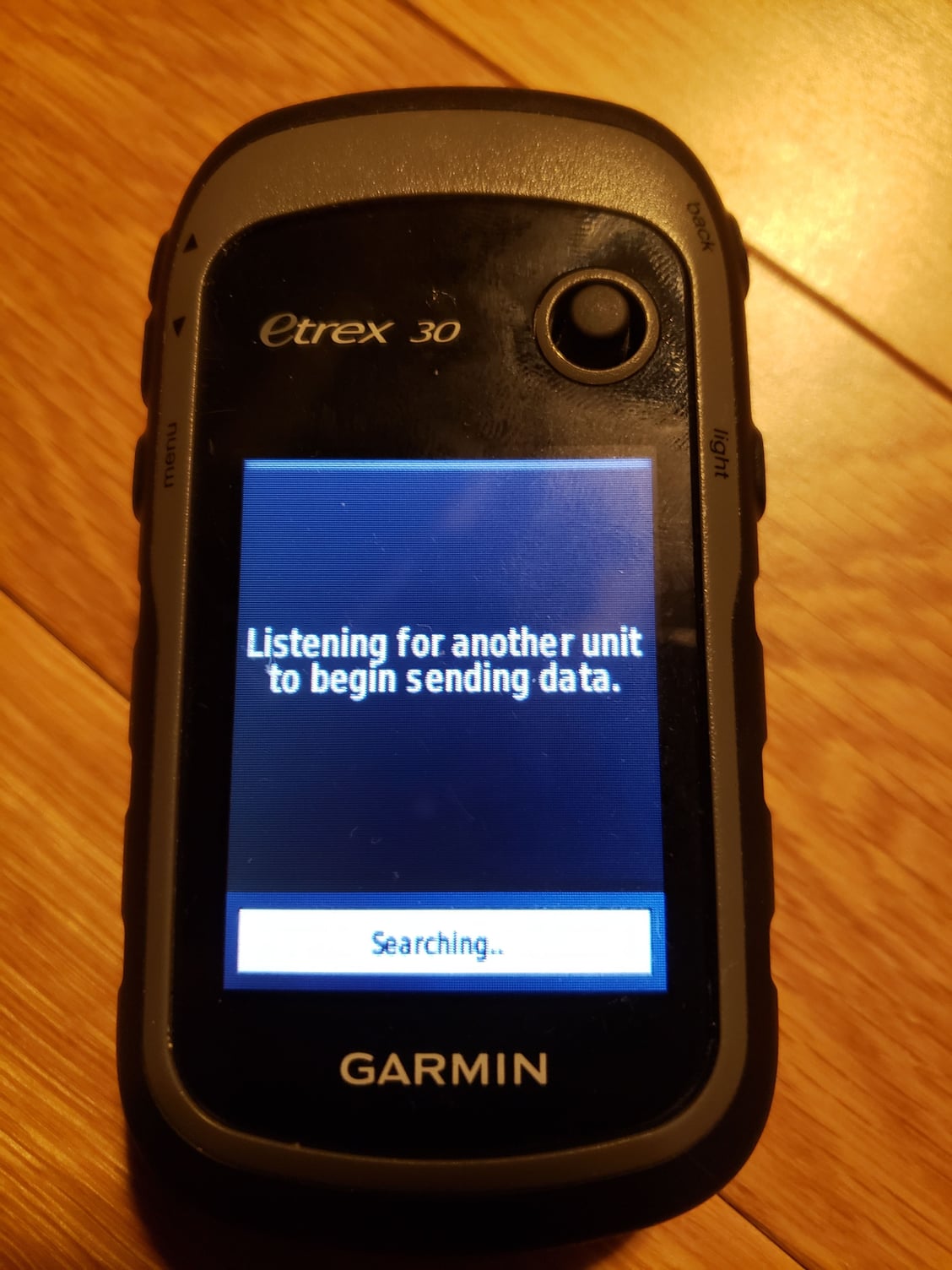
Many thanks folks, it finally worked! My other question now is how to connect to Etrex to my computer. Can I do this with wifi? It does seem to have the capability, but can't seem to detect any devices, and just keeps on searching. Also, do you use Garmin Connect as a software? I have an account there, but it seems like there are other Garmin apps. My goal is really good mapping and elevation profiles, and not so much health and performance stats.
01-01-24 | 02:15 PM
#12
Senior Member
Joined: Sep 2007
Posts: 15,293
Likes: 1,771
From: Far beyond the pale horizon.
Many thanks folks, it finally worked! My other question now is how to connect to Etrex to my computer. Can I do this with wifi? It does seem to have the capability, but can't seem to detect any devices, and just keeps on searching. Also, do you use Garmin Connect as a software? I have an account there, but it seems like there are other Garmin apps. My goal is really good mapping and elevation profiles, and not so much health and performance stats.
You connect your eTrex using a cable (like you did for the maps).
You can copy route/track files to the eTrex (using a cable). It doesn’t matter too much where you get or create route/track files from.
If you are recording activities, they should get uploaded to the Garmin Connect if you have Garmin Express running on your PC.
01-01-24 | 08:00 PM
#13
Senior Member
Joined: Aug 2010
Posts: 12,748
Likes: 2,111
From: Madison, WI
Bikes: 1961 Ideor, 1966 Perfekt 3 Speed AB Hub, 1994 Bridgestone MB-6, 2006 Airnimal Joey, 2009 Thorn Sherpa, 2013 Thorn Nomad MkII, 2015 VO Pass Hunter, 2017 Lynskey Backroad, 2017 Raleigh Gran Prix, 1980s Bianchi Mixte on a trainer. Others are now gone.
In my Garmin 62/64 series of GPS units, I connect my GPS to my computer with the mini (not micro) USB cable. I am using a Windows 10 computer. When I connect the GPS to the computer, a directory appears on my computer screen. If I have a Micro SD card in my GPS (and I always do), then I see two directories for my GPS, one the main unit memory, the other the SD card.
In the Garmin directory for the GPS main memory (not the SD card), I have several sub directories, most of which I have no clue what they are for and I do nothing with them. But there is one sub directory GPX. All of the routes, waypoints, tracks, etc., are in GPX type files in that GPX directory. If I save a track to the GPS, it is in a GPX file in that GPX subdirectory in the Garmin directory in the main memory.
I have never seen a GPS with a screen that says it is listening for a device to send to, not sure what yours was trying to do.
I do not know how many years ago Garmin stopped supporting Mapsource as a computer program, but that is what I use. I would not suggest you try that, it is not supported any more, I suspect most people that used it probably do not any more. I use it because I started using it two decades ago and it does everything I want it to, so I keep using it instead of trying to figure out something new.
In the Garmin directory for the GPS main memory (not the SD card), I have several sub directories, most of which I have no clue what they are for and I do nothing with them. But there is one sub directory GPX. All of the routes, waypoints, tracks, etc., are in GPX type files in that GPX directory. If I save a track to the GPS, it is in a GPX file in that GPX subdirectory in the Garmin directory in the main memory.
I have never seen a GPS with a screen that says it is listening for a device to send to, not sure what yours was trying to do.
I do not know how many years ago Garmin stopped supporting Mapsource as a computer program, but that is what I use. I would not suggest you try that, it is not supported any more, I suspect most people that used it probably do not any more. I use it because I started using it two decades ago and it does everything I want it to, so I keep using it instead of trying to figure out something new.
01-01-24 | 08:36 PM
#14
Thread Starter
Newbie
Joined: Jan 2018
Posts: 22
Likes: 4
From: Ottawa
Oh my, this feels like using the internet in 1992. I only discovered the mini usb port later (and I don't have a mini cable), so when I uploaded the map I put it straight on a micro SD card. I had to create a 'Garmin' folder myself, and it looks like that's what finally made the device able to read the map.
So if I understand correctly, i need to download a program called Garmin Express, so that I can use another program called Garmin Connect?! And what about Basecamp? I got this device for the great battery life I need on multi-day trips. But I don't quite get how such user-unfriendly product can have mainstream appeal, when everyone has a phone so vastly easier to use!
And if I want to follow a route created on RWGPS, how would I do that?
So if I understand correctly, i need to download a program called Garmin Express, so that I can use another program called Garmin Connect?! And what about Basecamp? I got this device for the great battery life I need on multi-day trips. But I don't quite get how such user-unfriendly product can have mainstream appeal, when everyone has a phone so vastly easier to use!
And if I want to follow a route created on RWGPS, how would I do that?
Last edited by Christo613; 01-01-24 at 09:12 PM.
01-01-24 | 11:40 PM
#15
Senior Member
Joined: Mar 2010
Posts: 2,683
Likes: 2,250
Oh my, this feels like using the internet in 1992. I only discovered the mini usb port later (and I don't have a mini cable), so when I uploaded the map I put it straight on a micro SD card. I had to create a 'Garmin' folder myself, and it looks like that's what finally made the device able to read the map.
So if I understand correctly, i need to download a program called Garmin Express, so that I can use another program called Garmin Connect?! And what about Basecamp? I got this device for the great battery life I need on multi-day trips. But I don't quite get how such user-unfriendly product can have mainstream appeal, when everyone has a phone so vastly easier to use!
And if I want to follow a route created on RWGPS, how would I do that?
So if I understand correctly, i need to download a program called Garmin Express, so that I can use another program called Garmin Connect?! And what about Basecamp? I got this device for the great battery life I need on multi-day trips. But I don't quite get how such user-unfriendly product can have mainstream appeal, when everyone has a phone so vastly easier to use!
And if I want to follow a route created on RWGPS, how would I do that?
 01-02-24 | 12:25 AM
#16

Broken neck Ken
Joined: Oct 2008
Posts: 5,221
Likes: 3,517
From: Portland, OR
Bikes: Trek Domane SL6 Gen 3, Soma Fog Cutter, Detroit Bikes Sparrow FG, Trek Mt Track XCNimbus MUni
eTrex is an expert friendly device, which means it's friendly to use once you're an expert. Even in its day it was pretty fiddly; by today's standard it's unacceptable.
It still has a following because it's rugged, has replicable batteries, and very very rarely crashes.
The mini-USB connector tells you everything you need to know about its status as a mainstream device.
It still has a following because it's rugged, has replicable batteries, and very very rarely crashes.
The mini-USB connector tells you everything you need to know about its status as a mainstream device.
01-02-24 | 06:08 AM
#17
Senior Member
Joined: Aug 2010
Posts: 12,748
Likes: 2,111
From: Madison, WI
Bikes: 1961 Ideor, 1966 Perfekt 3 Speed AB Hub, 1994 Bridgestone MB-6, 2006 Airnimal Joey, 2009 Thorn Sherpa, 2013 Thorn Nomad MkII, 2015 VO Pass Hunter, 2017 Lynskey Backroad, 2017 Raleigh Gran Prix, 1980s Bianchi Mixte on a trainer. Others are now gone.
Oh my, this feels like using the internet in 1992. I only discovered the mini usb port later (and I don't have a mini cable), so when I uploaded the map I put it straight on a micro SD card. I had to create a 'Garmin' folder myself, and it looks like that's what finally made the device able to read the map.
So if I understand correctly, i need to download a program called Garmin Express, so that I can use another program called Garmin Connect?! And what about Basecamp? I got this device for the great battery life I need on multi-day trips. But I don't quite get how such user-unfriendly product can have mainstream appeal, when everyone has a phone so vastly easier to use!
And if I want to follow a route created on RWGPS, how would I do that?
So if I understand correctly, i need to download a program called Garmin Express, so that I can use another program called Garmin Connect?! And what about Basecamp? I got this device for the great battery life I need on multi-day trips. But I don't quite get how such user-unfriendly product can have mainstream appeal, when everyone has a phone so vastly easier to use!
And if I want to follow a route created on RWGPS, how would I do that?
I do not use these other software packages you are talking about, I have no idea how to use them or what they are used for.
01-02-24 | 08:06 AM
#18
Senior Member
Joined: Sep 2007
Posts: 15,293
Likes: 1,771
From: Far beyond the pale horizon.
Garmin Connect is a website. It’s optional. But it’s a convenient place to store your activities and you can also make lan routes on it (like RWGPS).
You don’t need BaseCamp. It does what RWGPS does but runs on your PC. RWGPS is easier to use to create routes.
They have great battery life because they are slow and kind of limited. Smartphones are much more powerful computers but at the cost of worse battery life.
This works differently (I believe) on the eTrex than on the Edges (the units I’m familiar with). Hopefully, the two people in this thread that have use eTrex’s will provide that info.
Last edited by njkayaker; 01-02-24 at 08:11 AM.
01-02-24 | 08:36 AM
#19


Back in the day, on my old Garmin Edge 705, I used a USB cable to import routes to follow while riding, and exported ride recordings after I returned home. Plugging in the Garmin to my windows PC, it shows up as a USB drive.
Routes: a route from ridewithgps.com -- exported as a .GPX file.
I no longer remember, but I think i copied the gpx file into \Garmin\routes ? There's a set of folders on the garmin, it should be easy to pick the relevant one. (Now, on modern Garmins, the files go into a \Newfiles folder instead).
Ride recordings: I copied the file out of the Activities folder, saving on the PC, then ridewithgps or strava has methods for importing from a file.
Routes: a route from ridewithgps.com -- exported as a .GPX file.
I no longer remember, but I think i copied the gpx file into \Garmin\routes ? There's a set of folders on the garmin, it should be easy to pick the relevant one. (Now, on modern Garmins, the files go into a \Newfiles folder instead).
Ride recordings: I copied the file out of the Activities folder, saving on the PC, then ridewithgps or strava has methods for importing from a file.
Last edited by rm -rf; 01-02-24 at 08:40 AM.
01-02-24 | 04:28 PM
#20

Senior Member
Joined: Jan 2007
Posts: 1,979
Likes: 764
From: Eastern VA
Bikes: 2022 Fuel EX 8, 2021 Domane SL6, Black Beta (Nashbar frame), 2004 Trek 1000C for the trainer
I use BaseCamp because it is what I know with my Garmin Montana 600. There are equivalents to mange your way points, tracks and routes. I don't think Garmin Connect will work with the Etrex. As for map install it has been awhile since I have done this on my Montana since I have both Topo and City Navigator NA. But I have use OpenMaps. Then used Garmin MapInstall for installation of Specific maps on my Montana.
https://garmin.opentopomap.org/
https://openmtbmap.org/
https://www.gpsfiledepot.com/
See here for helpful tool to manage map files and backup a GPS.
https://www.javawa.nl/zumocolors.html
https://www.javawa.nl/
Good luck.
Edit. Get a cable...................
https://garmin.opentopomap.org/
https://openmtbmap.org/
https://www.gpsfiledepot.com/
See here for helpful tool to manage map files and backup a GPS.
https://www.javawa.nl/zumocolors.html
https://www.javawa.nl/
Good luck.
Edit. Get a cable...................
Last edited by biker128pedal; 01-02-24 at 06:50 PM.
01-02-24 | 04:50 PM
#21
Newbie
Joined: Jun 2006
Posts: 12
Likes: 1
Load Free maps online.
I just bought a used Etrex 30 for the purpose of bikepacking and cross country ski multi day trips. I like the battery life on this, but the map on it is useless. It only has highways. Is it worth buying the expensive Garmin map for my region (Canada), and every other I may visit, or are there good free maps I could upload to the device (like OSM), and how would I do that?
For national parks, I love the Avenza maps on my phone app. I don't suppose those work on a Garmin?
For national parks, I love the Avenza maps on my phone app. I don't suppose those work on a Garmin?
garmin.opentopomap.org
garmin.bbbike.org
01-02-24 | 07:16 PM
#22
Broken neck Ken
Joined: Oct 2008
Posts: 5,221
Likes: 3,517
From: Portland, OR
Bikes: Trek Domane SL6 Gen 3, Soma Fog Cutter, Detroit Bikes Sparrow FG, Trek Mt Track XCNimbus MUni
The screen is such low resolution and contrast, that if you have both background map and your route turned on, you can't discern route from map.
When navigating on bicycle, turn the map off. Use your breadcrumb and dot to navigate. I probably rode 50k miles using an etrex exactly like that. If you miss a turn, you won't know until you notice your dot hanging out on and empty screen. Fun times.
If navigating on foot, maybe you can see well enough to use both map and breadcrumb.
Last edited by downtube42; 01-02-24 at 07:20 PM.
01-02-24 | 08:04 PM
#23
Senior Member
Joined: Aug 2010
Posts: 12,748
Likes: 2,111
From: Madison, WI
Bikes: 1961 Ideor, 1966 Perfekt 3 Speed AB Hub, 1994 Bridgestone MB-6, 2006 Airnimal Joey, 2009 Thorn Sherpa, 2013 Thorn Nomad MkII, 2015 VO Pass Hunter, 2017 Lynskey Backroad, 2017 Raleigh Gran Prix, 1980s Bianchi Mixte on a trainer. Others are now gone.
The etrex series has primitive turn by turn capabilities. By primitive I mean effectively none. The way to navigate is with a breadcrumb gpx which shows up as a line on the display. Your location is a dot. Navigation is done by keeping the dot on the line.
The screen is such low resolution and contrast, that if you have both background map and your route turned on, you can't discern route from map.
When navigating on bicycle, turn the map off. Use your breadcrumb and dot to navigate. I probably rode 50k miles using an etrex exactly like that. If you miss a turn, you won't know until you notice your dot hanging out on and empty screen. Fun times.
If navigating on foot, maybe you can see well enough to use both map and breadcrumb.
The screen is such low resolution and contrast, that if you have both background map and your route turned on, you can't discern route from map.
When navigating on bicycle, turn the map off. Use your breadcrumb and dot to navigate. I probably rode 50k miles using an etrex exactly like that. If you miss a turn, you won't know until you notice your dot hanging out on and empty screen. Fun times.
If navigating on foot, maybe you can see well enough to use both map and breadcrumb.
01-03-24 | 07:54 AM
#24
Senior Member
Joined: Jan 2007
Posts: 1,979
Likes: 764
From: Eastern VA
Bikes: 2022 Fuel EX 8, 2021 Domane SL6, Black Beta (Nashbar frame), 2004 Trek 1000C for the trainer
I still have a Garmin 10 I don’t use. But used tracks with it. It came in handy for a return business trip in Germany years ago when I travelled alone. Helpful with the turns in the small towns. This was by car.
01-04-24 | 11:03 AM
#25
Senior Member

Joined: Feb 2016
Posts: 1,860
Likes: 821
From: SE Wisconsin
Bikes: Lemond '01 Maillot Jaune, Lemond '02 Victoire, Lemond '03 Poprad, Lemond '03 Wayzata DB conv(Poprad), '79 AcerMex Windsor Carrera Professional(pur new), '88 GT Tequesta(pur new), '01 Bianchi Grizzly, 1993 Trek 970 DB conv, Trek 8900 DB conv
1) Download a TRACK from RWGPS
2) Download/install Basecamp to your PC
3) Connect your Etrex to the PC via a usb cable (possibly supplied with your Etrex when you bought it, as mine was)
4) Basecamp will indicate your Etrex is connected.
5) Import your RWGPS TRACK into Basecamp
6) Transfer the track to your Etrex from Basecamp via menu on top (Device>Send to Device).
7) done
Eject your Etrex from the PC, fire it up, toggle to your Track Manager..select the track hit Go and you're on your way. This all sounds busy, but can be accomplished in 5 minutes.
The etrex series has primitive turn by turn capabilities. By primitive I mean effectively none. The way to navigate is with a breadcrumb gpx which shows up as a line on the display. Your location is a dot. Navigation is done by keeping the dot on the line.
The screen is such low resolution and contrast, that if you have both background map and your route turned on, you can't discern route from map.
When navigating on bicycle, turn the map off. Use your breadcrumb and dot to navigate. I probably rode 50k miles using an etrex exactly like that. If you miss a turn, you won't know until you notice your dot hanging out on and empty screen. Fun times.
If navigating on foot, maybe you can see well enough to use both map and breadcrumb.
The screen is such low resolution and contrast, that if you have both background map and your route turned on, you can't discern route from map.
When navigating on bicycle, turn the map off. Use your breadcrumb and dot to navigate. I probably rode 50k miles using an etrex exactly like that. If you miss a turn, you won't know until you notice your dot hanging out on and empty screen. Fun times.
If navigating on foot, maybe you can see well enough to use both map and breadcrumb.
There's been a couple Etrex threads lately where some people trash them..from their comments it's fairly easy to see that the trashing's roots lie in the owner not knowing how to use the unit, rather than it not working. Of course they could have a defective unit..who knows.